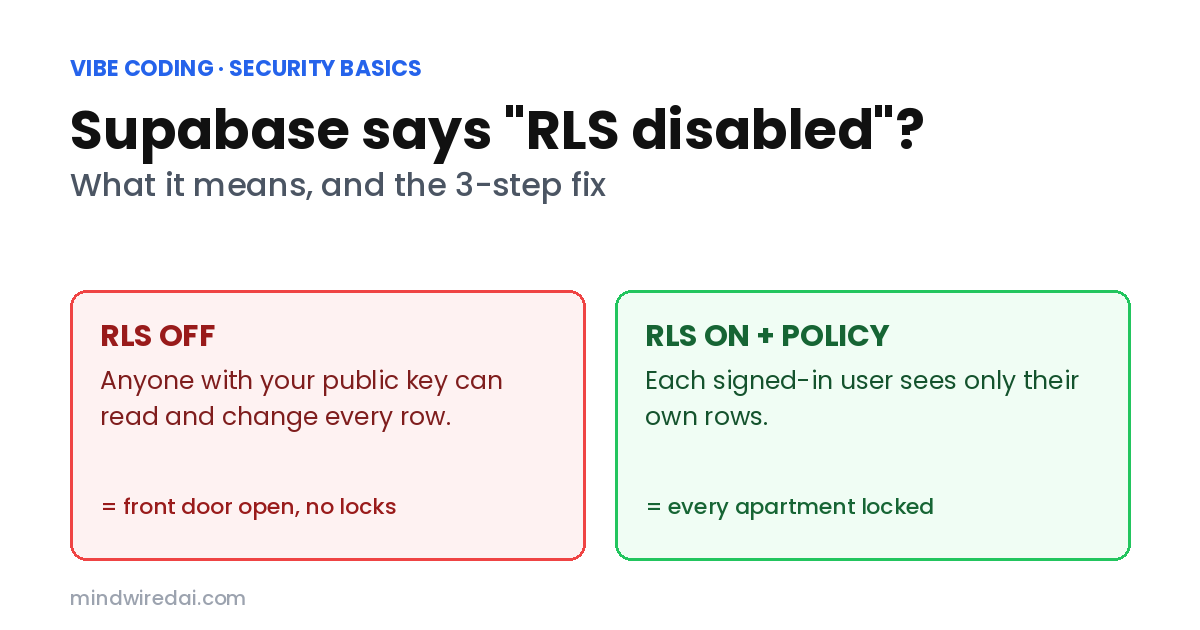
Vibe coding · Security basics · For beginners
Supabase Says “RLS Disabled”? What It Means and How to Fix It
That little warning is your database saying the front door is open.
Supabase RLS disabled warning on your vibe-coded app? Here’s what it actually means, why it matters even for a tiny side project, and the three steps to fix it without breaking your app.
You know the feeling. The app finally works. Sign-up works, the data shows up, you’re one tweet away from sharing it with the world — and then Supabase throws a red warning at you: RLS disabled in public. You don’t know what RLS is. The AI that built your database didn’t mention it. And everything looks fine, so it’s very tempting to close the tab and ship.
Please don’t. That warning means anyone who opens your website can read — and often change — every row in that table. The good news: the fix is a few lines, and you don’t need to become a database person to do it.
The short version
“RLS disabled” means a table in your Supabase project has Row Level Security turned off, so anyone with your public key — which ships inside your website — can read and write that table. Fix it by enabling RLS on the table, adding a policy that says who may see which rows, then re-running Supabase’s Security Advisor.
How I put this together. I’ve used Supabase on my own projects, but I didn’t keep notes or screenshots from that time, so I’m not going to pretend to walk you through “my” bug. Instead, on Nov 16, 2026 I read Supabase’s official pages on Row Level Security, API keys and database advisors, Supabase’s own linter rule for this warning, and Supabase’s 2025 security retro. Every claim below links to one of those.
What I did not do. I didn’t scan anyone’s app, and I didn’t test every policy pattern. Dashboard menus move around, so if a button isn’t where I say, the SQL commands below still work.
What does “RLS disabled” actually mean in Supabase?
Supabase is a database with a built-in web API. Your app talks to it straight from the browser, using a key that’s baked into your website’s code. That key is meant to be public — Supabase’s own docs say the publishable key is “safe to expose online”. Anyone can open your site, press F12, and find it in a minute.
So if the key is public, what stops a stranger from using it to download your users table? Row Level Security. RLS is a set of rules that live inside the database and decide, for every single row, “is this person allowed to see or change this?” Think of the public key as the building’s front door and RLS as the lock on each apartment. A building with an unlocked front door is normal. A building with no apartment locks is a problem.
Supabase’s own linter rule for this warning — 0013 “RLS disabled in public” — is rated ERROR, not a gentle suggestion, and calls publicly exposing full read-write access “a critically unsafe configuration.”
Is my Supabase data public if RLS is off?
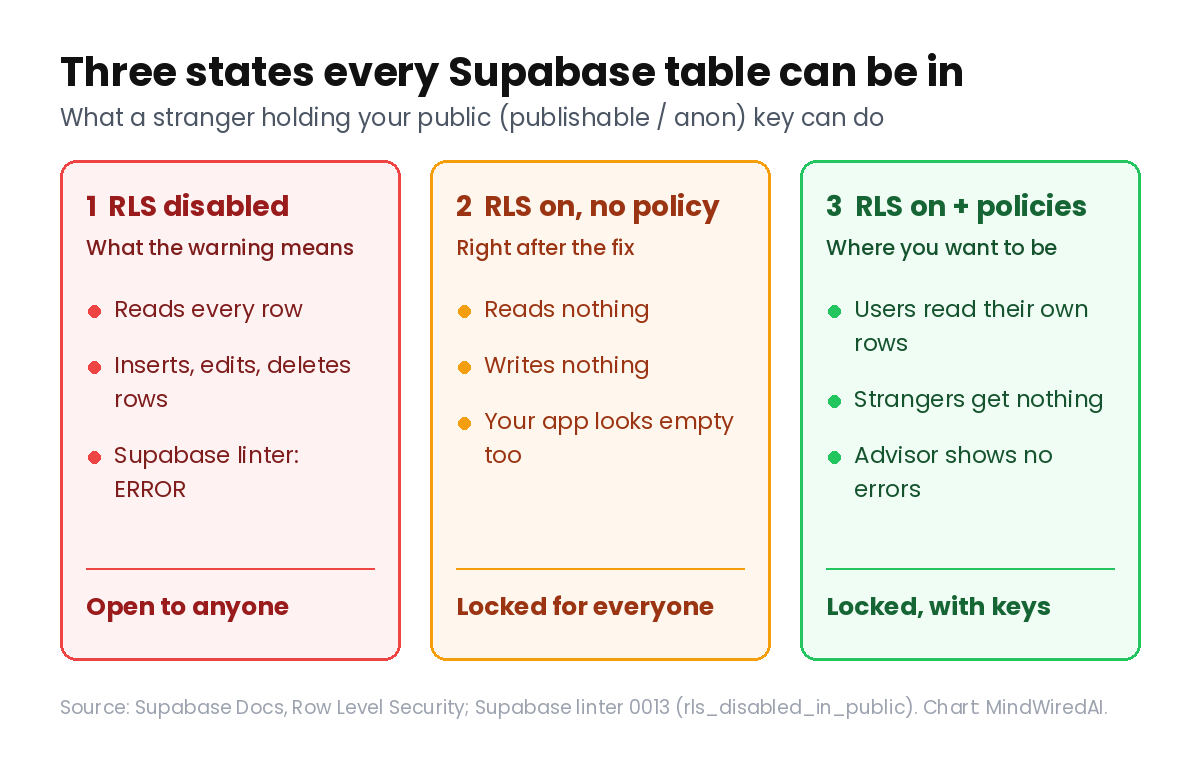
For tables in the public schema — which is where AI tools put almost everything — yes. Supabase’s RLS guide says it plainly: “A table in an exposed schema without RLS is readable and writable by any role with a grant on it.” And the same guide notes that on existing projects, the anonymous role may start with every privilege granted.
“Readable” means someone can download your users’ emails. “Writable” is the scarier half: they can edit or delete rows. This isn’t theoretical. In 2025, security researcher Matt Palmer reported (CVE-2025-48757) that an automated scan of 1,645 apps built with Lovable found 170 projects — about 10.3% — with weak or missing RLS. According to his write-up, exposed data included names, emails, phone numbers and payment details, and on one site he showed he could insert a record marked "payment_status": "paid".
Why did the AI leave RLS off in the first place?
Supabase actually tries to protect you here. Its 2025 security retro says that for tables created in the dashboard, RLS is on by default, and that project owners get email alerts when a table is created with RLS off.
The gap is everything that isn’t the dashboard. When Cursor, Claude Code, Lovable or Bolt builds your database, it usually does it with SQL or migration files. For tables made that way, the same retro points you to Postgres event triggers to enforce RLS automatically — which tells you it doesn’t happen by itself. The AI’s job was to make the app work, and an open table works perfectly — right up until someone else uses it.
How to fix Supabase RLS disabled in 3 steps
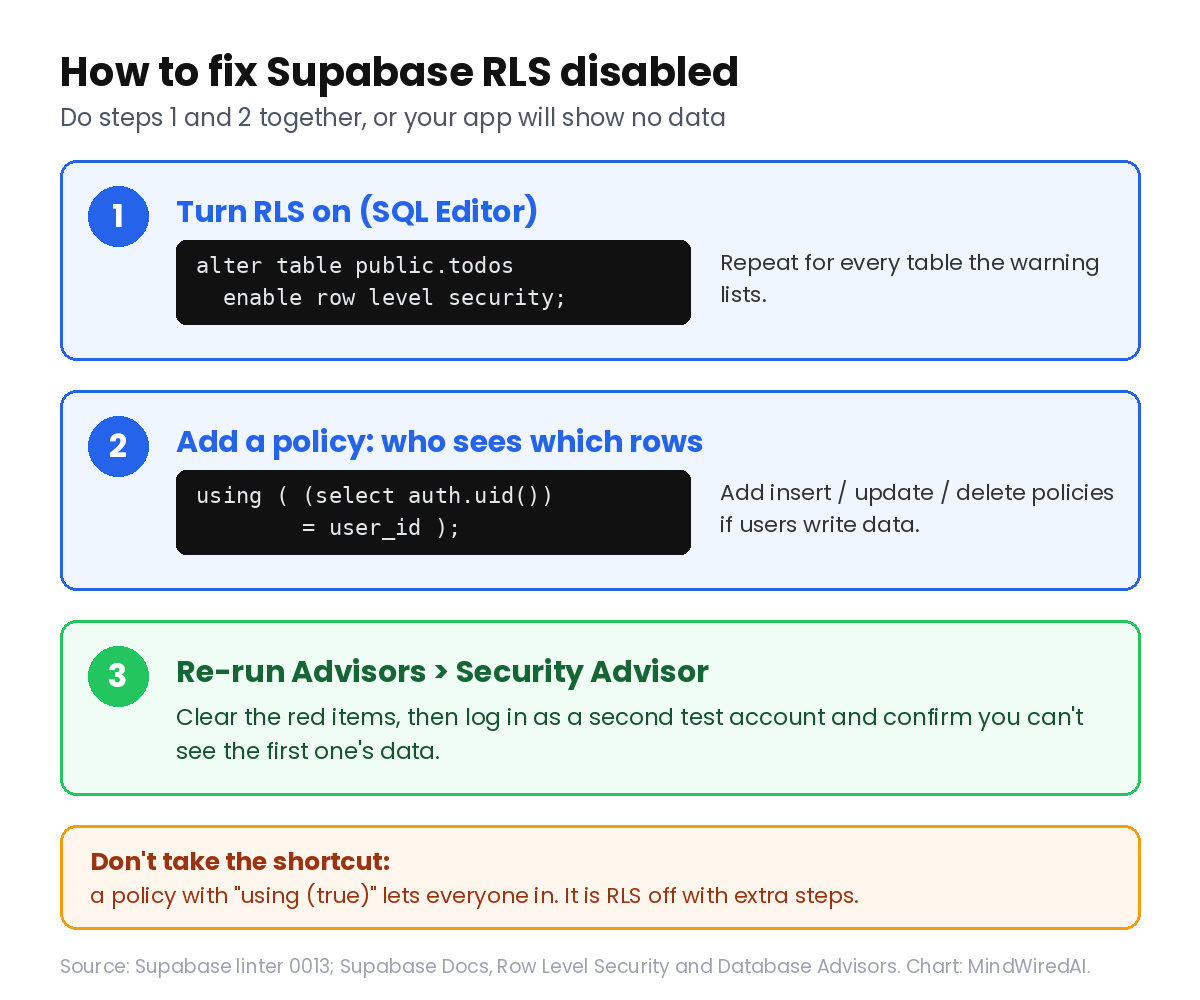
Step 1: Turn RLS on for the table
Open your project’s SQL Editor and run this, replacing todos with your table’s name. This is the exact fix Supabase’s linter recommends:
alter table public.todos enable row level security;Repeat it for every table the warning lists. The moment you do, the table is locked: per the linter page, the anonymous role can no longer read or write it through the API until you add policies.
Step 2: Add a policy that says who sees what
A policy is one sentence of database rules. For the most common case — “each user sees only their own rows” — Supabase’s docs give this pattern (it assumes your table has a user_id column holding the owner’s ID):
create policy "Individuals can view their own todos."
on todos for select
to authenticated
using ( (select auth.uid()) = user_id );
In plain English: “Signed-in users can read a row only if the row’s user_id matches their own ID.” That covers reading. If users also add, edit or delete their own rows, you need matching policies for insert, update and delete. The RLS guide has examples for each, plus a performance tip: add an index on every column your policies filter on (here, user_id).
Step 3: Re-run the Security Advisor
In your project, open Advisors → Security Advisor. According to Supabase’s advisors docs, it flags tables with RLS off, tables with RLS on but no policies, policies that are “always true,” public storage buckets that can be listed, and sensitive-looking columns exposed through the API. Fix until the red items are gone, then open your app and click through every screen.
💡 Save your working version first
Before changing security settings, commit your project so you can roll back the app code if something goes sideways. If you’ve never done that, my guide on going back with git when AI breaks your code takes about ten minutes.
I enabled RLS and now my app shows no data. Did I break it?
No — this is RLS working. Supabase’s docs say that once RLS is enabled, “no data is accessible through the API when using a publishable key, until you create policies.” Locked with no keys handed out means nobody gets in, including you. Add the policies from Step 2 and the data comes back — but only for the people who should see it.
Two other common surprises. First, if your policy uses to authenticated, a logged-out visitor sees nothing; that’s on purpose. Second, Supabase notes that auth.uid() returns null when no one is signed in, so it recommends writing auth.uid() IS NOT NULL AND auth.uid() = user_id for extra safety.
⚠️ The tempting shortcut
When the app goes blank, an AI will sometimes “fix” it with a policy like using (true). That makes the warning disappear and the data come back — and it’s basically RLS off again, because “true” means everyone passes. A policy that always says yes is a lock that’s painted on. Security Advisor flags these as always-true policies.
Anon key vs service role key: which one is safe in the browser?
This is where RLS and your keys meet. Supabase has two kinds of keys, and they behave completely differently around RLS:
| Key | Looks like | OK in the browser? | Obeys RLS? |
|---|---|---|---|
| Publishable key (old name: anon key) | sb_publishable_... | ✓ Yes | ✓ Yes — it only reaches what your policies allow |
| Secret key (old name: service_role key) | sb_secret_... | ✗ Never | ✗ No — it bypasses every policy |
Supabase’s API keys guide warns that a secret key “bypasses every Row Level Security policy you have,” and the RLS guide says never to use one in the browser. So perfect policies plus a secret key in your frontend still equals an open database. If an AI ever “fixed” a permissions error by swapping in the service role key, undo that first, and treat the key as leaked — my guide on what to do after pushing an API key to GitHub covers rotating it, and the .env security guide shows where server-only keys belong.
Can I just ask the AI to write my RLS policies?
Yes, and for a beginner that’s a reasonable way to start — as long as you check the result instead of trusting it. The Lovable case is the warning here: Palmer’s write-up says the platform’s scanner only checked whether any RLS policy existed, not whether it was correct. Existence isn’t safety.
A prompt that works well: “List every table in my Supabase public schema. For each one, tell me who should be able to read, insert, update and delete rows, in plain English, before writing any SQL.” Read that plain-English list. If it says “anyone can update any user’s profile,” you’ve caught a bug before it shipped. Then let it write the SQL, run Security Advisor, and log in as a second test account to confirm you can’t see the first account’s data. If the AI keeps going in circles on a policy error, stop and reset the chat after two failed attempts.
The honest limitations
Turning RLS on and clearing the Security Advisor fixes the most common, most damaging Supabase mistake — it doesn’t make your app “secure” in general. Storage buckets, Edge Functions, views and database functions have their own permission rules; the advisors docs list several of them, and I haven’t covered them here. Policies for shared data (teams, admins, public profiles) get more complex than the one-owner pattern above. And because I’m working from Supabase’s docs rather than a project I documented, I can’t promise the dashboard looks exactly like this in your account. For a broader sweep of your code, run the free security audit for vibe-coded apps too.
Who should actually care
Worth it if: your app uses Supabase and stores anything about real people — emails, profiles, orders, messages — or if Lovable, Bolt, Cursor or Claude Code created your tables.
Maybe not if: it’s a throwaway demo with fake data that you’ll delete next week. Still, fixing it now builds the habit before it matters.
Skip if: you don’t use Supabase, or your app never reads its database from the browser.
FAQ
What does “RLS disabled in public” mean in Supabase?
A table in your public schema has Row Level Security turned off. Because Supabase exposes that schema through its API, anyone with your public key can read and write the table. Supabase rates it as an error.
Is it safe to have my Supabase anon key in my frontend code?
Yes, the anon or publishable key is designed to be public — but only if RLS is on with sensible policies. The key isn’t the lock; RLS is. The secret (service role) key must never be in frontend code.
Why does my Supabase query return an empty array after enabling RLS?
RLS with no policies blocks everything. Add a policy that allows the right users to read the right rows, and check that you’re signed in if the policy targets authenticated.
Does Supabase turn on RLS automatically?
For tables created in the dashboard, yes, according to Supabase’s 2025 security retro. Tables created with SQL or migrations — the way most AI tools work — need you to enable it yourself, or to set up an event trigger that does.
The bottom line
The Supabase RLS disabled warning isn’t noise — it means your table is open to anyone holding a key that’s public by design. Enable RLS, write a policy, re-check the advisor, and test with a second account. That’s an afternoon, not a career change.
Your next step: open your Supabase project’s Security Advisor right now and count the red items. Even if you fix them tomorrow, you’ll know exactly what’s open today.
Related free AI guides
- How to run a free security audit on your vibe-coded app
- Pushed your API key to GitHub? What to do in the first hour
- The .env file security guide for vibe coders
Published Nov 16, 2026. Sources checked Nov 16, 2026: Supabase Docs (Row Level Security, API keys, Database Advisors), Supabase linter rule 0013, Supabase Security Retro 2025 (Jan 7, 2026), Matt Palmer’s statement on CVE-2025-48757 (May 29, 2025).


