Vibe coding · Build log · Pricing your app
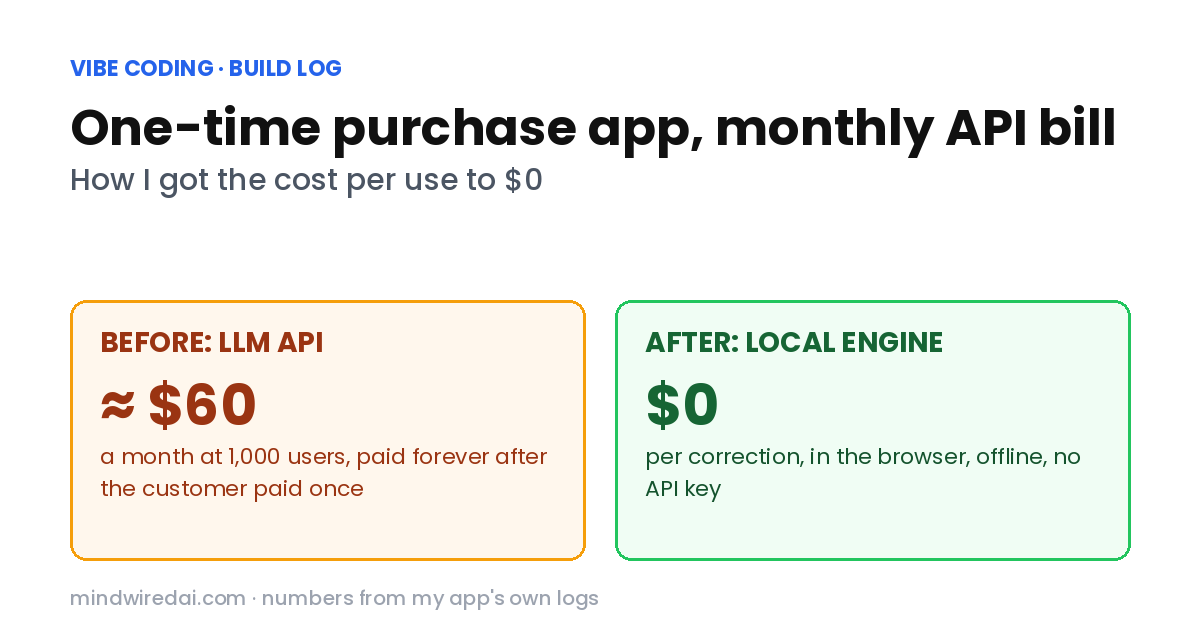
My one-time purchase app paid an LLM API cost every time someone pressed a button. Here’s the math that scared me, the local engine that replaced the API, and the test results that humbled me along the way.
You know the feeling. You build a small tool, you’re proud of it, and you pick the friendliest price you can think of: pay once, own it forever, no subscription. Customers love that sentence. You love that sentence.
Mine is a little writing tool that fixes Korean spelling and spacing. And for about three weeks, that friendly sentence was quietly untrue. Every time someone pressed “Fix,” my app paid an AI company — and the customer had already finished paying me.
The short version
A one-time purchase app that calls a paid LLM API on every use has an LLM API cost that never stops. If the feature is mechanical — like spelling and spacing — a rules-and-dictionary engine running in the user’s browser can do it for $0 per use, offline, with no API key. If the feature needs real understanding, it can’t.
Where these numbers come from. Everything below comes from my own app: its API cost logs, its test suite and its production build. I’m a vibe coder, so an AI coding agent wrote much of the code from my instructions; the decisions, the reviews and the mistakes were mine.
What this isn’t. Nobody outside my project audited these numbers, the engine only handles Korean, and the licensing section is what I did, not legal advice.
Why does LLM API cost break a one-time purchase app?
Because the costs keep running and the income doesn’t. Each correction sent the user’s text to a cheap, fast-tier language model and paid for the tokens. Per call, the numbers looked almost silly:
| From my logs | Cost |
|---|---|
| Average correction | $0.0002 |
| Longest texts | $0.0011 |
| First real request on the live server | $0.0009 |
| 1,000 users × 300 corrections a month = 300,000 calls | ≈ $60 a month, forever, with zero new revenue |
Nobody loses sleep over a fraction of a cent. But multiply it out and something ugly appears: my most loyal customer was also my most expensive customer, for the rest of the app’s life.
To survive that, I had already capped each access code at 30 or 60 corrections a day and set a hard $1 budget ceiling. When the ceiling hit, the service just stopped. So the product said “buy once, use forever,” and the small print said “unless you like it.”
What does my app actually need an AI model for?
This dumb-sounding question fixed everything. My app doesn’t rewrite emails or make anything sound professional. It fixes spelling and spacing and leaves the tone, context and word choice alone. Users had been telling me that for weeks; I kept hearing “AI writing assistant.”
Once I said it plainly, the answer was obvious. A job whose entire definition is “this character should be that character” doesn’t need a model that can write paragraphs. The expensive part of an LLM — understanding and generating language — was exactly the part I was paying for and asking it not to use. If you’re still at the planning stage, writing down what a feature must not do is the step I’d add to my vibe coding planning checklist.
3 ways to make an AI feature cost you $0 per use
I found three real options, and they aren’t interchangeable:
| Route | Where it runs | User friction | Quality | Offline |
|---|---|---|---|---|
| Local engine (rules + dictionary) | User’s browser or device | None | High for mechanical fixes, blind to meaning | ✓ |
| BYOK (user brings their own API key) | AI provider, billed to the user | Needs a key and a guide | Full model quality | ✗ |
| Desktop / mobile app (Tauri, Electron, Swift) | User’s device, installed | Install required | Depends on what’s inside | ✓ |
BYOK is the honest choice when your product truly needs a model — rewriting, summarizing, tone. You sell the interface once and the user pays for their own usage. But it hands the hardest step to the person least ready for it: someone who has never created an API key. If you go this way, treat “get a key in 60 seconds” as a feature you build, not a line in the docs.
A desktop app is a distribution choice more than a cost choice. A desktop app that still calls a paid endpoint still pays.
A local engine is what I chose. For spelling, spacing and a long list of always-wrong forms, explicit rules plus a dictionary are faster, give the same answer every time, and cost nothing to run a million times.
How a local spelling engine actually works
It’s simpler than it sounds. Mine runs six steps, always in this order:
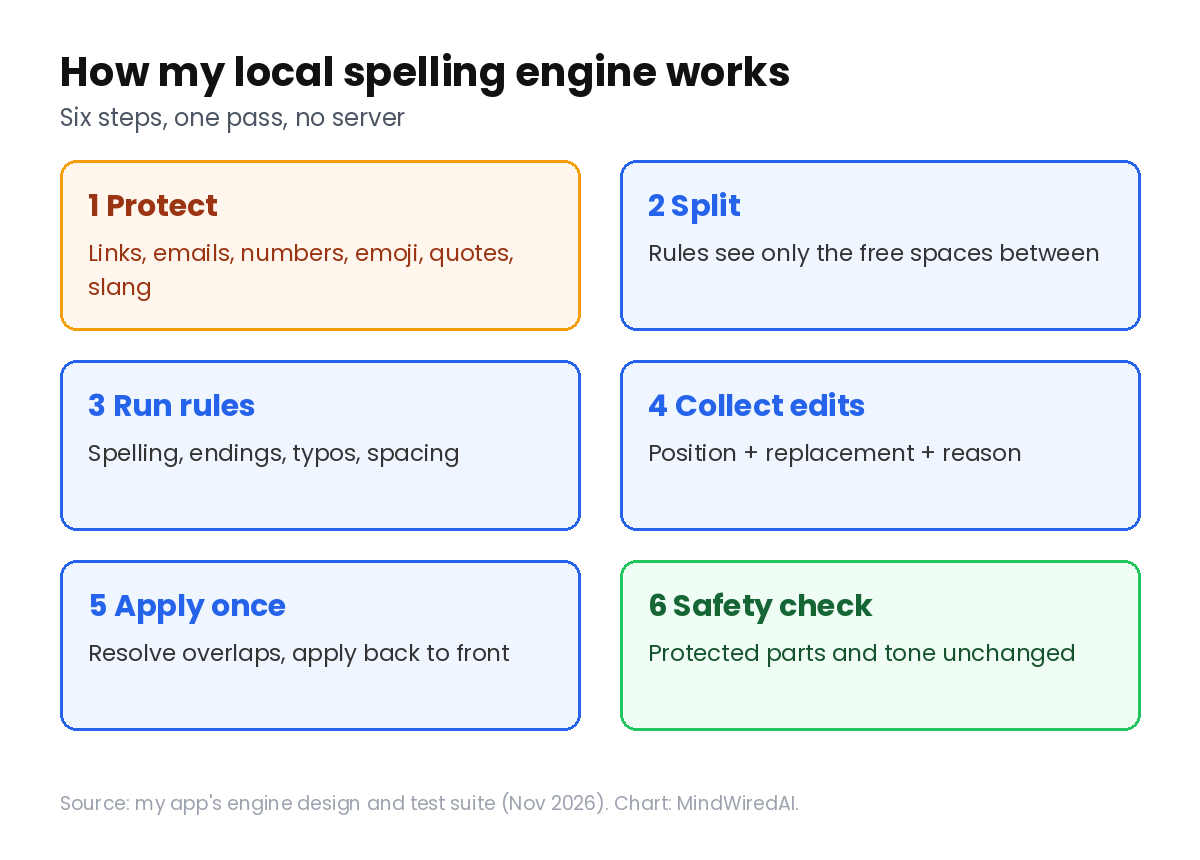
- Protect everything that must not change: links, emails, numbers, emoji, quotes, and intentional slang.
- Split the text into the free spaces between those protected pieces. Rules only ever see the free spaces.
- Run the rules: always-wrong spellings, verb endings, common typos, spacing patterns.
- Collect edits by position instead of rewriting the text.
- Apply once: settle overlaps by rule priority, then apply everything in a single pass from the end of the text backwards.
- Safety check against the original: protected pieces untouched, no tone changes, no mass rewriting.
Step 4 is the one I’d defend hardest. My first version chained replacements — fix A, then fix B on the result, then C. It worked until two rules touched the same letters; then B “fixed” A’s output and I got double corrections nobody could explain. Now every rule returns a small note instead of a changed string:
{ start, end, replacement, ruleId, kind: "spelling" | "spacing", reason }That reason also lets the app tell the user why each change happened. And one test checks that running the engine twice gives the same text as running it once. That single test caught more bugs than any other.
Slang is not a typo: protect before you correct
This is where a mechanical proofreader gets dangerous. In Korean chat, 넘 is slang for 너무 (“way too”), so 넘 맛있다 means “so good.” A rule engine in spelling mode will happily call 넘 a typo. My instruction was blunt: if someone breaks the rules on purpose, leave it alone. So 넘 맛있다 stays as written, but in 넘 맛잇어서 걍 몇일 먹었어 ㅋㅋ, the slang survives while the real typos (맛잇어서, 몇일) get fixed.
When the API version had this rule in its prompt, the model followed it maybe 90% of the time. A prompt is a request; a protected span is a wall. So slang now goes into the same protected list as links and emoji, and rules physically can’t reach inside. Three details made it work: check the letters around a match (넘어졌어, “fell over,” is a normal verb, not slang), handle repetition with patterns (넘넘), and let the longest match win (존맛탱 must not be trimmed to 존맛).
The principle at the top of my rules file now: missing an error is cheaper than changing a sentence that was already right. People forgive a typo they fix themselves. They don’t forgive you rewriting their voice.
Can I legally ship a dictionary inside a paid app?
A reviewer pointed out the obvious ceiling: the engine can only fix what’s in its dictionary and rules. So I went looking for Korean spelling data I could legally put inside a paid app — and learned that the license is a product decision, not a footnote.
| Data license | In my paid app? | Why |
|---|---|---|
| KOGL Type 1 (Korea’s public license) | ✓ Used | Commercial use and changes allowed, source credit required |
| Apache-2.0 / MIT | ✓ Used | Keep the license notice |
| CC BY-SA | ✗ Skipped | Share-alike could reach my own dictionary |
| GPL | ✗ Skipped | Same problem, stronger |
What I shipped: Korea’s national language standards (KOGL Type 1, credited with links), an Apache-2.0 typo list, and my own rules. What I left out on purpose: two big CC BY-SA dictionaries and a popular GPL spell checker — the ones everyone reaches for first. Credits live on a license page linked from the app’s footer, including a note about what I couldn’t verify.
The result: spelling entries went from 42 to 243, rules from 81 to 104, and the bundle grew by just 4.64 kB. Data you’re allowed to use is cheap. Data you’re not allowed to use is a lawsuit with a nice API.
Why my 100% test score was actually wrong
This is the part I most want other vibe coders to read. After expanding the dictionary I reported beautiful numbers: 119/121 on my original examples, 82/82 on the new set. A reviewer asked one question: weren’t those the sentences you wrote while writing the rules? They were. I had graded the engine on its own homework.
So I wrote a holdout set: 72 brand-new sentences, never used while writing any rule, with answers taken from the grammar standard instead of the engine’s output. Result: 70/72, and 27/27 on sentences that must be left untouched — no visible over-correction. I left the two misses unfixed on purpose, because tuning rules until the holdout is green turns it back into homework.
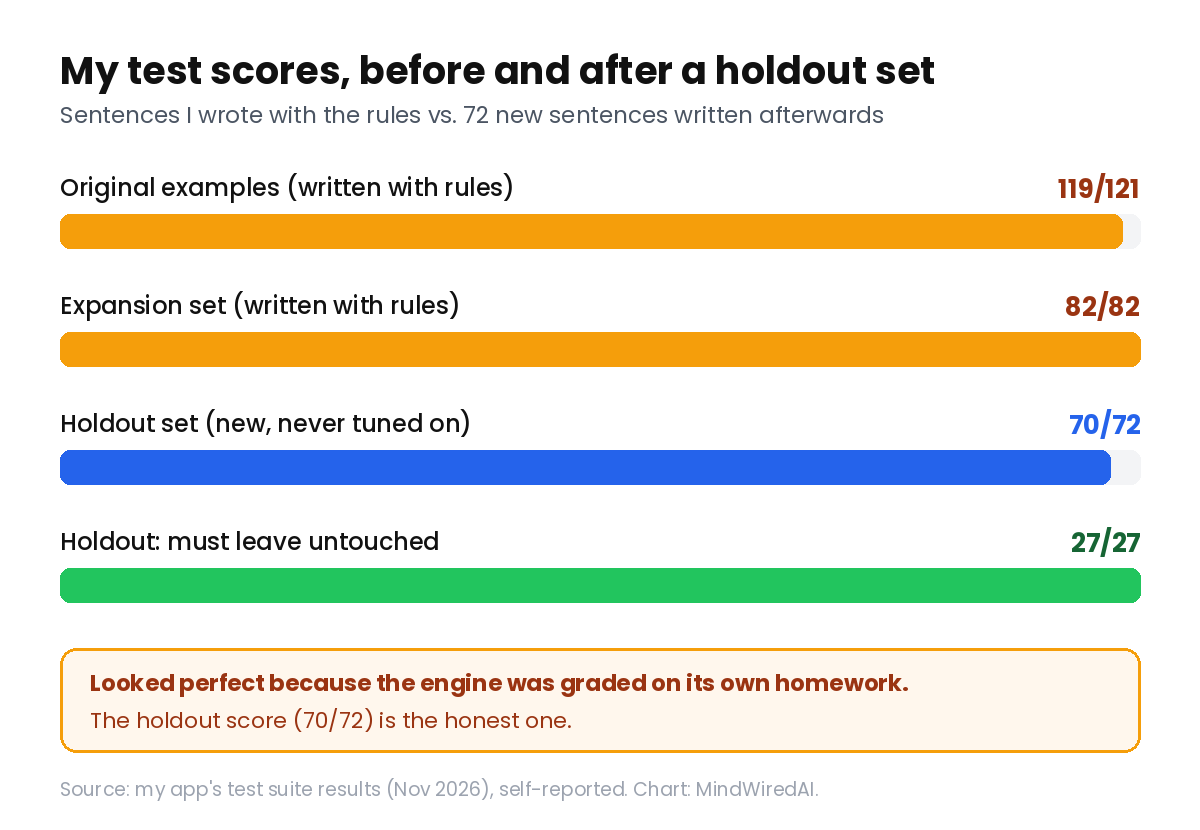
Two more humbling finds, both mine: one of my expected answers was simply wrong (the engine was right), and my scoring script miscounted a case. The gap between “100%” and “70/72” is the gap between a demo and a tool. It’s the same lesson as making the AI prove a fix instead of saying it: write the test after the rules, and never tune against it.
Rules that depend on meaning should suggest, not apply
Some “corrections” are really choices. In Korean, 대로 and 데로 differ by meaning, 안 되니까 and 안되니까 by nuance. Without reading intent, any rule that auto-fixes these will eventually rewrite a correct sentence. My first version applied them anyway, behind an “apply all” button.
Now those rules are marked as suggestions. They start unapplied, get skipped by “apply all” and by copy, and show a dotted underline with the reason and an “apply this one” button. The cost: auto-fixed coverage dropped from 251/254 to 246/254, so five sentences need one extra click. In exchange, nothing gets silently reworded. A suggestion costs a click; a wrong silent change costs trust.
My LLM API cost now: $0 per correction
LLM API cost per correction: $0, for as long as the app exists. No server call, no API key, no model download, no account.
Speed: 0.100 ms median per correction on my measurements.
Size: 96.94 kB gzipped, cached once, then it works offline.
Tests: 738 passing, plus type checks and a production build.
The privacy line also stopped being a promise and became a fact: drafts never reach my server, because no server sees them. And there’s no key to leak — if you’ve ever pushed an API key to GitHub by accident, you know that’s its own relief. Accounts, payments and backups still need a server; the correction itself never will. Where code runs is a decision, not a detail — the same reason an app can work locally and break after deploy.
The honest limitations
Don’t copy this just because it sounds clever. If your product is about meaning — rewriting, summarizing, translation, “make this friendlier” — a rule engine can’t do it, and a small dictionary pretending to is worse than the API bill. The dictionary becomes your product: quality is capped by data you can license and errors you can list. My engine still won’t touch pairs like 로서/로써 without context, so it doesn’t. I also tried an on-device language-analysis model; it worked, but the official model was an 88 MB download for a 500-character correction, so I removed it. And my engine is proven on chat-length text, not 5,000-character documents, where one wrong spacing fix is far more visible. All numbers here are from my own logs and tests.
Who should actually care
Worth it if: you sell (or plan to sell) a one-time purchase or lifetime-deal app whose AI feature is mechanical — formatting, spelling, validation, simple classification.
Maybe not if: you run a subscription that already covers API costs; the math is less scary, though the privacy and offline wins still apply.
Skip if: your feature’s value is understanding language. Keep the model, and look at BYOK or a paid tier instead.
A checklist before you move an AI feature to local
- Write down what the feature must not do. “Don’t change tone” decided my whole architecture.
- Get your real per-call cost from logs, average and worst case — not from the pricing page.
- Multiply by a plausible year of usage at your one-time price. If it scares you, the model is wrong for the product.
- Try the boring version first: rules and a dictionary, in an afternoon, on your own sentences.
- Protect before you correct, collect edits by position, and test that running twice equals running once.
- Check every data source’s license before shipping it in a paid app, and show credits where users can see them.
- Write a holdout test set after the rules are done, and never tune against it.
- Keep the old API path behind a switch while you compare, then remove it from the release — a leftover path is a leftover bill.
FAQ
How much does an LLM API cost per use in a small app?
In my spelling app on a cheap fast-tier model, about $0.0002 per correction on average and $0.0011 for long texts. Tiny per call — but 300,000 calls a month came to roughly $60, with no new income attached.
Is a local engine worse than an LLM?
For mechanical fixes it can be better, because it gives the same answer every time, with a reason attached. For anything involving meaning, the model wins easily. The mistake is using one engine for both jobs.
Can I keep the LLM for the hard cases?
Yes — that’s probably where most products land: local engine by default, plus optional BYOK or a paid mode for the cases that need understanding. The rule is that the default path costs you nothing, so free and lifetime users never create a bill.
Isn’t a rules engine just a pile of hacks?
It’s a pile of explicit, testable decisions — more than most prompts get. Mine has 738 tests around it. It isn’t simpler than an API call; it’s cheaper to keep alive, and it can explain itself.
The bottom line
“Buy once, use forever” is a promise that you can still afford to serve someone in three years. A per-call LLM API cost makes that promise expire quietly. Moving the mechanical work into the browser made the thousandth correction cost the same as the first: nothing. The engine is smaller and less impressive than the model it replaced — and it let me sell the app I actually wanted to sell.
Your next step: open your AI provider’s usage page, find your average LLM API cost per call, and multiply it by one year of your heaviest user. That number tells you whether you have a pricing problem.
Related free AI guides
- Vibe coding planning: 7 things to do before your first prompt
- AI keeps failing to fix the same bug? Stop at attempt two
- Pushed your API key to GitHub? What to do in the first hour
Published Nov 2026. Numbers come from my own app’s API logs, test suite and production build (Nov 2026). License terms checked Nov 16, 2026: Korea Ministry of Culture KOGL Type 1 page, Creative Commons BY-SA 4.0 deed.