Vibe coding · Errors explained · For beginners
“Blocked by CORS Policy” in Your AI-Built App: What It Means and How to Fix It
Your code isn’t broken. A server just hasn’t put your website on its guest list.
The CORS error is the wall almost every vibe coder hits the first time their app talks to an API. Here’s what it actually means, the five ways AI-built apps usually trigger it, and the “fixes” you should say no to.
You know the feeling. The button is there, the design looks great, and you click it — nothing. You open the browser console and there’s a wall of red: Access to fetch at ‘…’ from origin ‘…’ has been blocked by CORS policy. You paste it into Cursor or Claude. The AI says “Fixed!” You click again. Same red wall. Soon it’s adding mode: 'no-cors' or rewriting files that worked fine.
Here’s the part nobody tells beginners: a CORS error is usually not a bug in the code you’re looking at — it’s a permission the server hasn’t given yet. Once you see it that way, the fix becomes small and boring, which is exactly what you want.
The short version
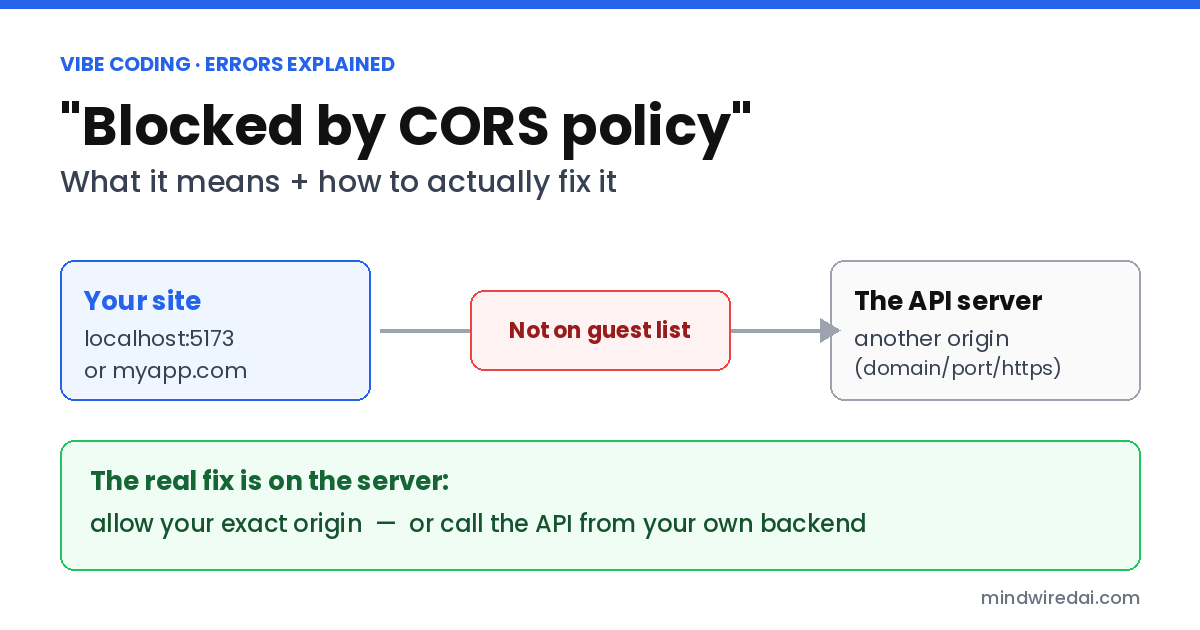
“Blocked by CORS policy” means your web page tried to read data from a different origin — another domain, port or protocol — and that server didn’t send a header allowing your site, so the browser hides the response. The fix is almost always on the server: allow your exact site address, or route the call through your own backend.
How I put this together. This is an explainer, not a story about my own bug — I don’t have notes or screenshots from a CORS error of mine, so I’m not going to invent one. On Nov 17, 2026 I read MDN’s CORS guide and its CORS error reference, FastAPI’s CORS tutorial, and Supabase’s guide to CORS for Edge Functions. Every rule below links to one of those.
What I did not do. I didn’t reproduce each case in a test app. Exact error wording differs a little between Chrome, Firefox and Safari, but the causes are the same.
What does “blocked by CORS policy” actually mean?
Browsers follow a safety rule called the same-origin policy. MDN puts it this way: a web app using fetch() “can only request resources from the same origin the application was loaded from unless the response from other origins includes the right CORS headers.”
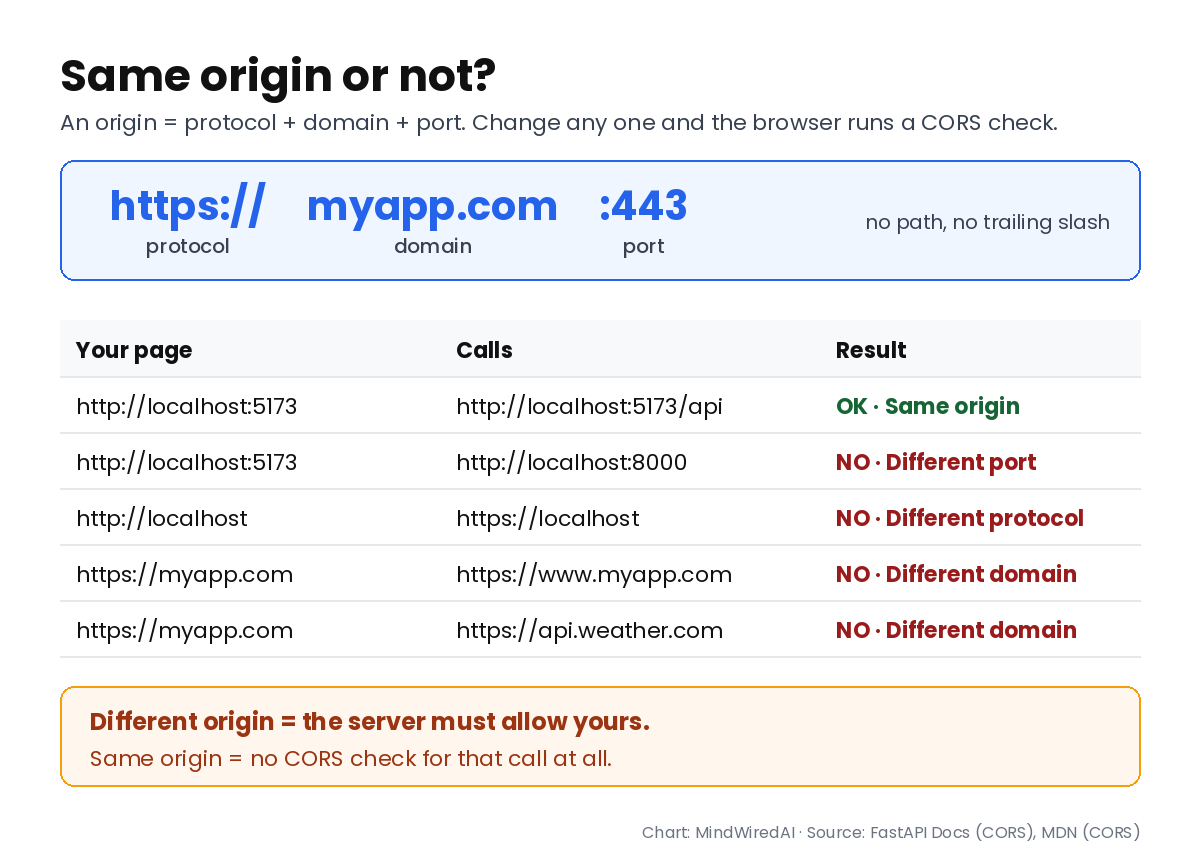
An origin is three things glued together: protocol, domain and port. FastAPI’s docs give a perfect beginner example — http://localhost, https://localhost and http://localhost:8080 are all different origins, even though they all say “localhost.” So if your page runs on localhost:5173 and your API on localhost:8000, the browser treats them as strangers.
CORS (Cross-Origin Resource Sharing) is how a server says “these strangers are fine.” Think of the server as a venue and the browser as the bouncer. Your request gets to the door, the venue answers — but if your site isn’t on the guest list in a header called Access-Control-Allow-Origin, the bouncer won’t hand the answer to your code.
Why does it work in Postman or curl but not in my browser?
Because CORS is a browser rule. Postman, curl and your own server don’t enforce it, so the same request sails through there. That’s also why the error feels so unfair: the server often did answer. The browser just refused to show your JavaScript the answer.
Two facts from MDN change how you debug this. First, “Most CORS errors can only be resolved on the server, because the server controls whether cross-origin access is allowed.” Second, the details are hidden from your code on purpose — “All the code knows is that an error occurred.” The real reason only shows up in the browser console, so that full console line is what you hand to the AI. If you’ve never dissected an error message before, my guide on how to read error messages when you can’t code walks through it.
Is it really a CORS error? Check this first
Some errors only look like CORS. MDN’s page on “CORS request did not succeed” says that error “is not directly related to CORS, but is a fundamental network error of some kind.” The causes it lists include an ad blocker or privacy extension blocking the request, an invalid HTTPS certificate, an https page calling an http address, and a server that crashed without sending anything back.
So before changing any CORS settings, open DevTools → Network, click the failed request, and look at its status. If your API is down, the URL is wrong, or the server threw an error, fix that first — the CORS message often disappears with it. A quick test: turn off your ad blocker or try a private window with extensions disabled.
5 reasons AI-built apps hit CORS errors (and the fix for each)
1. Your frontend and backend run on different ports
AI tools love splitting an app into a frontend (say, localhost:5173) and a separate Python or Node backend (say, localhost:8000). Different port, different origin, CORS check. The fix is to tell the backend which origins to trust. In FastAPI, the official pattern looks like this:
from fastapi.middleware.cors import CORSMiddleware

origins = [
    "http://localhost:5173",          # your dev frontend
    "https://your-app.vercel.app",    # your live site
]

app.add_middleware(
    CORSMiddleware,
    allow_origins=origins,
    allow_credentials=True,
    allow_methods=["*"],
    allow_headers=["*"],
)
Express, Django, Flask and other frameworks each have their own official CORS setting that does the same job. Ask your AI to use the framework’s official one, not a hand-rolled workaround.
2. It worked on localhost and broke after you deployed
The classic. Your allowed-origins list says http://localhost:5173, and that’s it. Your live site is a brand-new origin the server has never heard of. Add the production address — and add it exactly. An origin has no path, so https://myapp.com/ with a trailing slash won’t match https://myapp.com; www.myapp.com and myapp.com are different; http and https are different. If the setting lives in an environment variable, remember you have to redeploy after changing it. That one trips people up so often it’s cause #2 in my post on why apps work locally but not after deploy.
3. Your page calls someone else’s API straight from the browser
Asking an AI to “add weather data” or “connect to the AI API” sometimes produces a fetch() to a third-party API right inside your React component. If that company doesn’t allow browser calls from your origin, you get CORS — and you can’t change their server. MDN’s answer for this situation is to route requests through a server you do control: a small API route or serverless function on your own backend makes the call and passes the result back.
That move has a big bonus. If the call needs a secret API key, putting it in browser code means anyone can copy it — the CORS error was accidentally protecting you. Keep the key on the server. If one already ended up in your frontend or on GitHub, follow my steps for what to do after pushing an API key to GitHub.
4. You’re calling a Supabase Edge Function from the browser
Supabase’s own guide is direct: “To invoke edge functions from the browser, you need to handle CORS Preflight requests.” A preflight is a quick OPTIONS request the browser sends first to ask “may I?” — MDN explains it’s required for methods other than GET, or POST with certain content types. If your function doesn’t answer that OPTIONS request with CORS headers, the real request never goes out.
The Supabase guide shows answering OPTIONS first and adding corsHeaders to every response, including error responses. For supabase-js v2.95.0 and later it recommends importing those headers from the SDK (npm:@supabase/supabase-js@^2/cors) rather than hard-coding them. Since you’re in Supabase anyway, make sure your tables aren’t wide open while you’re there — see what the Supabase “RLS disabled” warning means.
5. You added login cookies and “*” stopped working
Setting allowed origins to * (everyone) seems to work — until you add login. MDN is strict here: when a request carries credentials like cookies, the server “must not specify the * wildcard” and must name an explicit origin instead. FastAPI’s docs say the same: with allow_credentials=True, origins, methods and headers can’t be ["*"]. The fix is the explicit list from cause #1.
| What you see | Likely cause | Where to fix it |
|---|---|---|
| Fails between two localhost ports | Backend doesn’t list your dev origin | Backend CORS settings |
| Works locally, fails when live | Live domain missing or mistyped | Backend CORS settings, then redeploy |
| Calling a third-party API from the page | Their server doesn’t allow your origin | Move the call to your own backend |
| Supabase Edge Function fails | OPTIONS preflight not handled | The function’s code |
| Broke right after adding login | “*” used with cookies | Explicit origin list |
The CORS “fixes” an AI may suggest — and why to say no
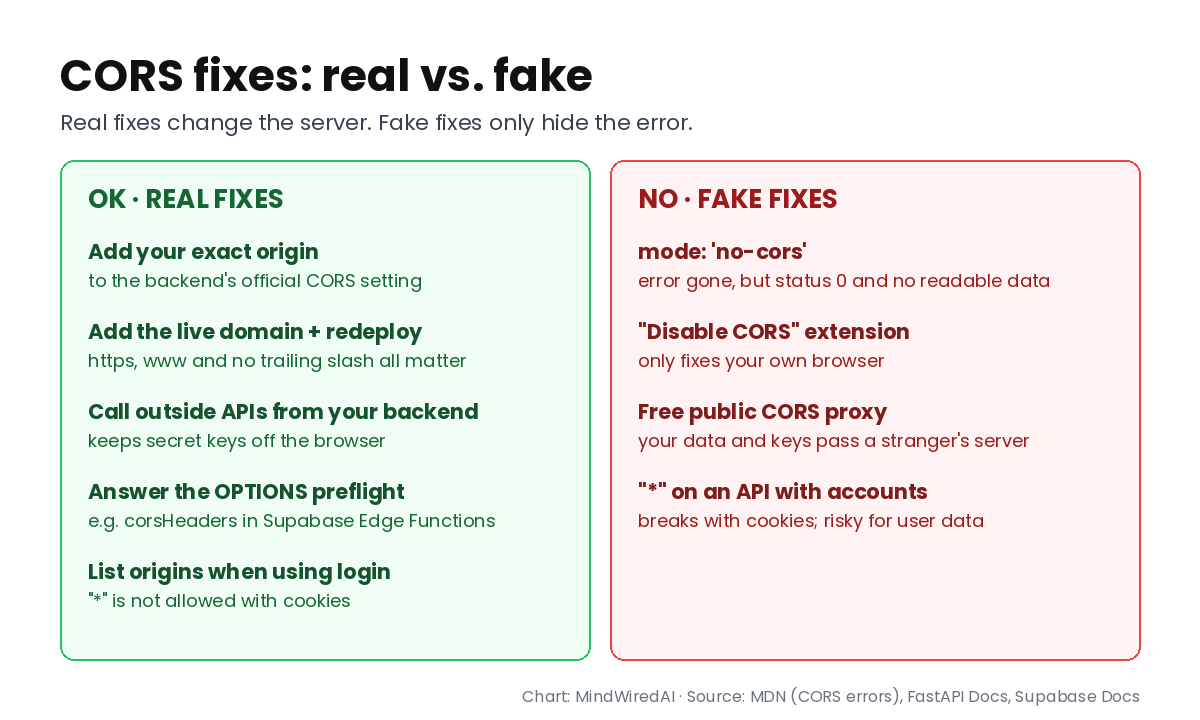
mode: 'no-cors'. This makes the red text go away, which is why AIs reach for it. But MDN explains the response becomes opaque: “its status is 0, its headers are empty, and its body is not readable by JavaScript.” No error — and no data either. It’s only useful when you truly don’t need the answer, like sending an analytics ping.
A “disable CORS” browser extension. It changes your browser only. Your users don’t have it, so the app is still broken for everyone else. Fine for a five-minute experiment, never a fix.
A free public CORS proxy. Your requests — and any keys or user data in them — pass through a stranger’s server. Build your own tiny backend route instead (cause #3).
⚠️ The “allow everything” shortcut
Setting allowed origins to * on your own API can be acceptable for truly public, read-only data with no login. For anything with user accounts, list your real domains. If a fix makes the error vanish without touching the server, be suspicious of it.
How to ask your AI to fix a CORS error properly
Most CORS loops happen because the AI is guessing. It sees your frontend file but not your server, so it keeps editing the frontend. Give it the three facts it can’t see:
I'm getting this exact error in the browser console:
[paste the full red line]

My frontend runs at: [e.g. http://localhost:5173 or https://myapp.com]
The request goes to: [the API address]
That server is: [my FastAPI / Express / Supabase Edge Function / a third-party API]

Fix this on the server side using the framework's official CORS setting.
Do not use mode: 'no-cors', browser extensions or public proxies.
If it's a third-party API, move the call to a backend route and keep any key server-side.
If the AI still fails twice in a row, stop feeding the same chat — start fresh with the summary above. I explain why in why AI can’t fix the same bug after a few tries.
💡 Check you’re done
After the fix, test in the place that failed — if it broke on your live site, test the live site, not localhost. Hard-refresh, open the console, and confirm the red line is gone and the data actually appears.
The honest limitations
This covers the common cases in AI-built apps, not every CORS situation. Custom headers, unusual HTTP methods, redirects and CDN or hosting settings can each add their own wrinkle, and MDN lists more than a dozen distinct CORS error reasons — each with its own page. Hosting platforms and frameworks change their settings screens, so if a menu isn’t where your AI says, the framework’s official CORS docs are the source of truth. And as I said up top, I’m working from documentation here, not from a bug I recorded myself.
Who should actually care
Worth it if: your app has a separate backend, calls any outside API, uses Supabase Edge Functions, or broke the moment you deployed.
Maybe not if: you’re using an all-in-one setup where pages and API routes live on the same domain — same origin means no CORS check for those calls.
Skip if: your app is a static page that never fetches data from anywhere.
FAQ
How do I fix “No ‘Access-Control-Allow-Origin’ header is present”?
Add your site’s exact origin to the server’s allowed origins using your framework’s official CORS setting. If you don’t control the server, call it from your own backend instead of the browser.
Can I fix a CORS error from the frontend?
Usually not. MDN says most CORS errors can only be resolved on the server. Frontend tricks like no-cors hide the error but also hide the data.
Why does my API work in Postman but not in the browser?
CORS is enforced by browsers only. Postman and curl skip the check, so they prove the API works — not that it allows your website.
Is “Failed to fetch” always a CORS error?
No. It can also mean the server is down, the URL is wrong, an extension blocked the request, or an HTTPS page called an HTTP address. Check the Network tab first.
The bottom line
“Blocked by CORS policy” sounds scary, but it’s one missing permission: the server hasn’t listed your site’s origin. Confirm it’s really CORS, find which server you’re calling, and fix it on that server — not by hiding the error in the browser.
Your next step: open your browser console, copy the full CORS line, and write down your frontend address and API address next to it. Those three lines are 90% of the fix.
Related free AI guides
- App works locally but not after deploy? 5 causes and fixes
- How to read error messages when you can’t code
- Why AI can’t fix the same bug — and what to do instead
Published Nov 17, 2026. Sources checked Nov 17, 2026: MDN (Cross-Origin Resource Sharing, last modified Oct 28, 2026; CORS errors; CORSDidNotSucceed), FastAPI Docs (CORS), Supabase Docs (CORS support for Edge Functions, updated Sep 4, 2026).