Build log · Search Console · Real numbers
Google indexed exactly one page of my blog: the homepage.
This is the day-zero record of what I found in Search Console, what I took down, and what I’m doing instead. No results yet. Just the honest starting line.
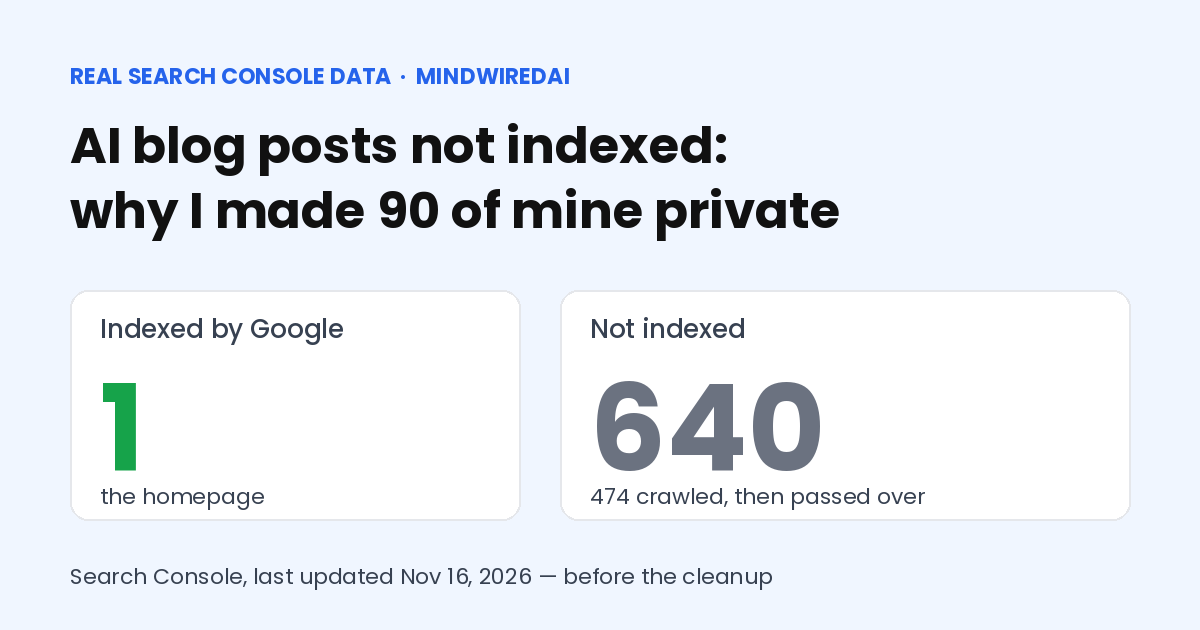
I opened Search Console expecting a slow trickle. Instead I saw two boxes: 640 not indexed, 1 indexed. That one page was my homepage. Every article I had published (the automated ones and the ones I’d spent real evenings on) was sitting outside Google’s index.
If you’re running a blog with AI help and your traffic is flat, check that report before you write another post. Here’s exactly what mine said and what I did about it.
TL;DR / Quick Answer
Why were my AI blog posts not indexed? Search Console showed 1 indexed page and 640 not indexed, with 474 marked “Crawled – currently not indexed.” My site had no technical block, so Google simply judged the pages not worth indexing. I set 90 auto-posted articles to Private, deleted 1,808 unused tags, and now publish two or three posts a week built from my own work. Results aren’t in yet.
How my blog ended up with 98 auto-posted articles
I’m a non-developer founder learning to build with AI. From March to June 2026, I ran this blog on autopilot: Claude wrote “free AI tools” articles and they went live automatically. It felt productive. The post count climbed, the tag list grew, and I didn’t have to think about it.
By November the results were clear. The posts were getting almost no views and the ad revenue was poor. In the last six months, Search Console counted 172 impressions and 20 clicks for the whole site, and the only search queries it listed were my own brand name. In plain terms: almost nobody found me through Google unless they already knew my name.
What “Crawled – currently not indexed” actually means
Here’s my real Page indexing report. The data was last updated November 16, two days before I changed anything, so treat it as the “before” picture.
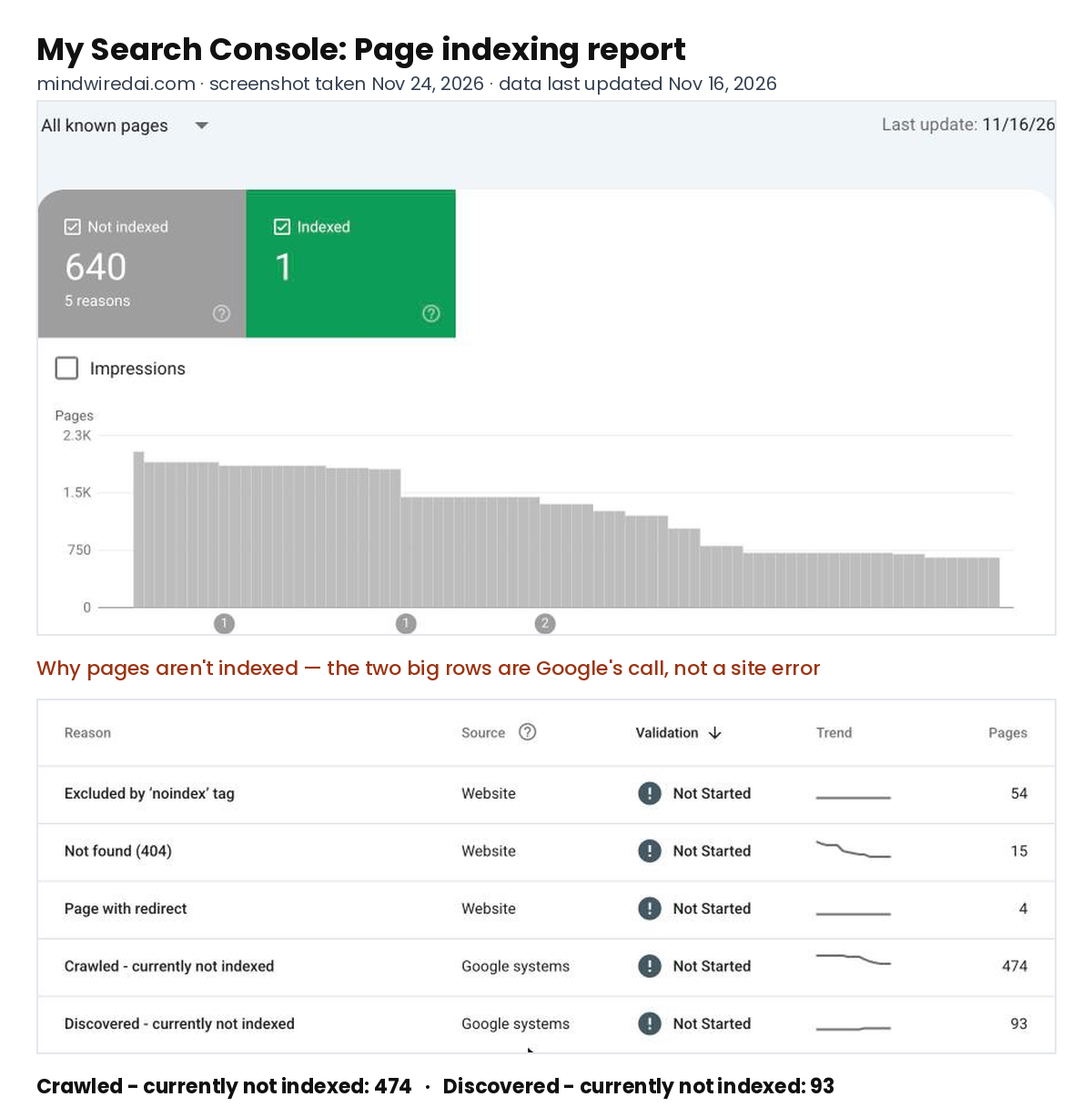
The two biggest rows are labeled Google systems, not Website. That difference matters more than the numbers:
- Crawled – currently not indexed (474). Google visited the page, read it, and decided not to add it to the index.
- Discovered – currently not indexed (93). Google knows the URL exists but hasn’t bothered to crawl it yet.
- Excluded by ‘noindex’ (54), 404 (15), redirect (4). These are site-side, and mostly on purpose.
My first instinct was “something is broken.” So on November 18 I checked every post URL in my sitemap: all 125 returned a normal page, none had a noindex tag, and each one pointed to itself as the canonical version. Nothing technical was stopping Google. Google could read my posts fine. It just didn’t think they were worth keeping.
Google’s own spam policy has a name for the pattern I’d built. It calls it scaled content abuse, and the first example it lists is using generative AI tools “to generate many pages without adding value for users.” The policy also says this applies “no matter how it’s created.” So AI itself isn’t the problem. Pages that add nothing are.
⚠️ The catch with my own diagnosis
Search Console never tells you why a page was passed over. “Google judged them low value” is my reading of the evidence: no technical errors, hundreds of near-identical tool roundups, zero non-brand queries. I can’t prove it, and I’d distrust anyone who says they can.
Delete, noindex or private: what to do with old AI posts
When you decide some posts have to go, you’ve got four realistic options. Here’s how I weighed them:
| Option | What visitors and Google see | Can you undo it? | My call |
|---|---|---|---|
| Delete | Page is gone | Only from trash or a backup | Too final for a first move |
| Noindex | Readers still see it; Google is asked to drop it | Yes, flip a setting | Keeps thin pages live for readers, which I didn’t want |
| Private (WordPress) | Logged-out visitors get a 404; content stays in your dashboard | Yes, same URL and date come back | ✓ What I chose for 90 posts |
| Rewrite | Same URL, genuinely better page | N/A | Best option, but I only have real material for a few |
I went with Private because it’s reversible. After switching, I checked a sample of the old URLs from outside my login and they returned 404, which is what I wanted Google to see.
What I changed on November 18
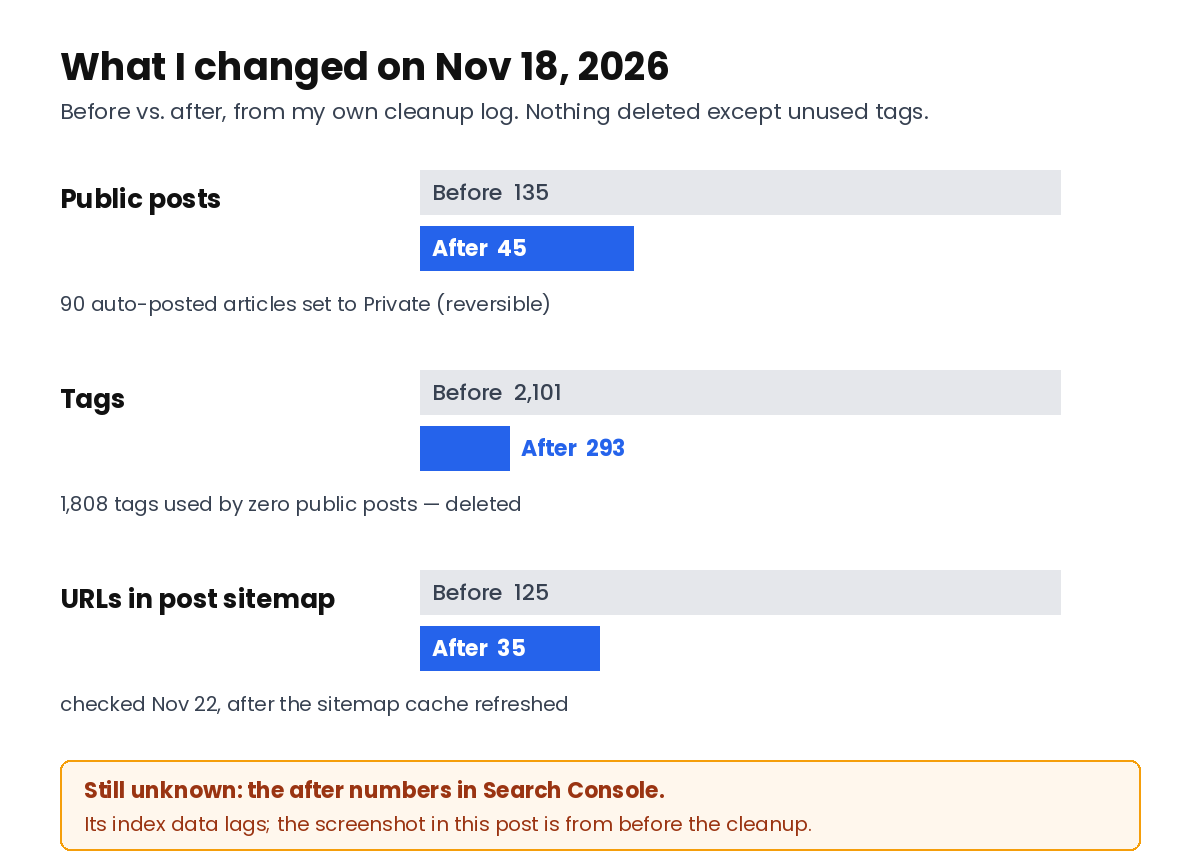
90 posts to Private, 8 kept
Of the 98 automated “free AI tools” posts, I set 90 to Private. All 90 switched without a single failure. Public posts dropped from 135 to 45 (that 45 includes 10 download pages that were already noindexed). I kept 8 automated posts public because they still match what this blog is about now: learning to build with AI as a non-developer. One example is my guide to building an app without coding using AI.
1,808 tags deleted
The automation had also created tags freely. I had 2,101 of them, and only 293 were used by any public post. The other 1,808 were attached to nothing visible, so each one was an empty archive page. I deleted those permanently. That was the only irreversible step, and I confirmed it separately before running it.
A new publishing rule
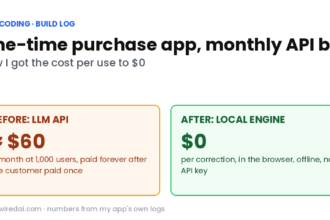
I dropped “one post a day.” Now I aim for two or three posts a week, and each one has to come from something I actually did: an error I hit, a number I measured, a decision I made. If I don’t have real material that week, I don’t publish. The first post written under this rule was my free security audit of a vibe-coded app, and the clearest example is my build log on replacing a paid LLM API with a local engine.
💡 Check your own blog in two minutes
Search Console → Indexing → Pages. Look at the “Indexed” number, then the rows labeled “Google systems.” If those rows are most of your site and there are no site-side errors, more posts of the same kind probably won’t help you.
The honest limitations
- No results yet. Search Console’s index data lags. On November 24 it still showed November 16 data, so it can’t tell me whether the cleanup worked. I’ll add the after numbers to this post when they show up.
- Taking posts down doesn’t earn indexing. It just stops the weak pages from defining the site. The remaining posts still have to be worth indexing on their own.
- I created broken links. The posts that stayed public still had links pointing to the 90 that went private. I’m fixing those a few posts at a time.
- One site, one case. This is my blog, not a controlled test. Your report may tell a different story.
Who should actually care
Worth it if: you auto-published AI posts at volume, your traffic is flat, and your Page indexing report is mostly “Crawled – currently not indexed.”
Maybe not if: you use AI to draft but add your own testing, screenshots and opinions to every post. Your problem may be elsewhere, so check for site-side errors first.
Skip if: your posts are indexed and getting non-brand impressions. Don’t tear down something that works because of my story.
Frequently Asked Questions
Does Google penalize AI-generated blog posts?
Not for being AI-written. Google’s spam policy targets pages made mainly to manipulate rankings that add little value “no matter how it’s created.” Mass-producing AI pages without adding value is listed as an example. In my case, nothing was penalized. Most of my posts were simply crawled and left out of the index.
Should I delete or noindex low-quality AI blog posts?
If you might rewrite them later, start with something reversible. In WordPress, setting posts to Private hides them from visitors and Google while keeping the content, URL and date. Noindex keeps them readable but asks Google to drop them. I’d treat deleting as a last step, after you’ve confirmed nothing links to those pages.
How long does Search Console take to show indexing changes?
It isn’t instant, and Google doesn’t promise a timeline. When I checked on November 24, my Page indexing report still showed data from November 16, before my cleanup. Note the “Last update” date at the top of the report before you read too much into any number, good or bad.
The bottom line
If your AI blog posts are not indexed and nothing technical is broken, writing more of the same is the wrong fix. I had 135 public posts and one indexed page. I’m now betting on fewer posts, each built from real work.
Your next step: open Search Console → Indexing → Pages today and write down three numbers: Indexed, Crawled – currently not indexed, and the “Last update” date. That’s your own day-zero baseline.
Related free AI guides
- Build log: replacing a paid LLM API with a local engine
- How to run a free security audit on your vibe-coded app
- How to read error messages when you can’t code
Published Nov 2026. How this post was made: the numbers come from my own Search Console (screenshots taken Nov 24, 2026) and my WordPress cleanup log from Nov 18, 2026. I drafted it with Claude; the decisions and the data are mine. Google source checked Nov 24, 2026: Spam policies for Google web search (scaled content abuse).