If you’ve spent any time vibe coding, you already know the frustration. You describe a UI to Claude or Codex. It writes the code. The output works — but it looks like AI made it. Generic layout. Safe colors. The kind of design you’ve seen ten thousand times across forgettable SaaS dashboards.
The problem isn’t the code. It’s that your AI agent has no design instincts. It’s pattern-matching off everything it was trained on — which means it defaults to the median, the average, the unremarkable.
A tool called Lazyweb just launched to fix exactly this — and it’s completely free.
At a Glance
| 🖼️ Screen library | 257,000+ real app & web screens |
| 🏢 Companies tracked | 25,000+ |
| 🔌 Integration | MCP — Claude Code, Codex, Cursor |
| 👤 Creator | Ex-Duolingo PM, Ali Abouelatta |
| 💰 Price | Free. For humans. For agents. |
| 🌐 URL | lazyweb.com |
What Is Lazyweb, Actually?
The simplest way to describe it: Mobbin meets an AI agent, but connected directly to your coding tool via MCP.
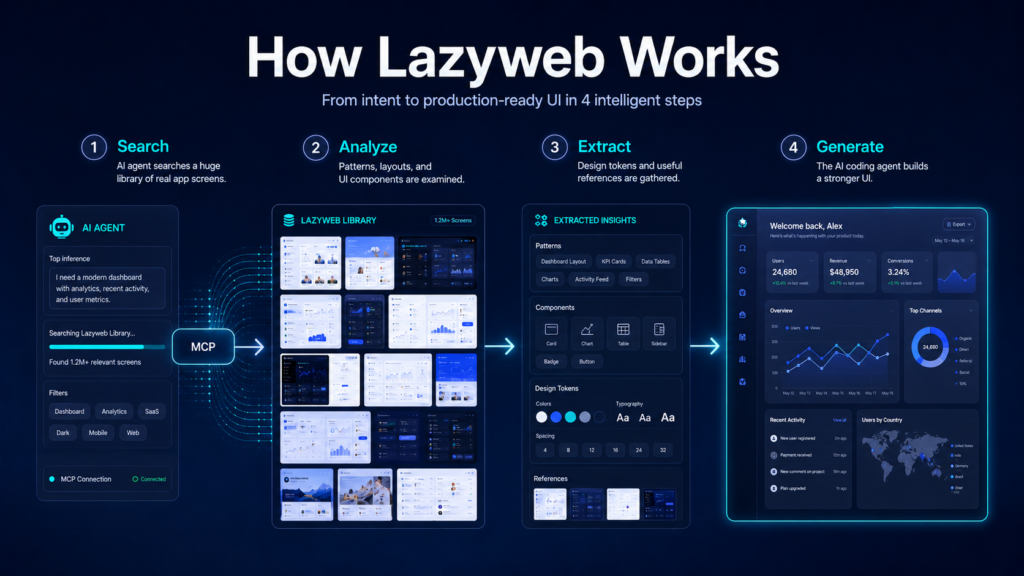
Lazyweb is a design research platform built specifically for AI coding agents. Instead of starting from a blank slate and generating “average-looking” UI from training data, your agent now searches a library of 257,000+ real app screens from 25,000+ companies before it designs anything. It finds actual examples, downloads them locally, and uses them as grounding references when building your UI.
Think of it this way: before Lazyweb, asking Claude to design a pricing page was like asking someone who’s only read about design to build one. After Lazyweb, it’s like giving that person a curated collection of the best pricing pages from Stripe, Linear, Notion, and 25,000 other real products — before they touch a line of code.
The creator himself described it as “fast design research and design exploration for vibe coders” — which is exactly the audience that needs this most.
Who Built It?
Lazyweb was built by Ali Abouelatta, a former Product Manager at Duolingo. He’s been publicly documenting the entire build process in a newsletter called First 1000 — sharing everything from product decisions to what it felt like to throw away weeks of work and start over.
One candid quote from his launch post stood out: “AI makes it dangerously easy to confuse motion with progress. You can produce a lot of code very quickly and still be making the product worse.” That kind of self-awareness from a solo builder — about the exact tool ecosystem Lazyweb is designed for — is worth noting.
The project went from concept to live product in about 2.5 months, built largely with Claude and Codex — which makes the origin story a nice bit of poetic irony: an AI-assisted product designed to make AI-assisted products look better.
What It Can Do: The 6 Agent Skills
Once connected via MCP, Lazyweb gives your agent six slash commands it can use at any point in the design process:
/lazyweb-design-research
Deep competitive analysis mode. The agent identifies competitors, searches the Lazyweb library + the open web, downloads reference screenshots, and generates a structured report with patterns, anti-patterns, unique angles, and actionable recommendations. Use this before building anything.
/lazyweb-quick-references
Fast screenshot lookup. Searches Lazyweb, groups results by visual pattern similarity, and downloads them locally. Lighter than full research — just find, group, show. Good for quick inspiration grabs mid-build.
/lazyweb-design-tokens
Extracts the full design system from any URL in seconds — logo, colors, typography, border styles, spacing tokens. One CLI command gives you a complete visual language profile to hand directly to your agent.
/lazyweb-vision-analyze
Visual analysis of screenshots. The agent examines downloaded reference images and produces structured observations: layout hierarchy, color usage, spacing patterns, and component breakdowns.
/lazyweb-flow-research
Step-by-step UX flow research. Pulls real user flows (Onboarding, Sign Up, Sign In, Paywall, Checkout, and more) from the canvas library and analyzes patterns across multiple products.
/lazyweb-inspiration
Connects to external inspiration sources including Mobbin, Savee, Dribbble, and Behance alongside Lazyweb’s own database — pulling cross-platform references into a single local report.

How to Set It Up (Takes About 2 Minutes)
Lazyweb connects via MCP — the same protocol Claude Code, Codex, and Cursor use to connect external tools. Setup is a single command. Here’s the full flow:
Get your free MCP token
Run this in your terminal to auto-generate and store a free token (no signup, no billing info):
mkdir -p ~/.lazyweb
curl -sS -X POST https://www.lazyweb.com/api/mcp/install-token \
-H “content-type: application/json” \
-d ‘{}’ | node -e “let s=”;process.stdin.on(‘data’,d=>s+=d);process.stdin.on(‘end’,()=>require(‘fs’).writeFileSync(process.env.HOME+’/.lazyweb/lazyweb_mcp_token’, JSON.parse(s).token))”
Install via Claude Code plugin marketplace
Two commands and you’re connected:
claude plugin marketplace add https://github.com/aboul3ata/lazyweb-skill
claude plugin install lazyweb@lazyweb
Use a slash command
Inside Claude Code, run any Lazyweb skill. For example:
/lazyweb:lazyweb-design-research “pricing page for a SaaS tool”
The agent searches, downloads references, and drops a structured report with inline images at .lazyweb/design-research/[topic]/report.md
Not Just for Devs — The Human Browser Is Free Too
You don’t need to use the MCP integration at all to get value from Lazyweb. The full screen library is browsable directly on the website — no paywall, no login wall, no “free trial” that expires.
📱 /canvas/flows
Browse complete step-by-step user flows from real apps, organized by category: Onboarding, Sign Up, Sign In, Permissions, Settings, Paywall, Checkout, and more.
🏢 /canvas/companies
Explore screens organized by app or brand. See how Stripe, Notion, Linear, and 25,000+ other products handle any screen type.
⬇️ Free downloads
Download any screenshot directly from the library, no subscription required. Useful for designers, PMs, and founders doing competitive research manually.
Why This Matters More Than It Looks
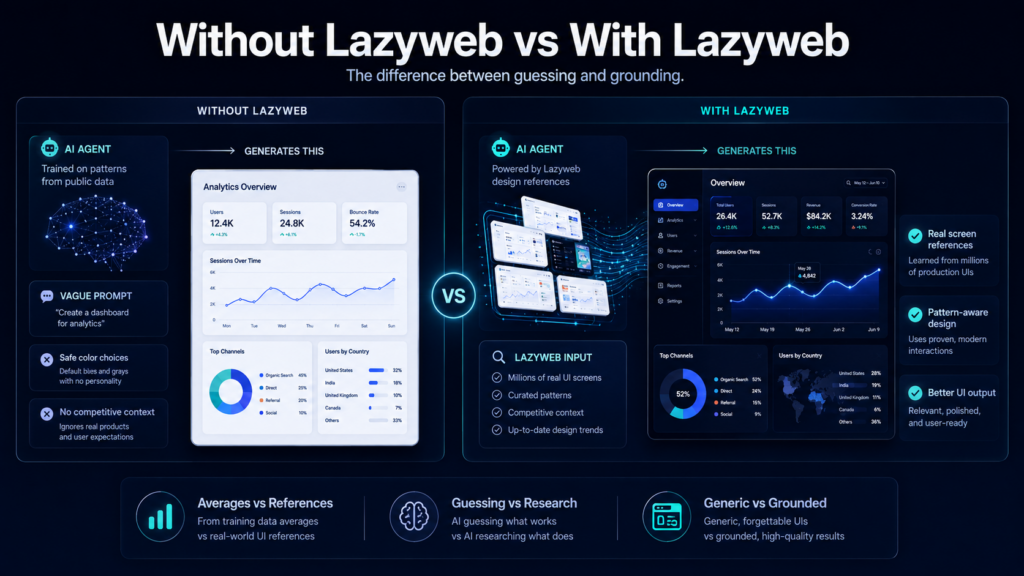
The core issue Lazyweb solves is surprisingly deep. When an AI agent generates UI without design grounding, it’s essentially averaging its entire training dataset. The output isn’t wrong, exactly — it’s just the statistical middle of “app design” as a concept. Functional. Forgettable.
Lazyweb changes the agent’s inputs before it generates anything. Instead of pattern-matching against “all apps ever,” it pattern-matches against the specific, curated examples you point it toward. The difference in output quality is significant.
| Without Lazyweb | With Lazyweb |
|---|---|
| Agent designs from training data averages | Agent searches 257k+ real screens first |
| Generic layouts and safe color choices | References grounded in real product patterns |
| No competitive context | Knows what competitors actually ship |
| Design research = hours of manual browsing | Structured report in minutes, agent-driven |
| Results look like AI made them | Results look like someone actually thought about it |
⚠️ Honest Heads-Up
Lazyweb is new and still early. The MCP integration requires some terminal comfort — this isn’t a one-click browser extension. You’ll need Node.js, a compatible AI coding tool (Claude Code, Codex, or Cursor), and a few minutes to set up. If you’ve never used MCP before, plan for a bit of troubleshooting. The payoff is real, but this isn’t a zero-friction tool yet.

The Bigger Picture: AI’s Design Gap Is Closing
Lazyweb isn’t a one-off curiosity. It’s part of a broader pattern that’s been accelerating through 2026: the specific gaps in AI-generated output — design quality, factual accuracy, context awareness — are being filled by targeted open-source tools and free platforms at a remarkable pace.
Eighteen months ago, the only way to get design-quality UI from an AI agent was to feed it Figma files manually or spend hours crafting detailed visual specifications. Now there’s a free, MCP-connected tool that does that research automatically, grounded in real product data from 25,000 companies.
The floor for what a solo developer can ship is rising fast. Tools like Lazyweb are part of why.
Try Lazyweb Free
257k+ real app screens · 25,000+ companies · MCP-ready · No paywall
Quick FAQ
Is it really free with no catch?
Yes. The website library, downloads, and MCP token are all free with no usage limits or billing. The generated token only authorizes the design reference tools — no billing data is associated with it. The GitHub README confirms: “Lazyweb is free.”
Which AI tools does it work with?
Claude Code, OpenAI Codex, and Cursor are the officially supported integrations. Any tool that supports MCP connections can technically connect, but the Claude Code plugin marketplace integration is the most polished path right now.
What’s MCP and do I need it?
MCP (Model Context Protocol) is Anthropic’s open standard for connecting AI agents to external tools and data sources. You need it for the slash-command agent skills. If you just want to browse the screen library or do manual design research, you don’t need MCP at all — just go to lazyweb.com.
How is this different from Mobbin or Dribbble?
Mobbin and Dribbble are human-browsed inspiration libraries. Lazyweb is built for agents — it connects directly to your coding tool, automates the research process, downloads references locally, and generates structured analysis reports your agent can act on. It also connects to Mobbin, Dribbble, Savee, and Behance as additional sources inside the same workflow.
Written by the MindWiredAI team. Information verified against lazyweb.com, EveryDev.ai, the official GitHub repo (aboul3ata/lazyweb-skill), and Ali Abouelatta’s First 1000 launch post. Lazyweb is an independent project. Screen and company counts are per official product documentation as of April 2026.