Build a Custom App for Your Local Business in 20 Minutes (Zero Coding Required)
If you run a local U.S. business—whether you own an HVAC company, manage a busy dental office, or run the front desk at a local salon—you already know that software is expensive. Hiring a developer to build a custom booking system, a client portal, or an internal tracking app can easily cost upwards of $10,000. But what if you could build it yourself in exactly 20 minutes, for free, without writing a single line of code?
Today, we are moving past just using AI to write emails. We are entering the era of the “1-person unicorn business,” where you can spin up fully functional software just by typing what you want. To show you exactly how this works, we’re going to break down a masterclass workflow using two incredibly powerful tools: Google NotebookLM and Google Anti-Gravity (a powerful AI “vibe coding” tool).
Why NotebookLM Instead of ChatGPT?
 Why use NotebookLM instead of ChatGPT?
 Why use NotebookLM instead of ChatGPT?
If you’ve tried using ChatGPT or Gemini to plan a big project, you’ve probably noticed they suffer from “hallucinations”—they forget what you said earlier, get confused, or just start making things up.
To demonstrate the sheer power of this, let’s look at an example workflow from a recent AI lab experiment. Even though they built an app for high-ticket professionals, you can use these exact same steps to build an app for your plumbing dispatch or salon inventory.
Step 1: Feeding the AI Expert Knowledge
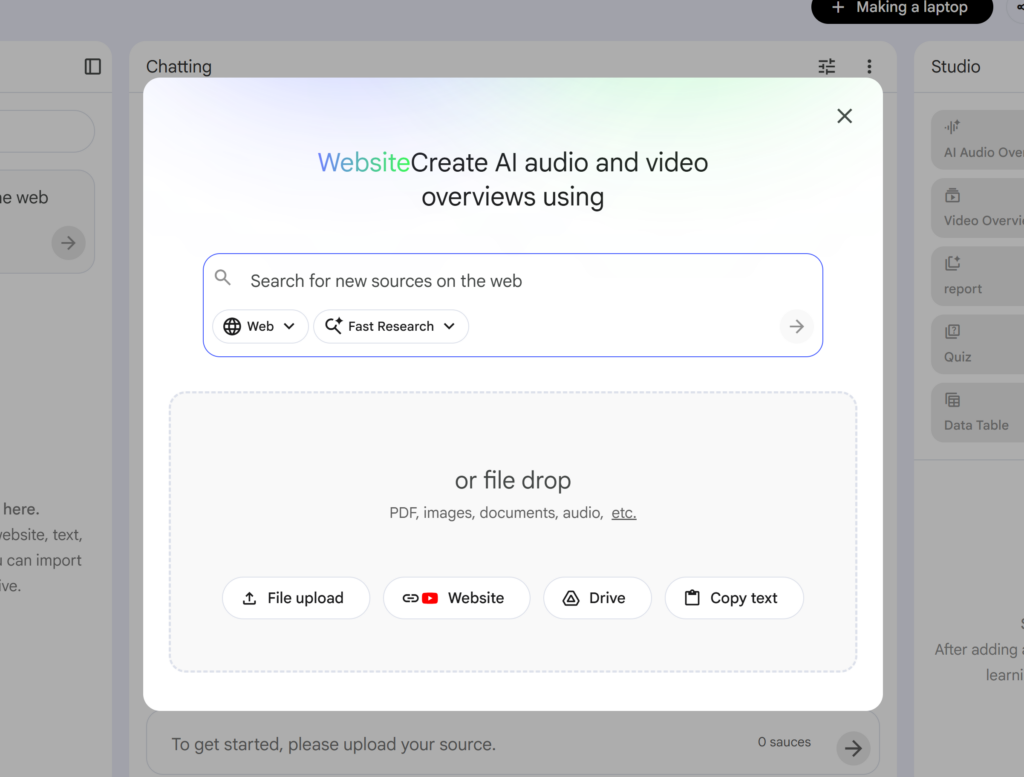
First, head to NotebookLM and click “Create New.” You need to upload your source materials. In our masterclass example, the creator uploaded three incredibly dense, proven business resources:
- A massive 300-page PDF of the Lean Startup Bible.
- The website of A16Z (a legendary Silicon Valley venture capital firm).
- An article detailing the “1,000 True Fans” business theory.
By checking the boxes next to these three sources, you are telling NotebookLM: “Use all the knowledge in these specific files to generate my business idea. Do not look anywhere else.”
Step 2: Generating the App Idea & Prompt
Once your sources are in, you tell NotebookLM exactly what you want. Here is the exact prompt used to generate a highly profitable app idea:
“Using our sources, give me a web-based idea that I can quickly build using vibe coding and validate for profitability within a month. It needs explosive growth potential so a 1-person business can become a unicorn.”
Within seconds, NotebookLM analyzed the Lean Startup and A16Z data and spit out a highly targeted idea: A hyper-niche AI research agent targeting high-income professionals who have money but no time. Specifically, doctors who need daily summaries of the latest medical papers, and venture capitalists who need to track overseas bio-trends.
Next, we need the actual technical instructions to build it. You simply ask NotebookLM:
“Based on this idea, write a detailed technical prompt to input into Google Anti-Gravity. Include the purpose, all features, design style, and user flow (where the login is, what happens when they click start). Make it structured and explicit so Anti-Gravity can build it perfectly.”
NotebookLM will generate a massive, structured blueprint. Copy this entire text. You are about to become a developer.
Step 3: Building the App with Google Anti-Gravity
 Step 3: Build an App Using Google Anti-Gravity
 Step 3: Build an App Using Google Anti-Gravity
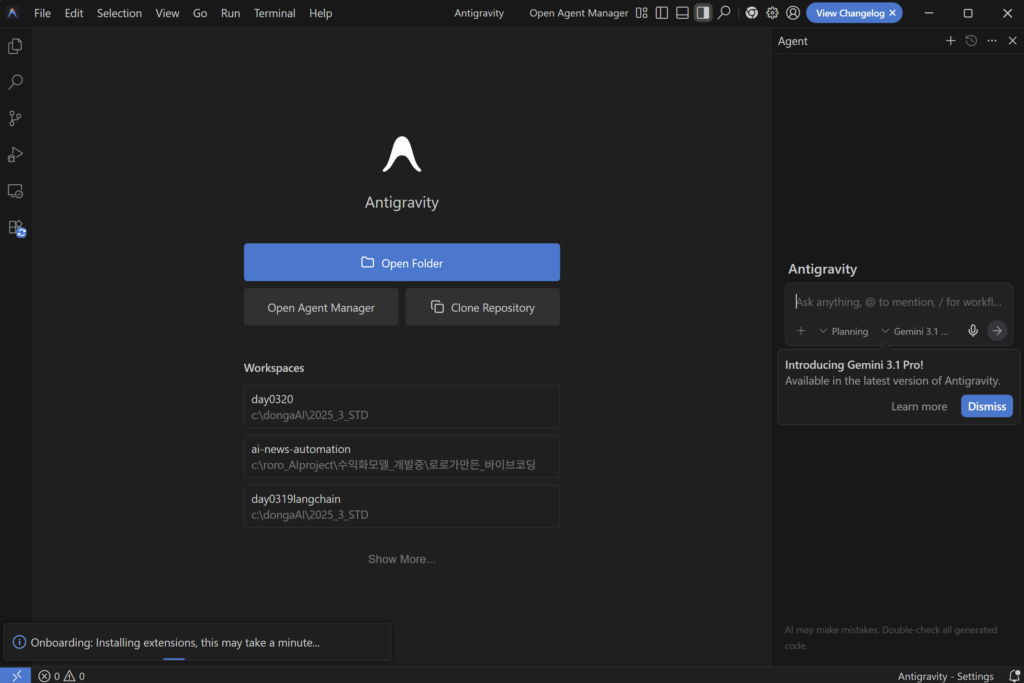
If you don’t have it, search for Google Anti-Gravity and download it for Mac or Windows. This is an AI agent that literally writes and executes code on your computer while you watch.
Crucial Setup Tweaks
Before you build, you need to configure two settings so the AI doesn’t drive you crazy:
- Customization Rules: Click the three dots, go to Customization, and tell it how to act. For example: “Please explain all artifacts and conversations clearly. Keep the conversation fun and engaging.” Hit
Ctrl + Sto save. - Turn Off Permissions: Click the settings icon in the bottom right and look for the “Always Prompt” setting. Turn this OFF. If you leave it on, the AI will constantly pause and ask, “Master, should I install this? What do you think about this color?” Tell it to stop bothering you and just do the work.
The “Planning” Mode Secret
Create a new folder on your computer (e.g., “1-Person-CEO-Test”) and open it in Anti-Gravity. Paste the massive blueprint you copied from NotebookLM into the chat box.
Research shows that AI codes significantly better when it plans first. By clicking “Planning,” the AI will create a step-by-step checklist (1. Setup UI, 2. Build Login, 3. Connect Database) and execute them one by one.
Sit back and watch. You will see files appearing out of nowhere in your empty folder. The AI is installing libraries, setting up a beautiful landing page, and writing complex code. It even has “Self-Healing” capabilities—if it writes a bug, it will spot its own error, apologize, and fix it automatically.
Step 4: Launching & Refining Your Masterpiece
After about 5 minutes, Anti-Gravity will announce the MVP (Minimum Viable Product) is ready. It will give you a command to type, usually npm run dev. Type that in, hit enter, and a link will pop up.
Click the link, and boom—your fully functional web application is live in your browser. You will see a gorgeous, high-end landing page with “Sign In” and “Request Access” buttons.
Upgrading the UX with Behavioral Science
Let’s say the app looks good, but you want it to convert visitors better. Go back to NotebookLM, uncheck your previous sources, and upload a new PDF: BJ Fogg’s Behavior Model (a famous Stanford paper on UI/UX design).
Copy the code of your current website, paste it into NotebookLM, and say: “Reconstruct the UI/UX of this website based on the BJ Fogg Behavior Model to minimize cognitive load and maximize social motivation. Write the prompt for Anti-Gravity.”
Paste the result back into Anti-Gravity. Watch as your app transforms into a hyper-personalized, high-converting masterpiece with custom onboarding forms (e.g., “I am a researcher” vs “I am an investor”).
Fixing Broken Buttons Naturally
What if you click the “Pricing” or “Service Introduction” links and nothing happens? You don’t need to know HTML. Just yell at the AI naturally.
Type into Anti-Gravity: “Hey, this isn’t working! I clicked Research Methodology, Pricing, and About Us, and absolutely nothing happens. Fix this right now, are you kidding me?”
You don’t need professional jargon. Just complain. Within 2 minutes, the AI will apologize, write the missing code, and suddenly all your navigation buttons and user registration flows will work flawlessly.
The 100-App Rule for Local Businesses
Building a successful business is a probability game. Just like a YouTuber needs to make 100 videos to find a viral hit, you might need to build a few different internal tools or customer apps before you find the perfect one that saves your office 20 hours a week.
The creator of this workflow is a 60-year-old entrepreneur who is launching apps globally every single day. He shared this method because he wants people to have hope. When you realize you can build enterprise-grade software from your living room without spending a dime, it changes your life. The opportunity isn’t just for Silicon Valley tech bros anymore—it’s for the salon owner, the HVAC dispatcher, and the front desk manager.
Stop paying thousands for clunky software. Open NotebookLM today, and build it yourself.
⭐ Anthropic Just Dropped a Free AI Academy (And It Will Save You $2,000 on Bootcamps)



One Comment
5nufqe