OpenAI just published official prompting guidance for GPT-5.5 — and buried inside it is a statement that will make a lot of developers cringe: “Begin migration with a fresh baseline instead of carrying over every instruction from an older prompt stack.”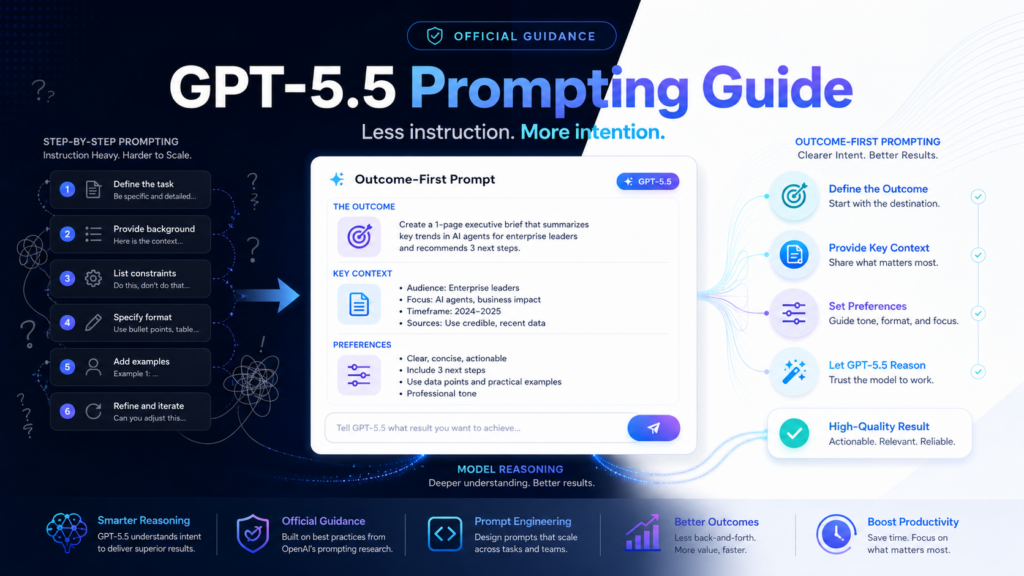
That means the prompt patterns you spent months perfecting for GPT-5.2 or GPT-5.4? Some of them are actively making GPT-5.5 worse.
This isn’t speculation — it’s the official word from OpenAI’s own engineering team. The guide changes how you should think about writing prompts at a fundamental level, and it applies to everyone from solo developers to product teams running production workflows. Here’s what you actually need to know.
GPT-5.5 Fast Facts
 The Single Biggest Change: Stop Describing Steps. Describe the Destination.
 The Single Biggest Change: Stop Describing Steps. Describe the Destination.
Every prompting guide from 2023 through early 2025 told you the same thing: be specific, break it into steps, chain your reasoning. That advice built careers in prompt engineering. It’s also now partially wrong for GPT-5.5.
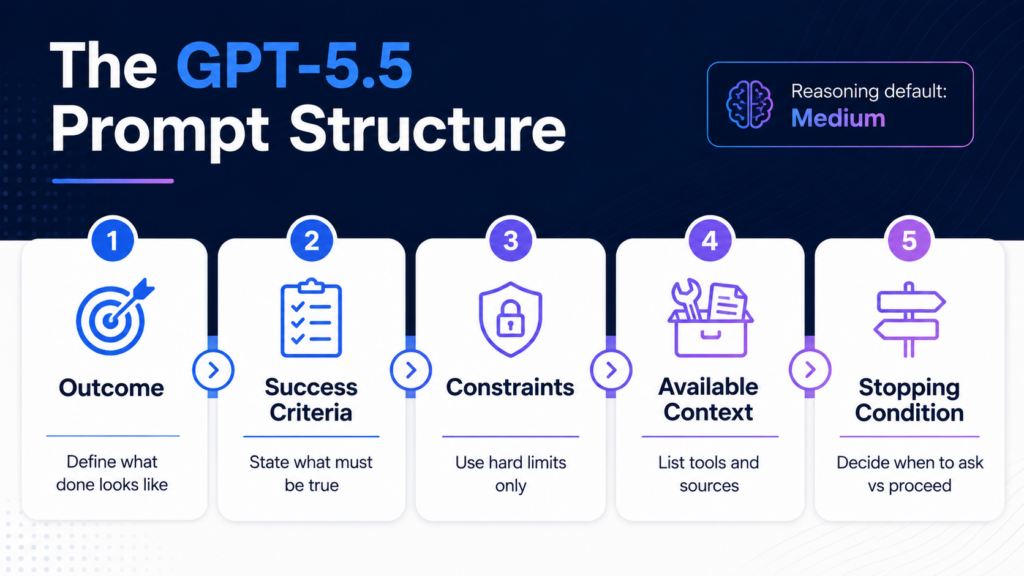
OpenAI’s official guide puts it directly: “GPT-5.5 is strongest when the prompt defines the target outcome, success criteria, constraints, and available context, then lets the model choose the path.”
The reason is architectural. GPT-5.5’s reasoning engine is better at finding efficient routes to a destination than its predecessors. When you over-specify the route — “first do A, then check B, then compare C, then output D” — you’re not helping the model. You’re constraining it. You’re forcing a less intelligent path through a problem space the model could navigate better on its own.
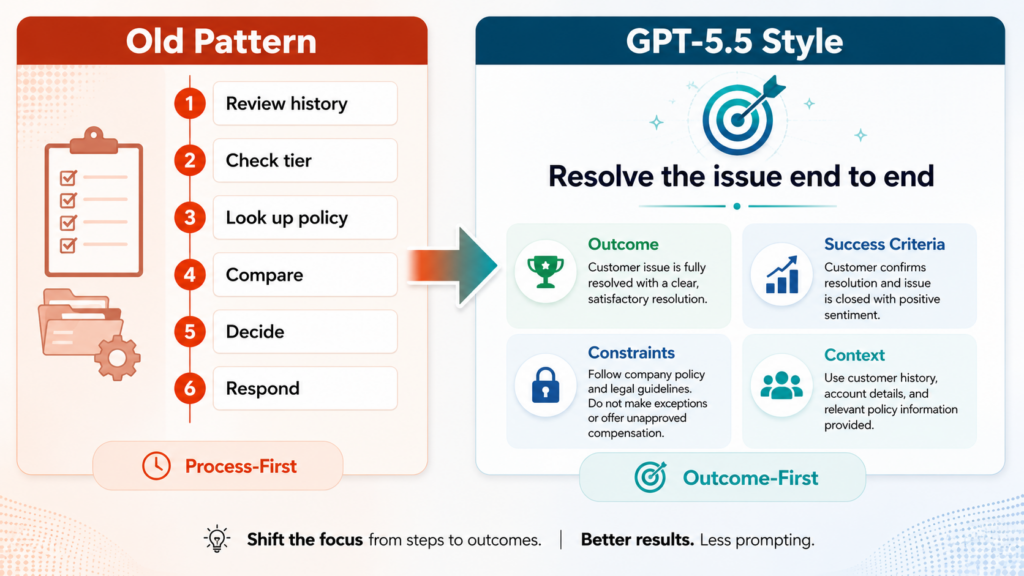
❌ Old Pattern (GPT-5.4 style)
First, review the customer’s account history. Second, check their subscription tier. Third, look up the relevant policy. Fourth, compare their situation against the policy. Fifth, determine eligibility. Finally, write a response.
✅ GPT-5.5 Style (from official guide)
Resolve the customer’s issue end to end. Success means: the eligibility decision is made from available policy and account data — any allowed action is completed before responding — the final answer includes completed_actions, customer_message, and blockers — if evidence is missing, ask for the smallest missing field.
Notice what changed: the second prompt defines what done looks like, not how to get there. This is the “outcome-first” principle, and it’s the central concept in OpenAI’s entire guidance document.
Stop Overusing ALWAYS, NEVER, and MUST
If you’ve been writing prompts for a while, you’ve got these in your system prompts. ALWAYS respond in bullet points. NEVER mention competitors. You MUST ask for clarification before proceeding. The caps lock was the whole point — it felt like emphasis the model would actually respect.
OpenAI’s guide calls this out explicitly: “Avoid unnecessary absolute rules. Use those words for true invariants — safety rules, required output fields, or actions that should never happen.”
The practical split: Reserve ALWAYS/NEVER/MUST for things like safety rails, required output fields, and actions that must never happen. For judgment calls — when to search, when to ask a follow-up, when to use a tool — replace commands with decision rules: “If X, then Y. Otherwise Z.” Locking judgment with absolute language cuts off GPT-5.5’s ability to find better answers.
Define Two Things Separately: Personality vs. Collaboration Style
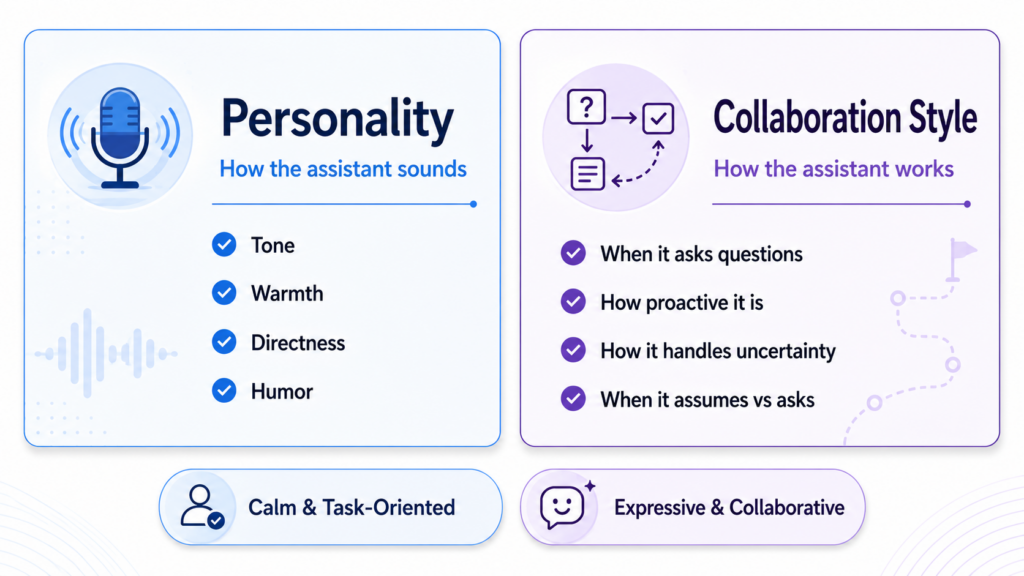
This is the concept from the guide that most people are still sleeping on, and it’s genuinely new thinking. OpenAI draws a hard line between two things that most prompt engineers mix together:
🎭 Personality — How the assistant sounds
Tone, warmth, directness, formality, humor, empathy. This is the voice. “Friendly but direct. No emojis by default. Skip filler phrases.”
⚙️ Collaboration Style — How the assistant works
When it asks questions vs. makes assumptions. How proactive it is. How it handles uncertainty. “Assume the user is competent. Proceed with reasonable assumptions rather than clarifying questions. Flag uncertainty explicitly.”
Why does this matter? Because the guide’s official example personas show the gap clearly:
| Style | Personality | Collaboration | Best for |
|---|---|---|---|
| Calm & Task-Oriented | Capable, friendly, direct. No emojis. Concise but not cold. | Assume user is competent. Proceed with assumptions, not questions. | B2B tools, dev tools, internal workflows |
| Expressive & Collaborative | Curious, witty, appropriately playful. Offers its own perspective. | Asks good questions when things are unclear. Decisive once context is established. | Coaching, creative tools, consumer apps |
The guide’s core warning: “Keep both short. Neither should replace clear goals, success criteria, tool rules, or stopping conditions.” A beautiful persona paragraph doesn’t substitute for telling the model what “done” actually looks like.
Reasoning Effort Now Defaults to Medium — And That Changes Your Costs
GPT-5.5’s reasoning effort parameter supports five levels: none, low, medium (default), high, and xhigh. The official guide’s recommendation is direct: before reaching for high or xhigh, confirm that medium isn’t already giving you what you need.
When to Use Each Level
LOW
Simple classification, reformatting, routing decisions, FAQ responses. Fast + cheap.
MEDIUM
Most production tasks. The recommended default. Balanced quality, latency, and cost.
HIGH
Complex multi-step analysis, hard debugging, ambiguous research tasks. Use when medium misses.
XHIGH
Frontier-difficulty problems. Scientific research, complex code architecture. Expensive — reserve deliberately.
The cost implication is real. Prompts with more than 272K input tokens are priced at 2x input and 1.5x output for the full session. Running everything at high reasoning effort on long-context tasks is a fast way to burn through your API budget unnecessarily.
OpenAI Is Officially Telling You to Use Less Formatting
 OpenAI Is Officially Telling You to Use Less Formatting
This is one of those quiet lines in the guide that deserves more attention. OpenAI’s official guidance is to use plain paragraphs as the default format for normal conversation, explanations, reports, documentation, and technical writeups — and to use headers, bold text, bullets, and numbered lists sparingly.
The full quote from the guide: “Keep the presentation clean and readable without making the structure feel heavier than the content.” Use formatting only when the user requests it, when the answer needs clear comparison or ranking, or when prose would genuinely be harder to scan.
What this means practically: If your system prompt says “always respond in bullet points” or “use headers for every section,” that instruction is now working against the model’s default behavior — and against OpenAI’s own recommended design principles. Review any formatting mandates in your production prompts.
The guide also adds a specific guardrail for editing and rewriting tasks: “Preserve length, structure, and genre first. Quietly improve clarity and flow. Don’t add new claims, sections, or a more promotional tone unless explicitly asked.” In other words: fix the writing, don’t inflate it.
The Content Marketing Warning: Facts vs. Expression
 The Content Marketing Warning: Facts vs. Expression
One section of the guide is aimed squarely at marketing, sales, and content teams — and it’s the most practically important part for anyone using AI to produce external-facing material.
The problem OpenAI names directly: when generating slides, leadership messages, outbound copy, or customer-facing summaries, the model tends to invent specific names, metrics, roadmap details, and customer outcomes to make the writing feel more concrete and compelling.
⚠️ What the model may fabricate without this guardrail:
❌ Specific customer names or case study outcomes
❌ Revenue figures or growth percentages
❌ Product roadmap dates or feature availability
❌ Competitive claims or market positioning data
OpenAI’s recommended fix: separate “facts” (sourced, verifiable) from “expression” (tone, structure, phrasing). In the prompt, be explicit: “Use only provided facts, cited sources, and confirmed data. If evidence is thin, use a placeholder or state the assumption explicitly — don’t fill gaps with plausible-sounding details.”
For any team producing AI-assisted content that goes to clients, investors, or the public, this guardrail isn’t optional. It’s the difference between a useful draft and a liability.
For Developers: The Preamble Trick for Tool-Heavy Workflows
If you’re building agents or multi-step tool workflows, there’s a specific UX fix in the guide that’s easy to miss. When GPT-5.5 runs a complex task, it may spend time reasoning, planning, or calling tools before emitting any visible text. From the user’s perspective, the app looks frozen.
The solution: prompt the model to send a brief visible update — a preamble — before any tool calls begin. One or two sentences acknowledging the request and stating the first step. The guide recommends this pattern when a task may take more than one step, require tool calls, or involve a long-running agent workflow. It doesn’t change the underlying execution — it just makes the product feel faster and more responsive.
From the Official Guide
The GPT-5.5 Prompt Structure Template
1. Outcome
What does “done” look like? Define the end state, not the path.
2. Success Criteria
What must be true for the answer to be correct? What output fields are required?
3. Constraints
Hard limits only. Reserve ALWAYS/NEVER for real invariants. Use decision rules for judgment calls.
4. Available Context
What data, tools, or resources can the model use? What sources are authoritative?
5. Stopping Condition
When should the model ask vs. proceed? What’s the minimum missing info that justifies a question?
What Still Works from Your Old Prompts
“Start fresh” doesn’t mean throw everything away. GPT-5.5 supports all API features that were already available with GPT-5.4, including prompt caching, hosted tools, tool search, compaction, and phase handling. What carries over includes:
✅ Well-defined output schemas and structured outputs
✅ Tool descriptions and function calling setups
✅ Safety rules and absolute constraints (the real ones)
✅ Factual guardrails for content generation
✅ Short, clear system prompts with defined roles
The Bottom Line
GPT-5.5’s prompting guide isn’t a minor version note. It’s OpenAI drawing a clear line between how prompts were written for 2024-era models and how they should be written now. The shift from “process-first” to “outcome-first” prompting is real, documented, and measurable in output quality.
The irony is that better prompts for GPT-5.5 are often shorter and simpler than what teams have been writing. The complexity that used to be in the prompt is now handled by the model. Your job changes from orchestrating every step to clearly defining the destination.
Less instruction. More intention. That’s the GPT-5.5 prompting philosophy in five words.
Know someone still running GPT-4-era prompts on GPT-5.5?
Send them this guide. It’ll save them a week of debugging why outputs feel “off.”
Written by the MindWiredAI team. All guidance and quotes verified against OpenAI’s official documentation: developers.openai.com/api/docs/guides/prompt-guidance (published April 25, 2026) and developers.openai.com/api/docs/guides/latest-model. GPT-5.5 was released April 23–24, 2026. Prompt structure template and example prompts are drawn directly from official OpenAI documentation.


