Let me set the scene. You want a landing page hero, an Instagram carousel, and a product mockup. Normally, that’s a conversation with a designer, a Figma session, stock photo searches, revision rounds, and probably a few days.
With the workflow I’m going to walk you through, it’s two tools and maybe 45 minutes.
Claude Code generates your HTML/CSS structure — layouts, animations, components, full pages. Nano Banana 2, Google’s latest AI image model, generates the actual visuals to drop in. Code + image, assembled in minutes. Here’s how to do it properly.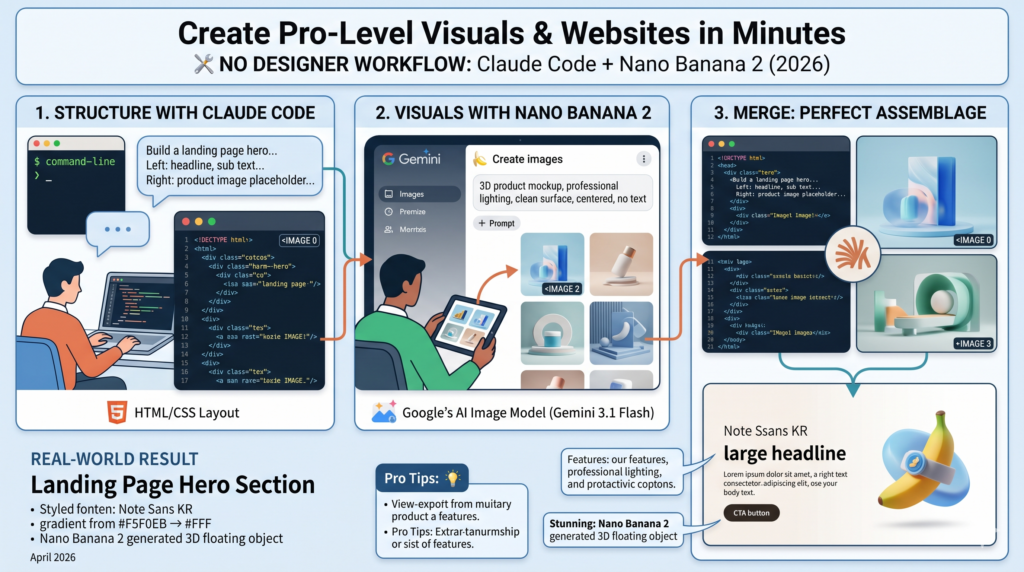
🧠 Quick Context — What Are These Tools, Actually?
Claude Code
Anthropic’s agentic coding tool. Works in your terminal or VS Code. Give it a visual description and it writes complete HTML/CSS/JS — layouts, carousels, dashboards, landing pages. No coding required on your end.
Nano Banana 2
Google’s AI image model (technically Gemini 3.1 Flash Image), released February 26, 2026. Available in the Gemini app under “Create images” in the tools menu. Generates and edits images from text prompts with strong character consistency and support up to 4K resolution.
The 3-Step Workflow
Think of it as: Claude builds the frame → Nano Banana fills the picture → Claude assembles it all.
Tell Claude Code What to Build
Open Claude Code in your terminal and describe the structure you want. You don’t need to think in code — describe it the way you’d explain it to a designer. The more visual detail you give, the better the output.
Prompt Example — Landing Page Hero
Build a landing page hero section.
— Left: large headline + sub text + CTA button
— Right: product image placeholder area
— Background: gradient from #F5F0EB → #FFF
— Mobile-responsive, new section on scroll
— Font: Noto Sans KR, headline 48px, body 18px
Prompt Example — Instagram Carousel (6 slides)
Create 6 Instagram carousel slides in HTML.
— Size: 1080×1350px (portrait)
— Slide 1: Cover (big title + hook line)
— Slides 2–5: Body (code cards + explanation)
— Slide 6: CTA (sweet close)
— Colors: background #F5F0EB, accent #B5652B
Prompt Example — SaaS App UI Mockup
Create a SaaS dashboard UI in HTML.
— Left sidebar: navigation menu
— Top: header + user menu
— Main: 4 KPI cards, 1 chart below
— Dark theme: background #1A1A1A, cards #2A2A2A
Generate Images in Nano Banana 2
Once Claude has your structure built with placeholder image slots, open the Gemini app, tap “🍌 Create images” in the tools menu, and generate visuals that will match the style of your layout.
📱 How to Access Nano Banana 2:
Open the Gemini app → tap the tools menu → select “🍌 Create images”. Nano Banana 2 is now the default model for all tiers (Fast, Thinking, Pro). Google AI Pro/Ultra users can access Nano Banana Pro via the three-dot menu for higher-fidelity outputs.
Key settings before generating:
- Model: Use the latest Nano Banana 2 (default) — no need to switch
- Aspect ratio: Match your use case (1:1 for feed, 4:5 for portrait, 16:9 for web)
- Style consistency: Use the same style keywords in every prompt so your images feel like a set
Prompt templates by use case:
| Use Case | Prompt Structure | Pro Tip |
|---|---|---|
| 3D Product Mockup | Minimal 3D floating object, soft gradient background, clean white surface, subtle shadow, product photography style, no text, centered composition, professional lighting | Always add “no text” — prevents random letters appearing |
| Abstract Background | Abstract gradient background, soft warm tones (#F5F0EB to #B5652B), flowing organic shapes, minimal, elegant, no text, high resolution, suitable for web hero section | Specify hex colors — Nano Banana 2 handles this reliably |
| Flat Icon / Illustration | Flat vector illustration of [subject], modern minimal style, 2–3 color palette, clean lines, no background, suitable for web UI, friendly and professional | “No background” = transparent-ready for easy compositing |
| Brand Lifestyle Photo | [Product/Scene], lifestyle photography style, warm natural light, shallow depth of field, film grain, muted warm tones, editorial quality | Use consistent style words across all images in a batch |
✅ 4 Prompt Habits That Always Improve Output Quality
- Always include “professional lighting” and “high resolution” — they’re not redundant, they’re signal
- Add “no text” unless you specifically need text in the image
- Use the same style language across all images in a batch to keep them visually consistent
- Add negative prompts at the end: “no blur, no noise, no artifacts” — helps clean up edge cases
Combine: Drop Images Into Claude’s HTML
Now tell Claude Code where to put the images in the structure it already built. There are three ways to do this depending on your use case:
Method 1 — Direct embed (cleanest for mockups)
Image path: ./images/hero-visual.png
Object-fit: cover
Corner radius: 16px rounded
Method 2 — Full-section background (great for hero sections)
Overlay: dark gradient (rgba 0,0,0,0.4)
Text sits on top of overlay in white
Method 3 — Grid layout (for galleries and carousels)
Gap: 16px
Hover: scale(1.05) + shadow
Real-World Playbook: 3 Complete Workflows
These are the three most useful combinations I’ve seen people run with this stack.
| Deliverable | Stage | Tool | Core Prompt Keyword |
|---|---|---|---|
| Instagram Carousel | Structure | Claude Code → HTML | “6 carousel slides, 1080×1350px” |
| Visuals | Nano Banana 2 | “abstract warm gradient, no text” | |
| Merge | Claude Code → HTML | “background image in, text overlay” | |
| Landing Page | Structure | Claude Code → HTML | “hero + features + CTA, responsive” |
| Visual | Nano Banana 2 | “3D product mockup, floating” | |
| Merge | Claude Code → HTML | “drop into right-side image area” | |
| Presentation | Structure | Claude Code → HTML | “16:9 slides, title + content layout” |
| Illustration | Nano Banana 2 | “flat vector illustration, minimal” | |
| Merge | Claude Code → HTML | “add illustration per slide” |
5 Things That Actually Make This Workflow Faster
These are the habits that separate a 45-minute workflow from a 3-hour one.
Save your style templates
When a Nano Banana prompt generates an image you love, save the exact wording. Use it as a template for every subsequent image in that project. Visual consistency is almost entirely a function of prompt consistency.
Generate a visual batch first, then build the structure around it
If you generate images first and then describe them to Claude, the structure it builds will actually fit the visuals rather than the other way around. This removes most of the “the image doesn’t fit” revision rounds.
Always build structure first, images second
Code is fast to iterate. Images have generation time. Build and validate the layout first — dimensions, spacing, typography — before running image generation. Easier to fix a placeholder than regenerate an image.
Use the actual target size when generating images
Don’t generate a square image for a portrait hero slot. Match aspect ratios from the start. Nano Banana 2 supports 14 aspect ratios natively — use the right one and save yourself a crop that ruins the composition.
One tool at a time — don’t try to do everything at once
The power of this workflow is specialization. Claude is better at code. Nano Banana is better at images. Combine their outputs in a clear merge step. When people try to make one tool do both jobs, the output suffers and the process stalls.
Honest Limitations Worth Knowing
This workflow is genuinely powerful, but it’s not a replacement for all design work. A few real limitations:
⚠️ Nano Banana 2 — Known Weaknesses
- Small faces — can look slightly off at small sizes; use portraits at medium-to-large dimensions
- Text accuracy — it’s improved significantly, but critical text (legal disclaimers, exact brand copy) still needs manual verification
- Major lighting changes — day-to-night edits or dramatic lighting shifts can produce artifacts
- SynthID watermark — all Nano Banana 2 images include Google’s invisible AI watermark (C2PA standard). Fine for most uses; check your usage rights for commercial publication
⚠️ Claude Code — Honest Assessment
- Requires an Anthropic Pro or Max subscription to use Claude Code
- Generated code may need small edits for cross-browser consistency — always preview before publishing
- High-complexity layouts with many interactions can require a few prompt iterations to get right
⚡ BOOKMARK THIS — Quick Reference Card
CLAUDE CODE → Use for:
- HTML/CSS layout structure
- Carousel, grid, hero sections
- Dark/light themes
- Responsive mobile design
- Inserting images into placeholders
NANO BANANA 2 → Use for:
- Product mockup visuals
- Abstract/gradient backgrounds
- Flat vector illustrations
- Lifestyle/brand photography style
- Section background images
The workflow: Describe structure to Claude → Generate matching visuals in Nano Banana 2 → Tell Claude to merge them. Three steps, one solid deliverable.
Tried this workflow? Drop your results in the comments — I’d love to see what people are building with this combination.


