
CHATGPT ADS
How to Turn Off Ads in ChatGPT (And What It Costs)
Yes, there’s an off switch. No, it isn’t free.
You know the feeling. You ask ChatGPT something ordinary — a recipe, a gift idea, where to stay in Santa Fe — and underneath the answer there’s a little card with a logo on it. Sponsored. You didn’t ask for that. And your first thought is the one everybody has: can I make this stop?
You can. OpenAI built a real off switch and put it in Settings, which is more than most companies bother to do. But almost nobody tells you what happens after you flip it — and that part matters more than the switch itself.
The short version
To turn off ads in ChatGPT, open Settings, tap Ads controls, choose “Change plan to go ad-free,” and select “Reduce message limits.” It works and it’s free. The catch: OpenAI lowers your usage limits and cuts feature access — including image generation — in exchange.
That last sentence is the whole story, and it’s the part the launch coverage skipped. Below is what each setting actually does, what you give up, and a free workaround that gets you an ad-free answer without touching your limits at all. Every detail here comes from OpenAI’s own help pages, not from a press release summary.
Verified September 2026. Menu names and availability change as OpenAI expands this test. If a menu below doesn’t match what you see, your region or app version hasn’t caught up yet.
What actually changed on the ChatGPT free plan
ChatGPT ads started as a US-only test on February 9, 2026, for logged-in adults on the Free and Go plans. Canada, Australia and New Zealand followed in the spring. Then on August 11, 2026, OpenAI confirmed the rollout had reached the United Kingdom, Mexico, Brazil, Japan and South Korea — and said it plans to keep expanding.
If you pay for Plus, Pro, Business, Enterprise or Edu, none of this touches you. Those plans don’t show ads, and OpenAI has committed to keeping it that way. Ads are the price of the free tier, not of ChatGPT itself.
Here’s what your ads actually look like: a card below the end of a response, labeled sponsored, visually separated from the answer. They only appear when your conversation matches something an advertiser is selling. They don’t appear in Temporary Chats — remember that, it comes back later.
The timing nobody connected
Five days before the international ads rollout, OpenAI shipped something else. In its August 6 release notes, the company said Free and Go users would get unlimited text chats, plus a Think button for harder questions. The free tier FAQ now states it plainly: free users have unlimited everyday text chats, with file uploads, image generation, voice and data analysis still capped separately.
So in the space of one week, the free plan got genuinely better and got ads. Those two facts are connected, and the connection is exactly what makes the off switch expensive.
How to turn off ads in ChatGPT: the exact steps
There are two different things people mean by “turn off ads,” and they produce very different results. Start with the real one.
Removing ads completely (the Ads-Free switch)
1. Open Settings in ChatGPT.
2. Select Ads controls. (Or go straight to the advertising settings page on web or iOS.)
3. Tap Change plan to go ad-free.
4. Choose Reduce message limits. This is the free option.
5. Confirm. ChatGPT shows you a prompt explaining the trade-off before it commits.
That’s it. No card, no payment, no email. Your ads disappear. If you’re on the Go plan, this option isn’t available to you — Ads-Free is a Free-plan feature, so you’d have to move back down to Free or up to Plus.
Changing your mind is just as easy. When you next hit a usage limit, the banner offers a Show ads button that puts you back on the ad-supported plan instantly. You can also do it from Ads controls.
⚠️ The catch
The button is literally labeled “Reduce message limits.” OpenAI isn’t hiding the cost — it’s in the name of the button. But it’s easy to tap past when what you’re focused on is making the ads go away.
What turning off ads actually costs you
OpenAI describes the Ads-Free experience as having lower usage limits and reduced feature access — its examples are fewer messages and no access to some tools like image generation or deep research.
Read that against the August change and the real price becomes clear. The ad-supported free plan gives you unlimited text chats. Going Ads-Free hands that back. You are trading an unlimited resource for the removal of a card that appears at the bottom of some answers.
And the feature loss is the sharper edge. Free image generation is one of the genuinely useful things about ChatGPT’s free tier — it’s the thing a small business owner uses for a quick social post, the thing a student uses for a slide. Losing it to avoid ads is a bad trade for most people, and OpenAI’s own wording says “some tools like” — meaning image generation and deep research are examples, not the complete list.

How much less, exactly?
OpenAI doesn’t say. There’s no published number for how many messages the Ads-Free plan gives you per day, and no list of every tool you lose. The help page says “lower usage limits” and “you may hit rate limits more often,” and leaves it there.
We’re not going to invent a figure. If you see a specific number on another site, ask where it came from — OpenAI hasn’t published one. The honest answer is that you’ll find out by using it, and you can switch back the moment you don’t like it.
Ads-Free and ad personalization are not the same thing
This is the mistake almost everyone makes, and OpenAI addresses it directly in its FAQ because so many people get it wrong.
Inside Ads controls there’s a toggle called Personalize ads. Turning it off feels like turning off ads. It isn’t. You’ll still see exactly as many ads — they’ll just be chosen from your current conversation instead of from your broader history. Fewer signals, same number of cards.
There’s a second toggle, Past chats and memory. Switch that off and ChatGPT stops using your saved memories and older conversations to pick ads, relying on the thread in front of you instead. Again — the ads stay. Only the targeting changes.
There’s also a Delete ads data button that clears your ads history and topics without touching your chats. If you use it, OpenAI says the data stops being used for ads immediately and is removed from its servers within 30 days.
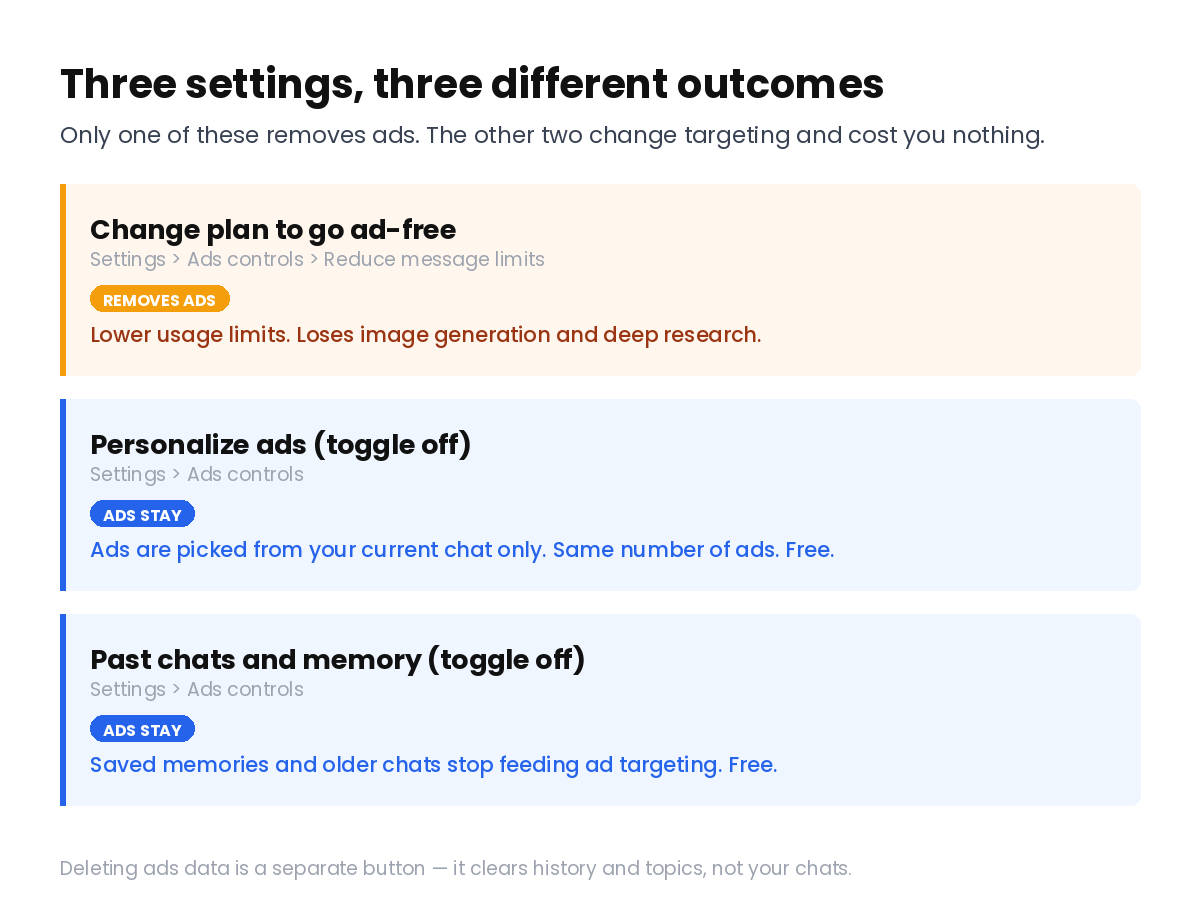
If your goal is privacy rather than a cleaner screen, the personalization toggles are the ones you want — they cost you nothing. If your goal is no ads at all, only the Ads-Free switch does that, and it costs you plenty. Knowing which problem you’re solving saves you from paying for the wrong one.
Does ChatGPT share your chats with advertisers?
No — and OpenAI is unusually specific about this, which is worth giving it credit for. The help center lists what advertisers never receive: your chats, your chat history, your memories, your name, your email, your precise location, your IP address, and sensitive information such as health or political topics.
What advertisers do get is aggregate performance data — how many people saw the ad, how many clicked. Ad selection happens inside OpenAI’s systems using your conversation topic; the topic never leaves. Ads also run on separate infrastructure from the chat model, so an advertiser can’t shape, rank or alter what ChatGPT tells you.
A few more guardrails that are real: ads don’t appear near personal health, mental health or political conversations. Political advertising isn’t allowed at all right now. Accounts identified as belonging to under-18 users don’t see ads — though note that OpenAI does this partly through age prediction, using signals like how long the account has existed and what topics you discuss. That’s a reasonable safety measure and a quiet reminder of how much the system infers about you either way.
⚠️ One thing to watch
If you tap “Ask ChatGPT” on an ad to ask questions about it, you’re pulling that ad into your conversation. With reference chat history enabled, that exchange can be referenced in future chats. Harmless in most cases — just don’t assume it vanishes.
The free workaround nobody mentions
Buried in OpenAI’s FAQ is a single sentence that solves this problem for a lot of people: Temporary Chats will not show ads.
Temporary Chat is the mode that doesn’t save to your history and doesn’t write to memory. It was built for privacy, not for ad avoidance — but it happens to do both. You keep your unlimited text chats. You keep image generation on the normal free plan. And the sponsored cards don’t appear.
💡 Try this before you change plans
Next time you’re about to ask something that would obviously attract an ad — a product, a trip, a purchase decision — start a Temporary Chat instead. Ad-free answer, full limits intact, nothing to undo later.
The trade-off is that Temporary Chats don’t remember anything, so they’re wrong for ongoing projects. But for the one-off questions that trigger most ads in the first place, that’s not much of a loss. If controlling what ChatGPT retains about you is the broader goal, it’s also worth cleaning up the digital footprint you’ve already left.
The honest limitations
Four things this guide can’t do for you.
You might not see these menus at all. Ads controls only appear for Free and Go users in regions where ads are live or arriving soon. Personalized ads aren’t initially offered in the European Economic Area or Switzerland. If your Settings screen looks different from the steps above, you’re probably outside the test — nothing is broken.
The numbers are missing on purpose. We can tell you the Ads-Free plan reduces your limits. We can’t tell you by how much, because OpenAI hasn’t published it. Anyone who gives you a precise figure is guessing.
This is still a test. OpenAI calls it a test in every document, and tests change. Menu names, the trade-off terms, which countries are included — all of it is subject to revision. This page reflects September 2026.
Mobile lags behind. If Ads controls isn’t in your app’s Settings, OpenAI’s advice is to update to the latest version before assuming you’re not eligible.
Who should actually care
Worth switching to Ads-Free if: you use ChatGPT for short, occasional text questions, never generate images, and the sponsored cards genuinely bother you. You’ll barely feel the lower limits.
Use the toggles instead if: your real concern is how much ChatGPT knows about you. Turn off Personalize ads and Past chats and memory, clear your ads data, and keep every bit of your free access.
Skip Ads-Free entirely if: you make images, run long research sessions, or lean on ChatGPT for daily work. You’d be trading unlimited chats and your most useful tools for a cosmetic fix. Use Temporary Chat, or pay for Plus if ads truly aren’t acceptable.
Frequently asked questions
Can I turn off ads in ChatGPT without paying?
Yes. Settings → Ads controls → Change plan to go ad-free → Reduce message limits. It costs nothing in money. It costs you usage limits and access to some tools, including image generation.
Does turning off ad personalization remove ads?
No. OpenAI states this directly. Turning off personalization changes how ads are chosen — they’ll be based on your current chat rather than your history — but the same number of ads still appears. Only the Ads-Free switch removes them.
Do Plus and Pro subscribers see ads?
No. Ads appear only on the Free and Go plans. Plus, Pro, Business, Enterprise and Edu accounts have no ads, and OpenAI has committed to always offering an ad-free paid tier.
How do I get rid of one specific ad?
Tap the three-dot menu on the ad. Hide ad dismisses it, Report ad hides it and flags it for review, and About this ad explains why you’re seeing it. None of these affect your plan or your limits.
Can I go back after switching to Ads-Free?
Yes, any time. Tap Show ads on the rate-limit banner when it appears, or return through Settings → Ads controls. Nothing about the switch is permanent.
The bottom line
ChatGPT’s ad-free switch is real, free, and reversible — and for most people it’s the wrong button to press. OpenAI put the price right in the label: reduce message limits. You’d be giving up unlimited text chats and image generation to remove a card that shows up at the bottom of some answers.
The better moves cost nothing. Turn off the personalization toggles if privacy is what’s bothering you. Use Temporary Chat when you’re asking the kind of question that attracts ads anyway. Keep your full free tier either way.
Do this one thing now: open Settings → Ads controls, switch off Past chats and memory, and tap Delete ads data. Thirty seconds, no downside, and your ads stop being built from everything you’ve ever typed.
Free AI tools are rarely free in the way the word suggests — there’s almost always a second price tag written somewhere in the footnotes. We keep reading the footnotes: here’s what happened to Hugging Face’s free tier, and a list of free AI tools that never ask for your email. If you’d rather reduce what ChatGPT stores in the first place, you can also move your ChatGPT memory somewhere else — or sharpen what you get out of it with these one-word commands that change how ChatGPT answers.
Related free AI guides
Free AI tools that never ask for your email — the ones you can open and use without handing over an address.
Is Hugging Face still free? — what changed, what still costs nothing, and where the line moved.
Erase your digital footprint with AI — a practical cleanup you can run in an afternoon.
Sources: OpenAI Help Center — Ads in ChatGPT · OpenAI Help Center — ChatGPT Free Tier FAQ · OpenAI — Testing ads in ChatGPT · OpenAI — Our approach to advertising. Verified September 12, 2026.


