Actually Uses It
Boris Cherny built Claude Code at Anthropic. In January 2026, he shared his entire workflow publicly — and the dev community lost its mind. Here’s exactly what he does, translated into actionable steps.
When the person who built the tool tells you how they actually use it, you pay attention.
Boris Cherny is a Staff Engineer at Anthropic and the creator of Claude Code. On January 2, 2026, he posted a thread on X sharing his personal Claude Code setup. It got 8 million views. The developer community called it a “watershed moment” — not because the workflow was complex, but because it was surprisingly simple. Boris himself called his setup “surprisingly vanilla.”
The thread revealed something important: the gap between amateur and expert Claude Code usage isn’t about exotic configurations. It’s about a fundamentally different mental model — one that treats Claude as a fleet of workers to schedule, not a single tool to chat with.
📌
All 7 strategies below are sourced directly from Boris Cherny’s public Threads post (Jan 2, 2026), his follow-up X thread (Jan 31, 2026), the Pragmatic Engineer interview (Mar 2026), and Anthropic’s official Claude Code docs. Everything is fact-checked.
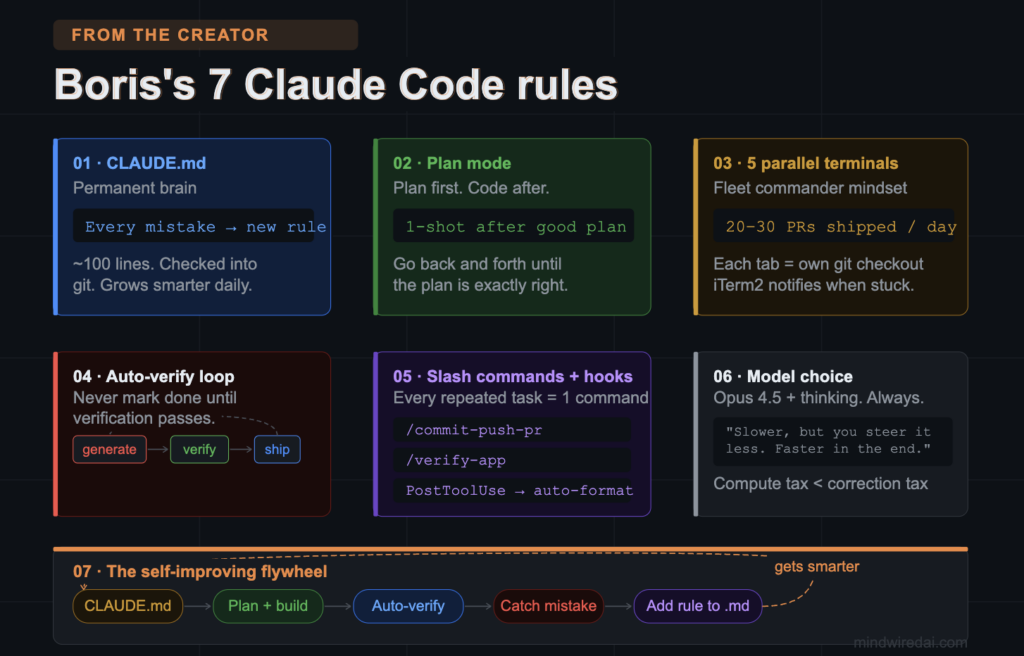
Every time you start a new Claude Code session, Claude starts fresh. It doesn’t remember your project’s architecture, your coding style, or the bug you fixed yesterday. Boris solved this with a single file: CLAUDE.md.
Claude reads this file at the start of every session. The Anthropic team’s CLAUDE.md documents their mistakes, best practices, style conventions, design guidelines, and PR templates — everything Claude needs to stay consistent across sessions.
Boris’s rule — verbatim:
“Anytime we see Claude do something incorrectly we add it to the CLAUDE.md, so Claude knows not to do it next time.”
What Boris’s CLAUDE.md actually contains (2,500 tokens, ~100 lines):
✓
Error logs — every mistake Claude made and the rule that prevents it from recurring
✓
Codebase conventions — naming, style, preferred patterns
✓
PR template — what a good pull request looks like at Anthropic
✓
Design guidelines — what architectural decisions have already been made
Pro move: Boris tags @.claude on coworkers’ pull requests to automatically add learnings to CLAUDE.md via the Claude Code GitHub Action. Code review becomes knowledge capture.
Most people start typing and let Claude code immediately. Boris does the opposite: he never lets Claude write a single line of code until the plan is approved.
The workflow has three distinct phases:
Plan phase
Use Plan Mode. Claude writes a detailed spec/design doc. You go back and forth until the plan is exactly right. No coding yet.
Critical review
Ask Claude: “If you were a senior engineer, what are the flaws in this plan?” Claude reviews its own design as a fresh set of eyes.
Execution
Switch to auto-accept edits mode. With a good plan in place, Claude one-shots the implementation almost every time.
Boris, directly:
“If my goal is to write a Pull Request, I will use Plan mode, and go back and forth with Claude until I like its plan. From there, I switch into auto-accept edits mode and Claude can usually 1-shot it. A good plan is really important!”
Why this matters: The classic failure mode is letting an agent make 40 changes you didn’t want. Plan Mode forces intent agreement before execution. The “senior engineer review” step surfaces architectural problems before they become code problems.
This is the most jaw-dropping part of Boris’s setup. He doesn’t work in one terminal. He runs 5 Claude Code instances in parallel, each in its own terminal tab and its own git checkout of the same repo.
Additionally, he runs 5–10 more Claude sessions on claude.ai in his browser. Total sessions alive at any time: 10–15.
His actual terminal setup:
~/repo-1 $ # Tab 1: building feature A
~/repo-2 $ # Tab 2: running tests
~/repo-3 $ # Tab 3: code review
~/repo-4 $ # Tab 4: debugging
~/repo-5 $ # Tab 5: documentation
Each tab is numbered 1–5. iTerm2 system notifications alert him when any Claude needs input. He’s not watching screens — he’s being notified when a worker needs steering.
Why separate git checkouts?
Each Claude can make changes in parallel without conflict. No merge chaos. Each tab has its own clean working directory.
Result at Anthropic:
Boris ships 20–30 PRs a day. A task that takes 5 hours sequentially compresses to 1–2 hours with parallel execution.
Model choice: Boris uses Opus 4.5 with thinking enabled for everything — not Sonnet. His reasoning: “Even though it’s bigger and slower, since you have to steer it less and it’s better at tool use, it is almost always faster than using a smaller model in the end.”
Boris’s team doesn’t manually verify that Claude’s code works. They built a verification subagent that does it automatically — and Claude doesn’t mark any task complete until verification passes.
Their verification subagent is called verify-app — it has detailed instructions for testing Claude Code end-to-end. Combined with a code-simplifier subagent that cleans code after implementation, the loop looks like:
→
→
→
→
Claude never considers a task done until the verification subagent confirms it works.
Boris’s rule: “Never mark a task complete without proving it works. Ask: ‘Would a staff engineer approve this?’ Run tests, check logs, demonstrate.” When humans read the PR, the code is already in good shape because verification ran first.
Boris uses slash commands for every task he does more than once a day. The logic is simple: if you type the same prompt repeatedly, it should be a command. Commands are checked into git and live in .claude/commands/.
Beyond commands, Boris’s team runs a PostToolUse hook that auto-formats code after every tool call. Claude generates well-formatted code most of the time, and the hook fixes the last 10% — eliminating formatting failures in CI.
Boris’s actual slash commands:
/commit-push-pr
Used multiple times every day. Uses inline bash to pre-compute git status so it runs fast without back-and-forth.
/code-simplifier
Runs after every implementation to clean up Claude’s output before it goes into review.
/verify-app
Detailed end-to-end testing of Claude Code itself. The verification subagent that closes the quality loop.
Key insight from Boris: “If you do something more than once a day, turn it into a skill or command.” The commands live in git, so the entire team benefits. Shared commands encode best practices that Claude follows automatically.
The real difference between how most people use Claude Code and how Boris uses it isn’t features — it’s mental model. Here’s the comparison:
| Dimension | Amateur workflow | Boris’s workflow |
|---|---|---|
| Memory | Context resets every session | CLAUDE.md — permanent learning loop |
| Planning | Code first, patch the mistakes | Plan Mode + senior review before a single line |
| Execution | One session, sequential tasks | 5 terminals + 5-10 browser, all parallel |
| Quality | Manual debugging, human QA | Automated verify-app loop, PostToolUse hooks |
| Scale | Individual tool for the coder | Fleet of workers to schedule and steer |
“Boris doesn’t see AI as a tool you use, but as a capacity you schedule. He’s distributing cognition like compute: allocate it, queue it, keep it hot, switch contexts only when value is ready.”
— From Product with Attitude analysis of Boris’s workflow
The seven strategies above aren’t independent tips. They form a compounding system. The longer Boris’s team uses it, the better it gets — automatically.
Here’s how the flywheel turns:
BUILD
CLAUDE.md + Plan Mode give Claude the right context to start strong
SCALE
Parallel execution + subagents multiply the work output by 5x
VERIFY
Automated verification loop catches errors before humans see them
LEARN
Every mistake gets encoded into CLAUDE.md — the system gets smarter with each PR
The compound effect: a team that uses this system for 6 months has a CLAUDE.md that encodes hundreds of learned rules. Their Claude makes far fewer mistakes than a team that started last week — even if both use identical tools. The system advantages grow over time.
You don’t need to implement all 7 at once. Boris himself said his setup is “surprisingly vanilla.” Start here:
This week: Create a CLAUDE.md in your project root. Add your tech stack, one coding convention, and the first mistake Claude makes. That’s it — you’re compounding now.
Next task: Use Plan Mode for your next non-trivial feature. Spend 10 minutes on the plan before touching code. Ask Claude to critique its own plan as a senior engineer would.
This month: Create your first slash command for a workflow you repeat daily. Check it into git. Watch your teammates start using it too.
Sources (all fact-checked):
Boris Cherny’s original Threads post — January 2, 2026 (@boris_cherny)
Boris Cherny’s X thread — January 31, 2026 (@bcherny)
Pragmatic Engineer interview with Boris Cherny — March 2026
Anthropic official Claude Code cost/workflow docs — code.claude.com/docs
HowBorisUsesClaudeCode.com — community documentation of all 72 tips
Start with CLAUDE.md. Add Plan Mode. Build one slash command. The compounding starts the moment you do.
Bookmark this and share it with your team.
Share this guide
Know a Claude Code user? They need this. 🔧
Most devs use Claude Code like a chatbot. This is how the creator actually uses it.
Every share reaches a dev who’s been chatting with Claude when they should be commanding a fleet 🙏