“The more you try to control GPT Image 2, the worse it performs.”
For years, power users stacked prompts with 8K, masterpiece, ultra-detailed, hyperrealistic — dozens of constraint keywords borrowed from Midjourney and Stable Diffusion culture. That approach trained us to over-specify. GPT Image 2 doesn’t need it.
This model has built-in reasoning. Over-constraining it fights the reasoning loop rather than guiding it. The prompt structure that works here is different: set the direction with texture, composition, and color — then let the model decide the rest.
Keyword stacking → model gets confused by competing constraints → generic, flat output
Direction over control → reasoning loop fills gaps intelligently → output looks intentional
⚡ The one rule that covers everything:
Specify texture + composition + color with enough direction to set the mood. Leave execution to the model. Every prompt template below follows this structure.
GPT Image 2 supports aspect ratios from 21:9 (ultra-wide) all the way to 1:30 (extreme tall) — and specifying the ratio isn’t just a format choice, it’s a compositional instruction. The model recomposes the entire image for the ratio you specify, not just crops. This is the simplest prompt upgrade with the biggest impact.
Add the ratio at the end of any prompt. Example: ...aspect ratio 4:5. The model won’t just resize — it’ll reframe the entire composition for that format.
Posters are where GPT Image 2’s text rendering and composition logic combine most visibly. The key: describe the feel of the visual hierarchy — which element dominates, what grid system the layout follows, what tension you want — not every design spec.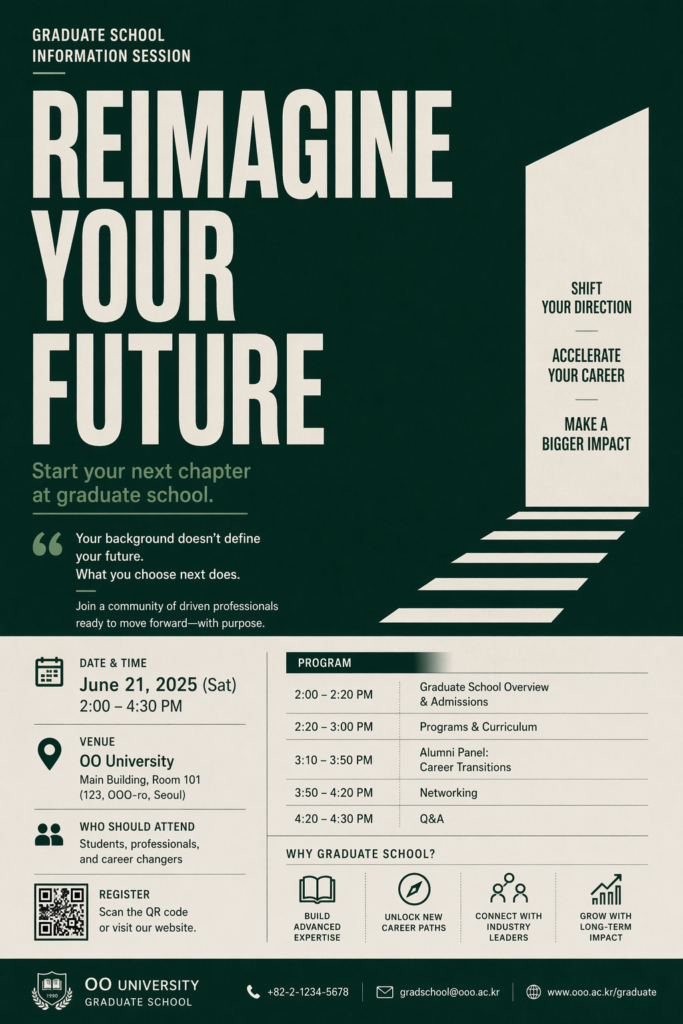
Composition: headline dominates, date/venue/details organized in a lower or side grid.
Direction: Swiss grid discipline meets campaign poster tension.
Text: Main Korean headline reads clearly and boldly — treat it as the primary visual anchor.
Aspect ratio 3:4.
Use designer reference points as direction: “Swiss grid,” “Bauhaus tension,” “editorial restraint,” “campaign urgency.” GPT Image 2 understands these — and they do more work than 10 keyword modifiers.
The biggest mistake in product prompts is describing what the image looks like rather than what it feels like. For luxury goods, sensory language unlocks the model’s ability to translate atmosphere into visual tension. Texture keywords are your main lever — not quality keywords.
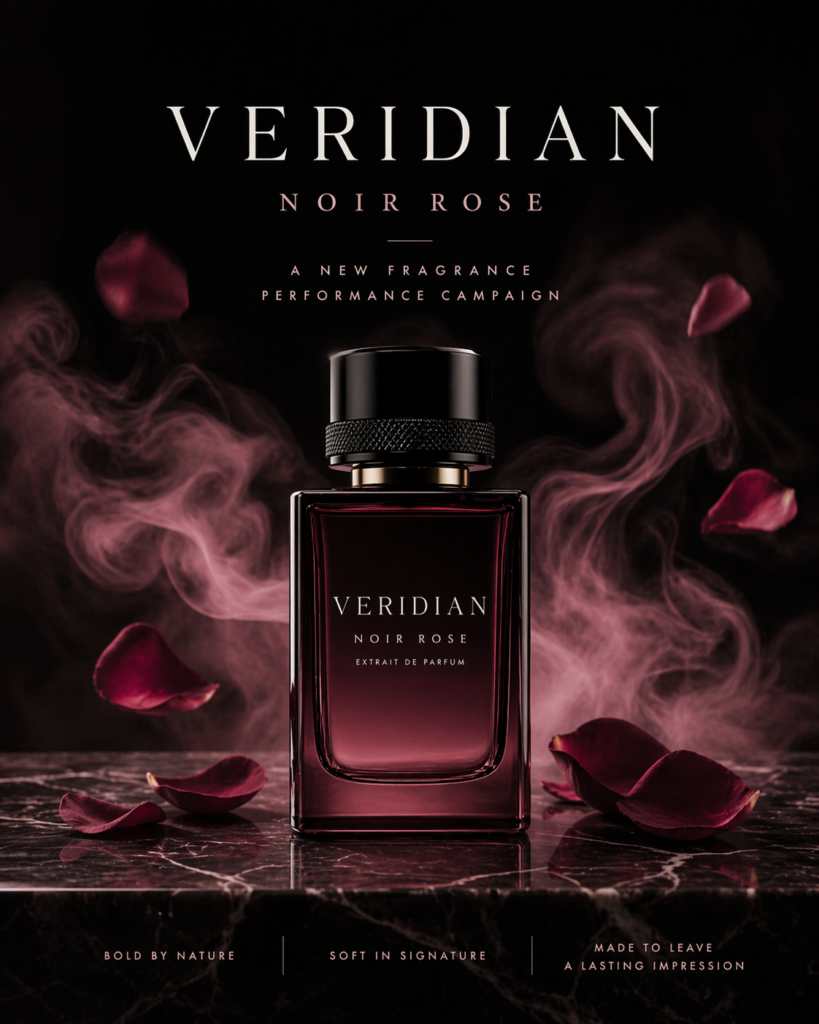
The visual impression should evoke scent — tension and luxury, not opulence.
Strong frontal composition readable in one second on mobile. Clear hierarchy between hero product and supporting elements.
Colors: black, burgundy, smoky rose. Lighting: dramatic but clean — editorial, not theatrical.
Aspect ratio 4:5.
Hex codes work — GPT Image 2 handles them accurately. But color names often produce better results because they carry mood connotations the model can reason about. “Burgundy” is not just a hex — it implies warmth, richness, restraint. Use whichever approach fits your needs.
Social thumbnails have a specific constraint most prompts ignore: they need to win in 0.3 seconds on a phone screen. That’s a composition requirement, not an aesthetic one. State it explicitly. GPT Image 2 understands “readable on mobile in one second” as a layout instruction — use it.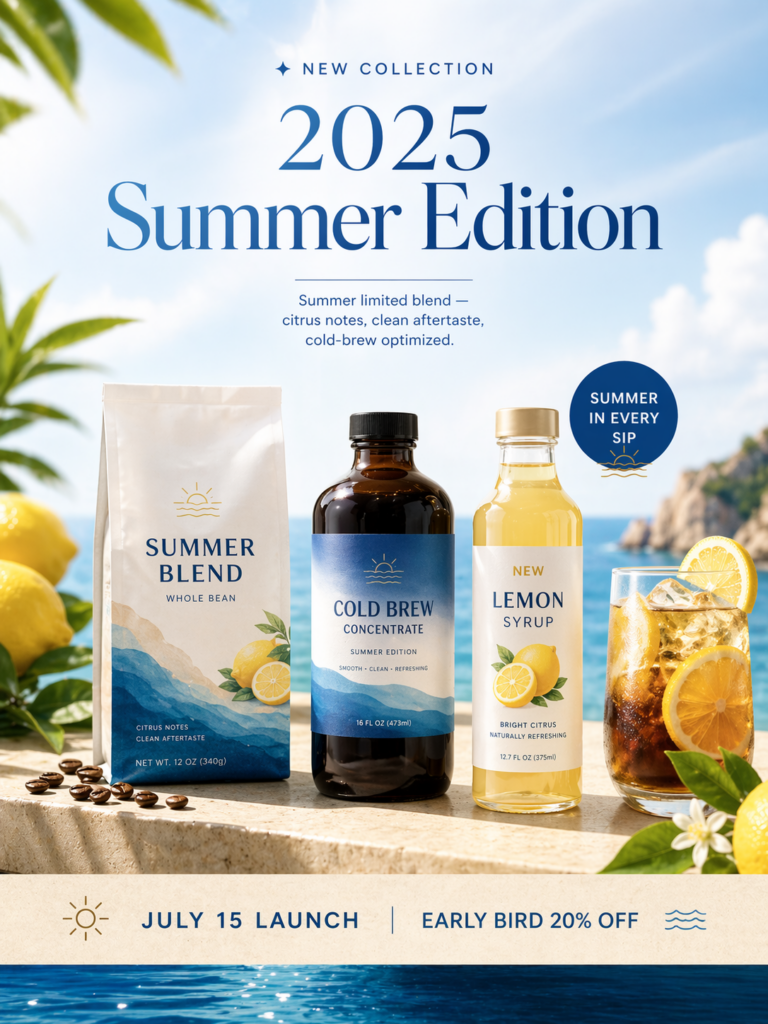
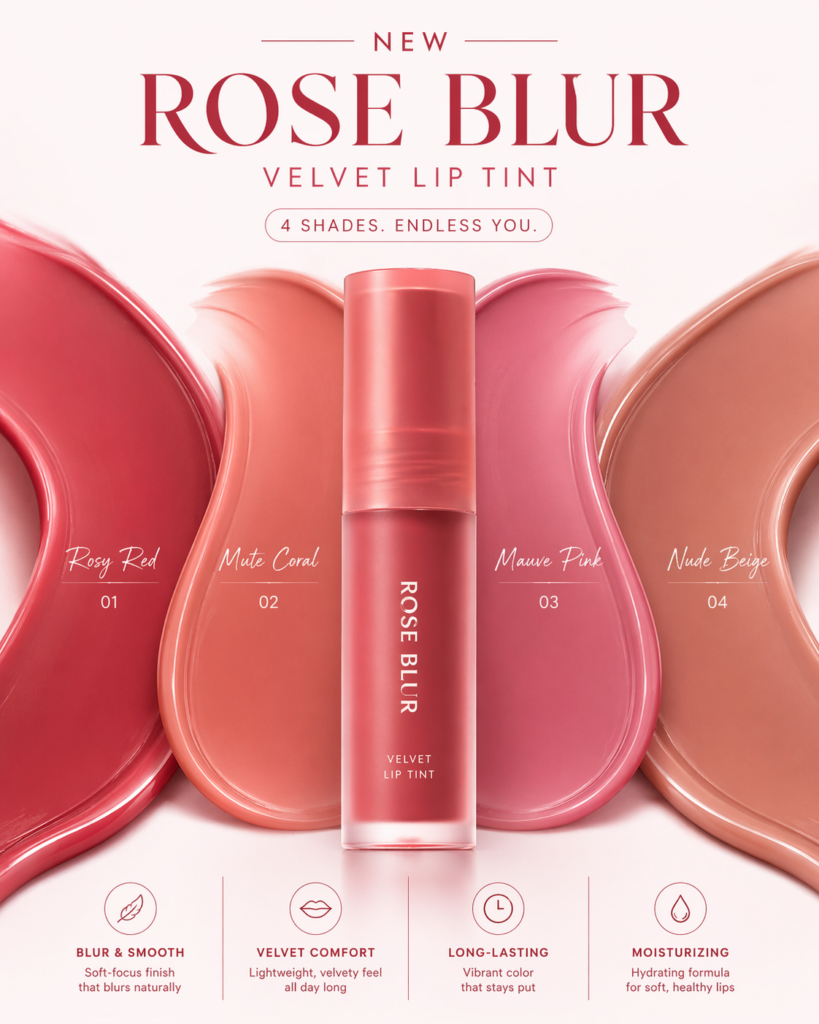
The visual appeal is the color range and the new product’s color lineup.
Mobile portrait, center-weighted composition. Color name at top, shade points at bottom.
Colors: rosy red, mute coral, mauve pink, clean nude beige. Lighting: bright and clear — beauty content clarity, not moody editorial.
Aspect ratio 4:5.
Collection description: Summer limited blend — citrus notes, clean aftertaste, cold-brew optimized.
Product lineup: ☕ Summer Blend whole bean · 🧊 Cold Brew concentrate · 🍋 Lemon Syrup (new).
Bottom: “July 15 launch | Early bird 20% off”. Premium e-commerce design, summer color palette.
Aspect ratio 3:4.
For SNS and e-commerce work, putting the actual copy directly into the prompt is not just acceptable — it’s the correct approach. GPT Image 2’s text rendering accuracy means you can include real headlines, dates, and CTAs. The model places them correctly.
This is where GPT Image 2’s “visual polyglot” capability becomes genuinely new. Combining two distinct aesthetic traditions — Korean ink painting and contemporary illustration, for example — used to require a skilled illustrator because no model could hold both registers simultaneously. GPT Image 2 can, when the prompt describes both clearly and lets the model decide how they interact.
Overall style: film poster meets dreamlike watercolor illustration. Quiet, majestic, sacred — with a subtle nostalgic pull.
Paper grain with hanji texture. Soft mist overlay. Brushwork with fleeting ink and negative space beauty — Korean sensibility and modern sensibility in simultaneous tension.
Aspect ratio 2:3.
Film noir + manga, architectural blueprint + watercolor, Swiss poster design + traditional textile pattern. Name two visual languages with an emotional goal. GPT Image 2 will synthesize them more faithfully than any previous model.
This one requires a different prompt structure. Character sheets aren’t atmospheric — they’re operational. The model needs a strong concept brief upfront, then minimal execution direction. Give the character the context it inhabits (its world, its purpose) before describing how it should look.
The main character of a near-future urban fantasy webtoon, reinterpreted in SD/chibi form for goods and operational use — expandable reference format. One character only.
Include: front/side/back views, 3 expression variations, 3 pose variations, key accessory details (necklace, ID card, etc), merchandise application mockups (acrylic stand, keyring, sticker), color palette reference, SD size comparison guide.
Layout should feel like a professional production document — clean, labeled, print-ready.
With Thinking Mode (Plus/Pro), GPT Image 2 can generate up to 8 consistent images from one prompt — keeping character details, colors, and accessories identical across all panels. For character sheets, this is a major time saver.
Every prompt template above follows the same underlying structure. Copy this and fill it in for any use case:
| Old keyword | Why it doesn’t help | Replace with |
|---|---|---|
| 8K, 4K, ultra HD | GPT Image 2 doesn’t use resolution as a quality signal — it uses your described content | Specify texture and material instead |
| masterpiece, best quality | Diffusion model tokens — meaningless to a reasoning model | Describe the output purpose (“print-ready,” “production asset”) |
| hyperrealistic | Vague — the model needs to know what kind of realism (photo, illustration, editorial) | “Editorial photography style” or “product photography realism” |
| perfect lighting | “Perfect” is undefined — the model can’t execute it | “Dramatic but clean editorial lighting” or “soft diffuse overcast” |
| award-winning, trending | Social signals, not visual signals — the model ignores these | Reference a specific aesthetic tradition instead |
Tried any of these templates? Drop your results in the comments — especially curious what use cases you’re adapting them for.


