Here’s a pattern I keep seeing with vibe coding projects that go sideways. The AI writes clean code. The individual features work. But at some point the whole thing starts misbehaving in ways nobody can quite explain. An edge case the agent handled wrong three weeks ago keeps recurring in a slightly different form. A retry that should happen doesn’t. A task that was “done” gets re-attempted when it shouldn’t be.
It’s not a prompt problem. You could write better prompts forever and it wouldn’t fix it. It’s an architecture problem — specifically, the absence of what’s now being called a harness.
Yeachan Heo — the Korean developer behind oh-my-claudecode (32K+ GitHub stars) and oh-my-codex — has been building in public at the frontier of this problem. His take: the teams that ship reliable AI-powered products aren’t the ones with the best prompts. They’re the ones who designed the best closed-loop systems. “Prompts are cheap now. Architecture is everything.”
This post breaks down what that means in practice, specifically for full-stack builders who are vibe coding their way to production and need their apps to actually hold together.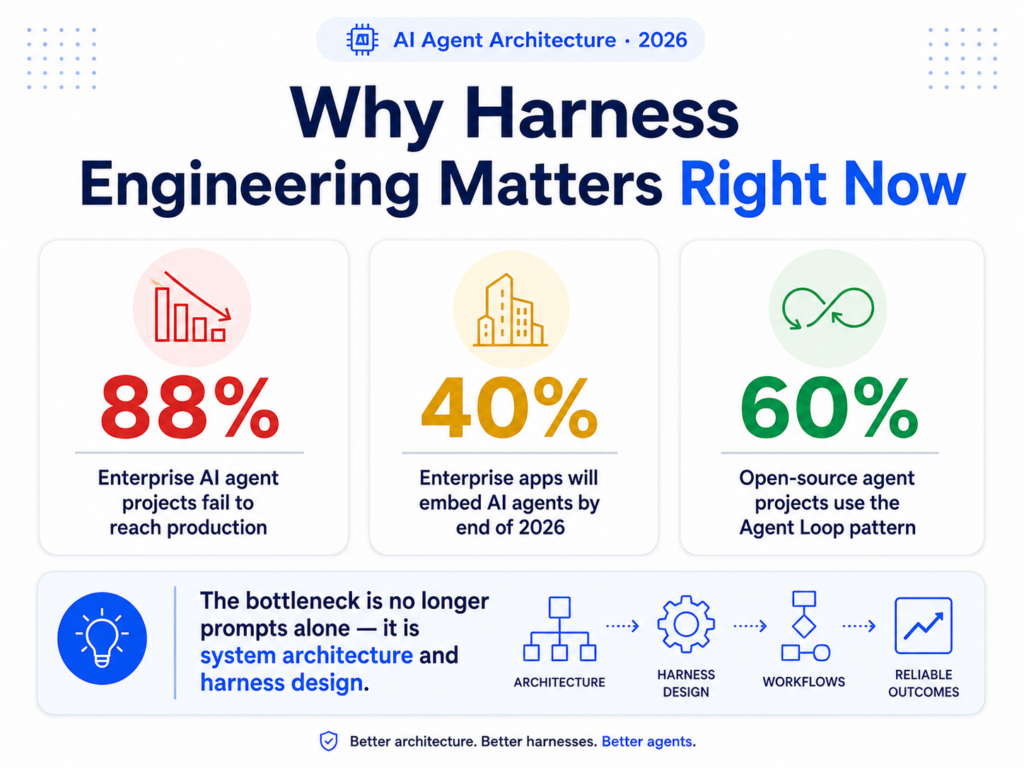
Why this matters right now
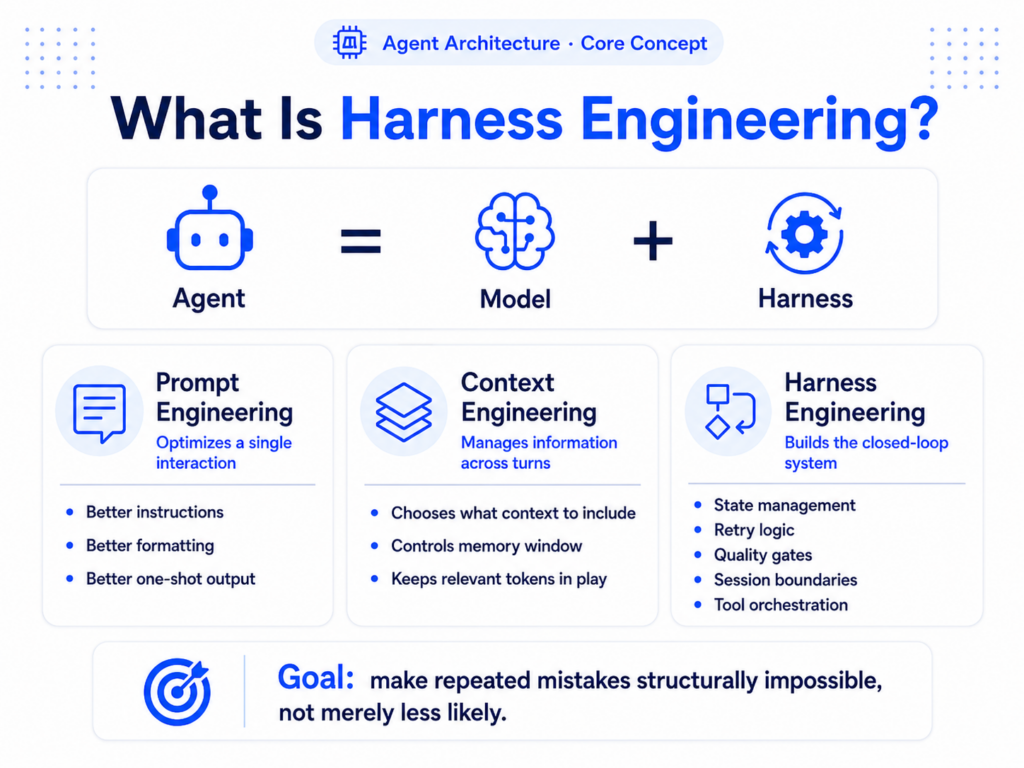
 First: What Is Harness Engineering?
 First: What Is Harness Engineering?
The term got its formal definition in February 2026, credited to Mitchell Hashimoto — the founder of HashiCorp and creator of Terraform. The principle: whenever an AI agent makes a mistake, don’t fix the prompt. Build a constraint that makes that specific mistake structurally impossible to repeat.
Martin Fowler’s site formalized it shortly after: “Agent = Model + Harness.” The harness is everything except the model — the orchestration, the state management, the retry logic, the quality gates, the session boundaries. It’s what turns a stateless, probabilistic LLM into a persistent, tool-using, self-correcting system.
The key distinction: prompt engineering optimizes a single interaction. context engineering manages the token set across turns. Harness engineering operates outside both — it introduces context resets, structured handoffs, and phase gates that make multi-session, multi-agent work coherent.
For full-stack vibe coders, this lands as a very concrete question: are you designing a system, or are you writing prompts and hoping the agent figures out the system for you?
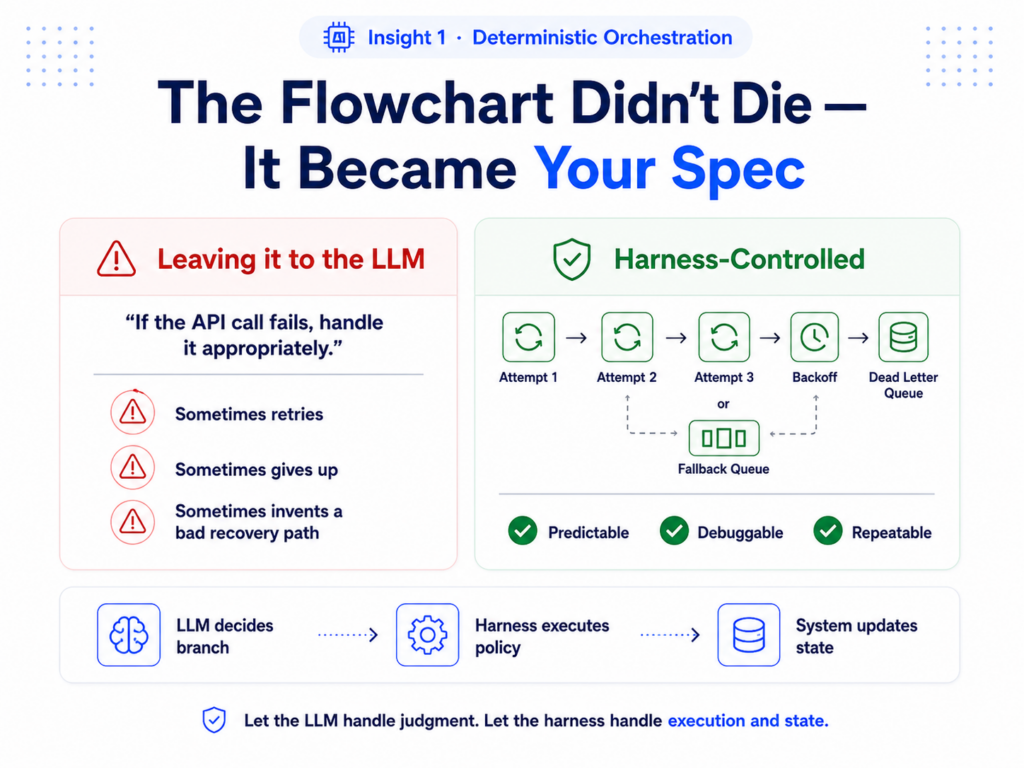
Insight 1: The flowchart didn’t die. It became your spec.
 Insight 1: The flowchart didn’t die. It became your spec.
There’s a version of “LLM-native development” that assumes you can just describe what you want and the AI handles everything, including the orchestration logic. That version doesn’t work in production.
Task routing, work assignment, failure handling, state management — these are classical computer science problems. They need to be deterministic, predictable, and debuggable. An LLM deciding in real-time whether to retry a failed database write is not an architecture. It’s a prayer.
What actually changed: in a pre-LLM system, you wrote if/then rules to handle every branch. Now you design the decision points, write the harness constraints around them, and let the LLM choose which branch to take based on context. The LLM handles judgment. The harness handles execution and state.
❌ Leaving it to the LLM
“If the API call fails, handle it appropriately.” — The agent decides what “appropriately” means in the moment. Sometimes it retries. Sometimes it gives up. Sometimes it hallucinates a recovery path that makes things worse.
✅ Harness-controlled
The harness has a deterministic retry policy: 3 attempts, exponential backoff, fallback to queue if all fail. The LLM doesn’t decide any of this. It just executes the next task the harness hands it.
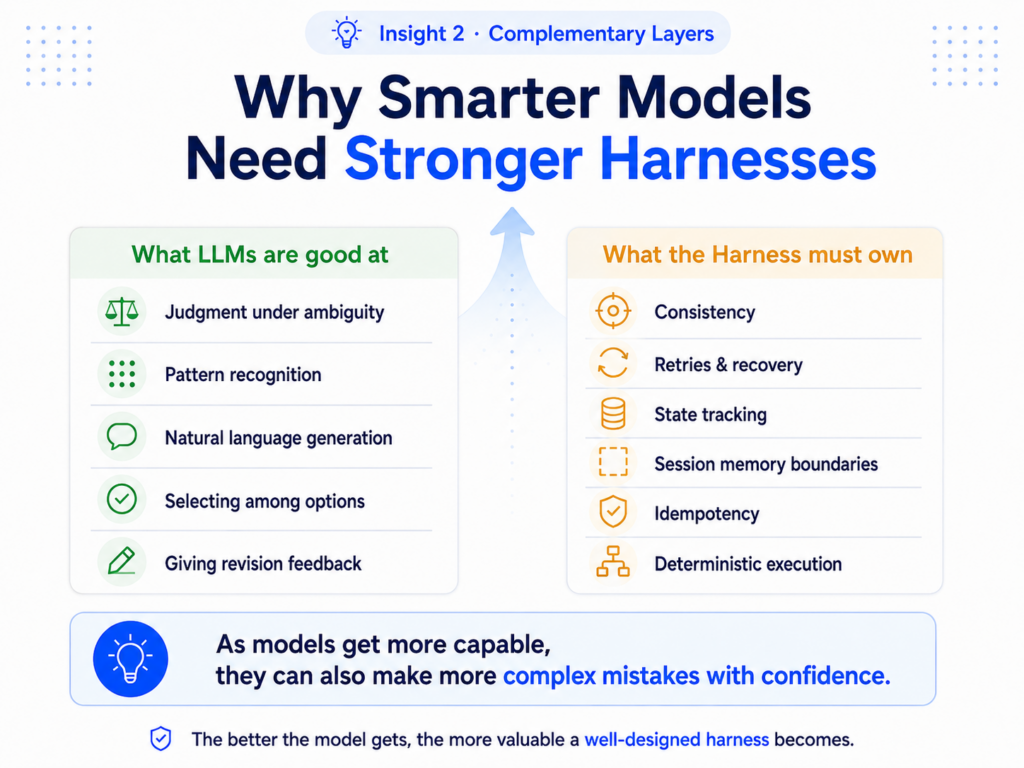
Insight 2: As LLMs get smarter, the harness matters more — not less
This one is counterintuitive and worth sitting with. The instinct is: as models improve, you need less infrastructure around them. The reality is the opposite.
An LLM that’s 100x more capable is 100x more capable of making complex mistakes with confidence. Its judgment is better, but its consistency is still fundamentally probabilistic. The same input, run twice, produces different outputs. That’s not a bug. It’s how these systems work. And as you give a more capable model more autonomy, the blast radius of a confident wrong decision gets larger.
LLMs are excellent at:
✅ Judgment
Which branch to take, how to interpret ambiguous input, what context means
✅ Reasoning
Breaking down complex goals, generating creative solutions
❌ Consistency
Doing the exact same thing the exact same way, every time
❌ State awareness
Knowing what happened three sessions ago without explicit memory
The harness covers exactly what LLMs are bad at. That’s why the value of a good harness scales with the capability of the model inside it. They’re not competing layers — they’re complementary ones.
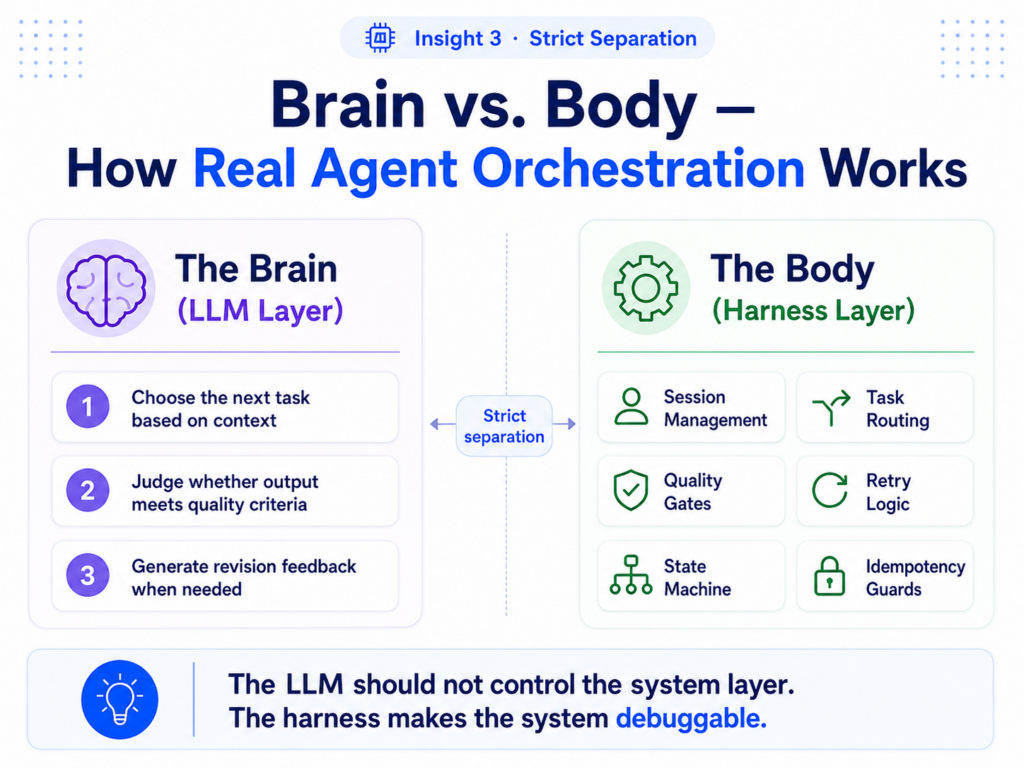
Insight 3: Brain vs. Body — how a real orchestration system is structured
The mental model that makes this practical: your system has a brain and a body, and they need to be strictly separated. Not loosely separated. Strictly.
🧠 The Brain (LLM layer)
Only responsible for three decisions:
1. Which task to tackle next, given current context
2. Whether output meets the quality criteria the harness defined
3. What feedback to send back when something needs revision
⚙️ The Body (harness layer)
Handles everything else with deterministic logic:
Session Management
Process lifecycle, creation, monitoring, teardown
Task Routing
Priority queue + DAG — tasks go where they belong
Quality Gates
Deterministic checklists — output either passes or returns to LLM
Retry Logic
Fixed policy — 3 attempts, backoff, dead letter queue
State Machine
Task states: pending → in-progress → done / failed
Idempotency Guards
Same task never runs twice even if the agent asks
The dual-path dispatch pattern from production coding agents makes this concrete: if input is a system command (starts with “/”), route it to a deterministic handler. If it’s a user request, route it through the agent loop. The LLM never touches the system layer. This isn’t over-engineering — it’s the basic architecture that makes things debuggable.
The CS Primitives Vibe Coders Keep Skipping (And Why They Bite You)
 The CS Primitives Vibe Coders Keep Skipping (And Why They Bite You)
These feel like “backend engineer” concepts. They’re not. Any full-stack vibe coder building an app that does more than one thing autonomously needs all of them.
State Machine — the agent’s spine
Every task in your system should exist in a known state at all times: pending, in_progress, awaiting_review, done, failed. Transitions between states should be explicit and logged.
Without it: Your agent picks up “in-progress” tasks and starts them again on every session restart. Classic double-execution bug.
Idempotency Guard — “done is done”
Every operation your agent can perform needs an idempotency key. If the same operation is requested twice — due to a retry, a crash, a duplicate message — it should execute exactly once. Store completed operation IDs. Check before executing.
Without it: Your payment processing agent charges the user twice because a network timeout triggered a retry.
DAG (Directed Acyclic Graph) — task dependency map
When tasks have dependencies, you need an explicit graph that defines order. Task B can’t run until Task A completes. If Task C fails, Task D and E don’t start. This is just a topological sort — classic CS, five lines of code — but without it, your agent runs things in the wrong order constantly.
Without it: Agent tries to write to a database table before the migration that creates it has run.
Priority Queue — what gets worked on first
When multiple tasks are ready to run, the harness decides which one the agent picks up. Not the agent. Priorities are defined by you at design time, based on business logic — user-facing tasks before background jobs, critical failures before optimizations.
Without it: Agent spends 20 minutes on a logging optimization while a user-blocking bug sits in the queue.
Dead Letter Queue — graceful failure
Tasks that fail after all retry attempts go here instead of disappearing. You can inspect them, debug them, and re-queue them when the underlying problem is fixed. Without this, failures are silent and unrecoverable.
Without it: A third-party API was down for 10 minutes. All 47 tasks that hit the failure window are just gone.
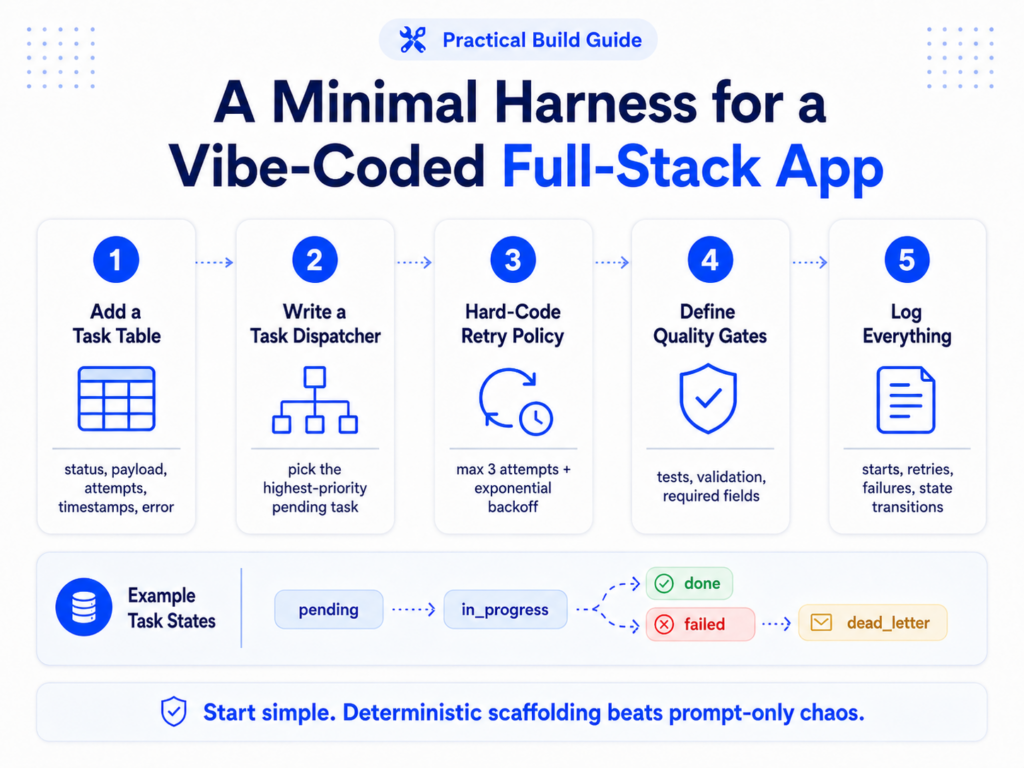
What a minimal harness looks like for a vibe-coded full-stack app
You don’t need Temporal or Prefect or a full orchestration platform to start. For a solo full-stack project, the minimum viable harness is simpler than it sounds.
Add a task table to your database
Columns: id, type, status, payload, attempts, created_at, updated_at, error. This is your state machine. Every task the agent works on lives here. When the agent finishes a task, it updates the status. When it crashes, the harness sees “in_progress” tasks with no heartbeat and resets them to “pending”.
Write a task dispatcher, not a prompt
The dispatcher queries the task table, selects the highest-priority pending task, marks it “in_progress”, and hands it to the agent. The agent doesn’t choose what to work on. The dispatcher does. This is 20 lines of code that eliminates an entire class of “wrong thing worked on” bugs.
Hard-code your retry policy
Max 3 attempts. Exponential backoff (1s, 5s, 30s). After 3 failures, status becomes “dead_letter” and you get an alert. This logic never changes based on what the agent thinks. It’s a harness rule. The agent can’t override it.
Define quality gates as checklists, not prompts
Before any output leaves the system, it passes through a deterministic check. For code: does it compile? Do tests pass? For content: does it meet the minimum length? Is the required field present? These checks run outside the LLM. They either pass or reject — and rejection sends the task back to the agent with specific feedback about what failed.
Log everything the harness does, separately from the LLM
Task starts, task completions, retries, failures, state transitions — all logged with timestamps and task IDs. This is how you debug the system. When something goes wrong, you can reconstruct exactly what happened at the harness level before you even look at what the LLM produced.
Tools that implement harness patterns out of the box
 Tools that implement harness patterns out of the box
| Tool | What it handles | Best for |
|---|---|---|
| oh-my-claudecode | 19 specialized agents, 36 skills, parallel tmux workers, hooks system | Claude Code users building multi-agent workflows |
| LangGraph 2.0 | Graph-based state management, checkpoint-resume recovery, router/supervisor/subagent primitives | Teams needing robust multi-day agent tasks |
| Temporal | Durable execution, automatic retry, workflow history, fault tolerance | Production systems where reliability is non-negotiable |
| Prefect | Dynamic pipelines, observability, retry policies, scheduling | Data-pipeline-adjacent workflows with LLM steps |
| Custom (Postgres + Node/Python) | Task table, dispatcher, retry logic — built by hand | Solo vibe coders who want full control without framework overhead |
Insight 4: The four rules for building agents that don’t break
State machines are not legacy. They’re the agent’s spine.
Every agent that does more than one thing needs to know what state its tasks are in. This isn’t a throwback to 2010s backend engineering. It’s the minimum viable infrastructure for any agent that needs to be debugged.
Retry logic is not boilerplate. It’s the lifeline.
External APIs fail. Networks blip. Rate limits hit. A harness with proper retry logic means these are blips, not incidents. A harness without it means they’re production outages.
Flowcharts are not outdated. They’re the spec.
Before you write a prompt for a multi-step agent workflow, draw the flowchart. What are the states? What are the valid transitions? What happens on failure? If you can’t draw it, you can’t build it reliably. The drawing is the harness design.
LLMs coordinate algorithms. They don’t replace them.
Routing, scheduling, retry decisions, quality validation — these are solved problems with deterministic solutions. The LLM’s job is to apply judgment to the tasks those algorithms route to it. Keep those layers separate and you have a system. Blend them and you have an expensive coin flip.
The Harness Engineering Prompt Template for Claude
All the architecture theory above has to translate into something Claude actually follows. The problem most vibe coders run into isn’t that Claude can’t do harness-style development — it’s that the default prompt invites the AI to make judgment calls it shouldn’t be making. It rewrites things you didn’t ask it to rewrite. It “fixes” adjacent code while implementing a feature. It hallucinates a library it thinks would be useful.
The structure below is designed around one principle: separate what Claude is allowed to decide from what the harness has already decided. Use this as your system prompt or paste the relevant sections at the start of each session.
System Prompt
## ROLE
You are a harness-aware senior engineer. You implement what is asked, nothing more. You do not refactor untouched code. You do not add features not in the task. You do not change variable names, file structure, or patterns unless explicitly instructed.
## SCOPE RULES (non-negotiable)
– ONLY modify files explicitly named in the task.
– NEVER touch adjacent files, even if you think they need improvement.
– NEVER install new dependencies without asking first.
– NEVER refactor working code as part of a feature task.
– If you notice a problem outside the task scope, REPORT it in [OBSERVATIONS] but do not fix it.
## HALLUCINATION PREVENTION
– If you are unsure whether a function, API, or library feature exists: STOP and ask. Do not guess.
– If you reference external documentation, cite the exact source. If you cannot cite it, flag it as unverified.
– If the codebase context is ambiguous, ask one clarifying question before proceeding.
Project Context
## HARNESS RULES (deterministic — Claude does not override these)
# Fill in for your project:
RETRY_POLICY: max 3 attempts, exponential backoff (1s / 5s / 30s), dead_letter after 3 failures
TASK_STATES: pending → in_progress → done | failed | dead_letter
IDEMPOTENCY: every write operation must check operation_log before executing
TASK_ROUTING: dispatcher assigns tasks — Claude does not self-assign or re-prioritize
QUALITY_GATE: output must pass [lint / tests / schema validation] before marking done
# Tech stack (Claude uses only what is listed here):
STACK: [your stack here — e.g., Next.js 15 / Supabase / Tailwind / Zod]
APPROVED_LIBS: [list every package already in package.json — Claude adds nothing outside this list]
Per-task template
## TASK
ID: TASK-[number]
GOAL (what done looks like):
[one sentence — what state the system should be in when this is complete]
FILES IN SCOPE (only these):
[list exact file paths]
SUCCESS CRITERIA (harness will verify these):
– [ ] [specific, testable condition 1]
– [ ] [specific, testable condition 2]
EXPLICITLY OUT OF SCOPE:
[what Claude must not touch, even if it looks related]
CONTEXT (what Claude needs to know):
[relevant existing behavior, data shape, constraints]
Response shape
## RESPONSE FORMAT (always use this structure)
[PLAN]
2-3 sentences: what you will change and why. Stop here and wait if the plan touches anything outside scope.
[CHANGES]
File: [exact path]
“`[only the changed code blocks — not the full file]“`
[VERIFICATION]
How to confirm each success criterion is met. Include exact commands to run.
[OBSERVATIONS] (optional — only if you noticed something outside scope)
Flag issues you saw but did not touch. No fixes. Just reports.
[BLOCKERS] (optional — only if you need human input before proceeding)
Specific question that prevents proceeding. One question only. Wait for answer before continuing.
What each block is doing (the harness layer it maps to)
Block 1
Scope rules + hallucination prevention — This is the idempotency guard for the LLM itself. It tells Claude what it’s not allowed to decide unilaterally, the same way the harness tells an agent which operations it can’t repeat.
Block 2
Harness definition — This encodes your deterministic layer directly into Claude’s context. Retry policy, state transitions, task routing rules — these are now constraints Claude works within, not decisions it makes.
Block 3
Task format — This is the DAG node. You’re defining the task boundary, success criteria, and scope exclusions before Claude touches anything. Claude is the brain executing the task; you’re the harness deciding what the task is.
Block 4
Output format — This is the quality gate protocol. [PLAN] forces Claude to declare intent before acting. [VERIFICATION] generates the deterministic check. [OBSERVATIONS] separates “noticed” from “fixed.” [BLOCKERS] implements the “ask before proceeding” stopping condition.
What a real Block 3 task looks like in practice:
## TASK
ID: TASK-014
GOAL:
When a task fails 3 times, its status must be set to “dead_letter” and an entry must be inserted into the dead_letter_log table.
FILES IN SCOPE:
lib/dispatcher.ts, lib/task-runner.ts
SUCCESS CRITERIA:
– [ ] Task with attempts=3 and status=failed transitions to status=dead_letter
– [ ] dead_letter_log has a row with task_id, error, and failed_at
EXPLICITLY OUT OF SCOPE:
Do not touch the notification system, the retry backoff logic, or the task schema migration files.
CONTEXT:
The tasks table already has a dead_letter_log table with columns (id, task_id, error TEXT, failed_at TIMESTAMP). The dispatcher.ts currently increments attempts and sets status=failed. It does not yet check if attempts has reached the max.
The production gap isn’t a model problem. It’s a harness problem.
88% of enterprise AI agent projects fail to reach production — not because the models aren’t capable enough, but because the systems around them aren’t engineered to handle the reality of probabilistic, non-deterministic outputs in production environments. The vibe coders who ship reliable products are the ones who figured this out early. You don’t need a distributed systems degree. You need a task table, a dispatcher, a retry policy, and a flowchart. The rest follows.
Building an AI app that keeps doing weird things in production?
The problem is almost certainly architectural, not prompt-related. Send this to whoever is debugging it.