AI Tools · Content Automation
You Can Now Make Five AI Videos From a Single Sentence in Claude
No render farm. No video editor. No second tab. Just one line of plain English in a chat window — and finished clips come back.
Here’s a prompt you can actually type into Claude today:
“Make 5 ASMR videos of cracking Lego bricks. Hand close-up, top-down, keyboard room background, 9:16, with sound.”
A minute or two later, you have five short, sound-on, vertical clips sitting in your chat — ready to drop straight onto TikTok, Reels, or Shorts. You never opened a video tool. You never picked a model. You just described what you wanted.
This is what Higgsfield’s MCP connector does once you wire it into Claude. And it quietly changes who gets to make video at all.
What’s actually happening behind that one prompt
MCP stands for Model Context Protocol — an open standard that lets an AI agent reach outside tools safely. Higgsfield runs an MCP server, and connecting it gives Claude direct access to the entire Higgsfield platform from inside any chat. Your conversation thread becomes the production environment.
So when you send that Lego prompt, a small choreography fires off that you never see: Claude reads your intent, translates it into the exact parameters each model expects, picks the model that fits the shot, sets duration and aspect ratio, runs the generation, and brings the finished clip back — with your Higgsfield credentials staying on Higgsfield’s side the whole time. From your seat, it looks like one message. Underneath, it replaced what used to be three or four sessions across as many platforms.
One connector, the whole studio
The connector exposes 30+ video and image models — including Sora 2, Veo 3.1, Kling 3.0, Seedance 2.0, plus Higgsfield’s own Soul models — through a single link. Output runs up to 4K, clips up to 15 seconds, in any aspect ratio. Setup takes about a minute, and new accounts come with free credits to try it.
Setting it up takes about a minute
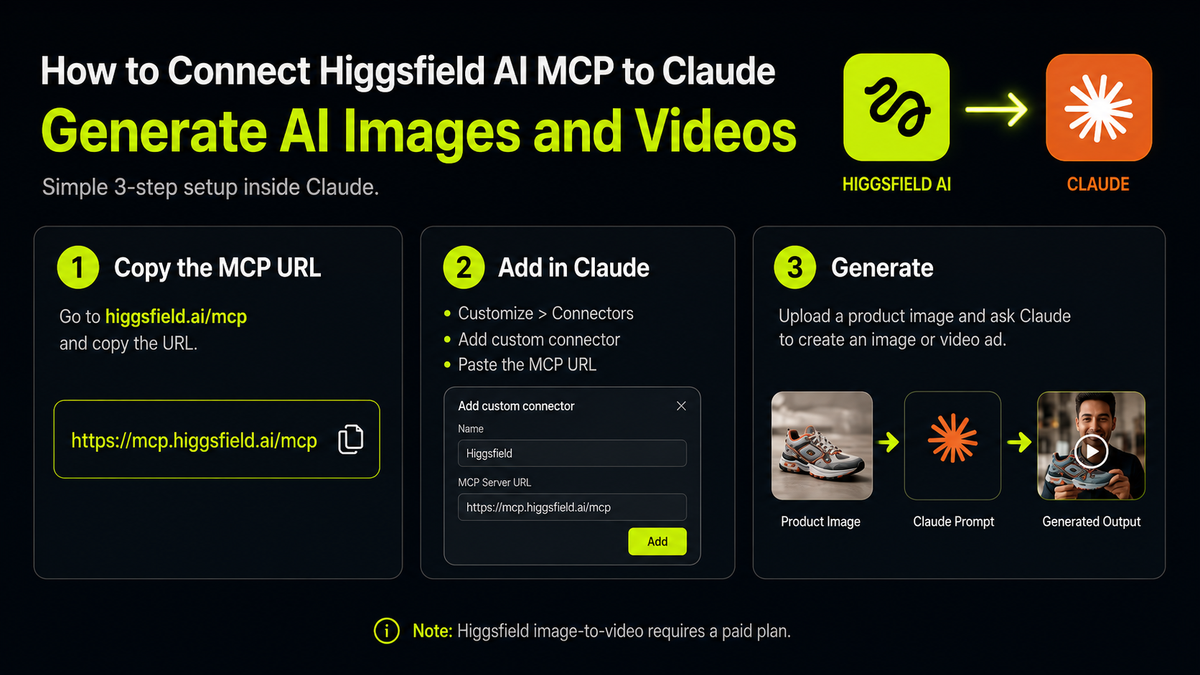
In Claude, open Settings → Connectors (or the Customize area), click Add custom connector, name it Higgsfield, and paste the Higgsfield MCP server URL (mcp.higgsfield.ai/mcp). Save it, hit Connect, and sign in to your Higgsfield account once. That’s the whole job — the connector then stays live. A recommended tweak: set the connector’s permissions to “Always Allow” so Claude can render without asking for approval on every request, which is what makes the back-and-forth feel continuous instead of gated.
Where this gets genuinely useful
The headline trick — one prompt, many clips — matters most when you need volume. Feed it a single product photo and ask for fifty UGC-style ad variations, and you get a week of hook tests instead of one. Run faceless content channels — sleep videos, nature loops, ASMR — off a rolling brief. Spin one product reel into platform-sized cuts for TikTok, Reels, and YouTube in the same chat. You can even send the same brief to several models at once and compare before committing: “Run this scene on Veo, Kling, and Seedance and show me the best result.”
For a small operator, that’s the real unlock. The bottleneck in content was never ideas — it was the hours of production between idea and post. This collapses that gap to an afternoon.
⚠️ Two honest catches before you commit
It isn’t free. New accounts get starter credits, but real image-to-video work needs a paid Higgsfield plan (reportedly starting around $49/month). And on-screen text is still a weak spot — Korean text rendering isn’t reliable yet, so put any Korean copy in as English or add it later in an editor rather than baking it into the generation.
Is this for you?
| ✅ Great fit | ⚠️ Maybe wait |
|---|---|
| Marketers and sellers needing weekly ad variants | You only need one video, once — the subscription won’t pay off |
| Faceless creators running multiple short-form channels | Your videos depend on precise on-screen Korean text |
| Solo founders who’d rather brief than learn an editor | You want full frame-level control over every shot |
Why this moment matters
For years, creative work has looked like an assembly line: one tool to write, another to design, a third to generate video, a fourth to publish. Every handoff cost time and lost context. What MCP does is collapse that line into a single thread — the brief, the model choice, the render, the variants, all without leaving the conversation. The compounding win isn’t raw speed; it’s that the cycle finally gets short enough to iterate, and iteration is where creative work actually gets good.

TL;DR
Connect Higgsfield’s MCP to Claude and a single plain-English brief turns into finished AI video or image variants — 30+ models, up to 4K, all inside one chat. It’s a real shortcut for anyone shipping content on a cadence. Just know it’s a paid platform, and don’t trust it to render Korean text on screen.
Try it in 5 steps
☑ Open Claude → Settings → Connectors → Add custom connector
☑ Name it “Higgsfield”, paste mcp.higgsfield.ai/mcp, save
☑ Connect and sign in once; set permissions to “Always Allow”
☑ Start with a small brief — specify aspect ratio (9:16) and “with sound”
☑ Keep on-screen text in English, or add Korean copy afterward in an editor
Want the AI workflows that actually save you hours?
We break down one practical AI shift like this every day — no hype, just what’s worth your time.