AI ENGINEERING
Harness Engineering: The Discipline That Makes AI Agents Actually Reliable
The model isn’t the hard part anymore. Building the system around it is. Here’s how OpenAI, Stripe, and Anthropic are doing it — and how you can start.
|
18 min read
|
Covers: OpenAI Codex, Stripe Minions, Claude Code, Practical Setup
TL;DR — What Is Harness Engineering?
When an AI agent makes a mistake, most people try a better prompt. Harness engineering takes a different approach: you redesign the environment, tools, and constraints around the agent so that mistake can never happen again. It’s the discipline of building the infrastructure that turns unreliable AI demos into production-grade systems. In 2026, it’s quickly becoming the most important skill in AI — more important than the model itself.
What’s in This Guide
1. The Three Eras: Prompt → Context → Harness Engineering
2. Where the Term Came From
3. The Four Pillars of a Harness
4. Case Study: OpenAI’s Million-Line Experiment
5. Case Study: Stripe’s Minions — 1,300 PRs Per Week
6. The Practical Workflow: How to Actually Work with Agents
7. Setting Up Your Own Harness (Folder Structure + Files)
8. Harness Engineering for Non-Developers
9. Why This Changes Everything About AI Work
 1. The Three Eras: Prompt → Context → Harness Engineering
 1. The Three Eras: Prompt → Context → Harness Engineering
To understand why harness engineering matters, it helps to see how our relationship with AI has evolved in just three years.
2022 – 2024
Prompt Engineering
One question, one answer. The focus was on crafting better instructions — word choice, formatting tricks, “act as” role-plays. It worked for simple tasks, but broke down the moment you needed anything multi-step or consistent.
2025
Context Engineering
The realization that a single prompt was never enough. To make good decisions, the model needed a dynamically constructed context window — relevant documents, conversation history, tool definitions, RAG results. Andrej Karpathy popularized the term, and tools like LangChain and MCP made it practical. Think of it as making sure the model has the right information at the right time.
2026
Harness Engineering
The current frontier. It includes the previous two but operates at a higher level. It’s not about what you say to the model or what files you attach. It’s about designing the entire environment the agent works in — the constraints, feedback loops, tools, verification systems, and recovery mechanisms. The model is the engine. The harness is the entire car.
Phil Schmid, a well-known figure in the AI engineering community, offers another useful analogy: the model is the CPU, the context window is RAM, the harness is the operating system, and the agent is the application. You wouldn’t run software directly on a CPU without an operating system. Similarly, deploying an AI agent without a harness is asking for trouble.
The key insight
Some problems can’t be fixed by improving prompts. Some quality can’t be maintained by improving context. The harness addresses a fundamentally different layer — the environment itself.
2. Where the Term Came From
The word “harness” comes from horse tack — the reins, saddle, and bit that channel a powerful but unpredictable animal in the right direction. The metaphor is deliberate. An AI model is like a horse: fast, powerful, but it doesn’t know where to go on its own. A harness gives it direction without taking away its strength.
The concept had been floating around in AI engineering circles since late 2025 — Anthropic was already referring to the Claude Agent SDK as a “general-purpose agent harness.” But the crystallizing moment came in early February 2026, when Mitchell Hashimoto, co-founder of HashiCorp and creator of Terraform, published a blog post documenting his AI adoption journey.
After months of forcing himself to reproduce manual work with AI agents — literally doing every task twice — Hashimoto reached a stage he called “Engineer the Harness.” His definition was simple and sharp: every time you discover an agent has made a mistake, you take the time to engineer a solution so that it can never make that mistake again.
Days later, OpenAI published a detailed account of building a million-line application with zero human-written code. The article title: “Harness engineering: leveraging Codex in an agent-first world.” Martin Fowler wrote an analysis. Ethan Mollick reorganized his AI framework around it. Within weeks, the term went from niche developer jargon to one of the most discussed concepts in AI.
It spread so fast because it named something practitioners had already been building without shared vocabulary for it.
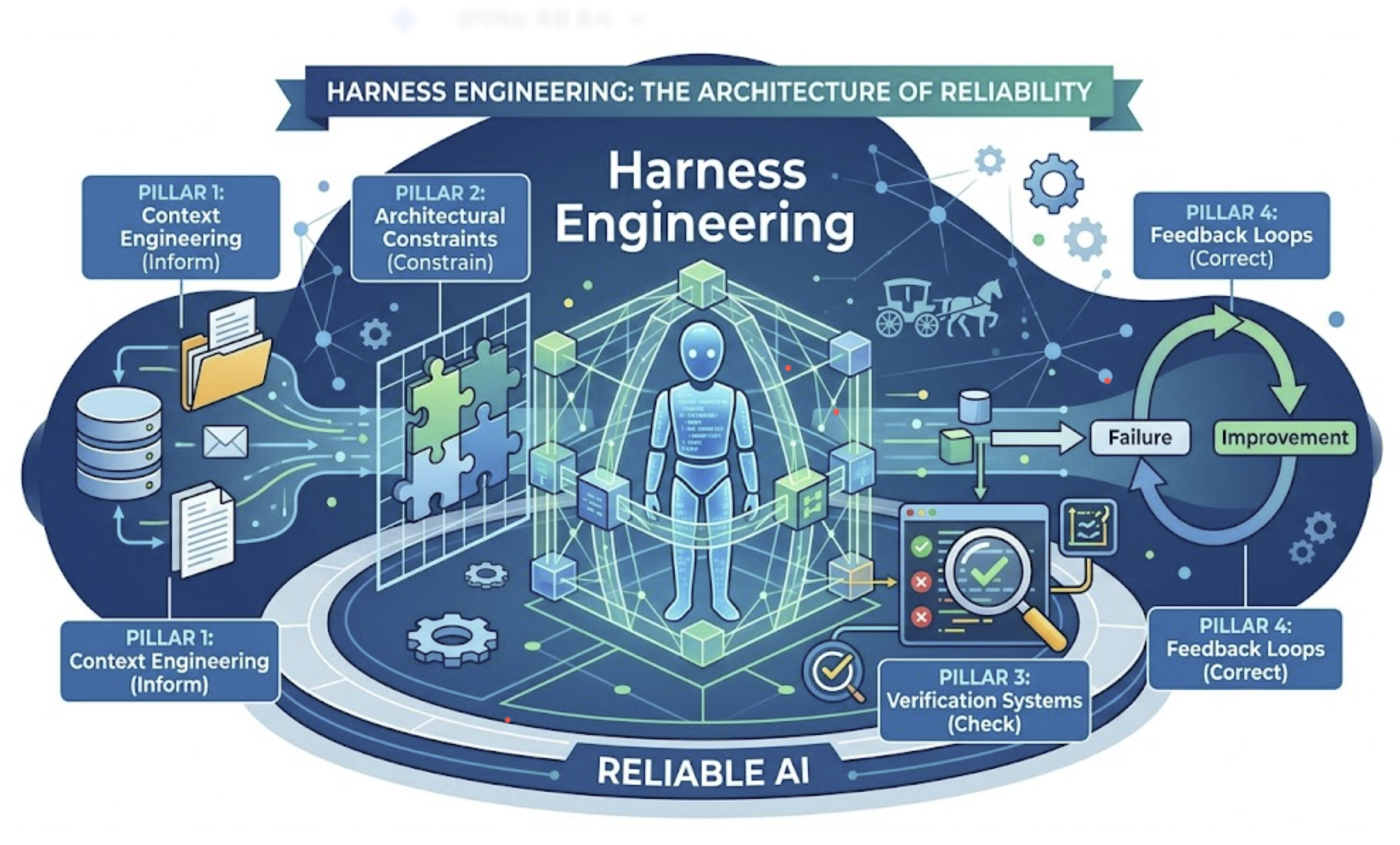
3. The Four Pillars of a Harness
Drawing from OpenAI’s framework and production implementations across the industry, a well-designed harness does four things:
PILLAR 1
Context Engineering — Inform the Agent
Ensure the agent has the right information at the right time. From the agent’s perspective, anything it can’t access in-context effectively doesn’t exist. Knowledge in Google Docs, Slack threads, or people’s heads is invisible. The repository must be the single source of truth. This includes instruction files (AGENTS.md, CLAUDE.md), architecture decision records, coding conventions, and dynamic context like observability data.
PILLAR 2
Architectural Constraints — Constrain What It Can Do
Here’s the counterintuitive truth: constraining an agent’s options makes it more productive, not less. When an agent can generate anything, it wastes tokens exploring dead ends. When you enforce module boundaries, limit available tools, and define strict architectural patterns, the agent works faster and makes fewer mistakes. This includes linters, type checkers, dependency rules, and CI validation — all enforced mechanically, not by suggestion.
PILLAR 3
Verification Systems — Check Its Work
Test suites, automated code review, CI/CD pipelines, and — critically — separate evaluator agents. Anthropic’s research found something important here: a stock AI model is a terrible evaluator of its own work. It’s too lenient and easily convinces itself that bugs aren’t critical. But it’s far easier to engineer a separate evaluator agent to be ruthlessly strict than to teach a generator agent to be self-critical. This split between “maker” and “checker” is a cornerstone of any mature harness.
PILLAR 4
Feedback Loops — Correct and Improve Permanently
When an agent fails, you don’t just fix the output. You fix the system so the failure can’t recur. This is what separates harness engineering from regular debugging. OpenAI’s team phrased it this way: when the agent struggles, treat it as a signal — identify what’s missing (tools, guardrails, documentation) and feed it back into the repository. They even had their AI write its own fixes, creating a self-improving loop.
4. Case Study: OpenAI’s Million-Line Experiment
This is the experiment that put harness engineering on the map.
Starting from an empty Git repository in August 2025, a small OpenAI team used Codex (powered by GPT-5) to build a production application. The rule: zero manually typed code. Everything — application logic, infrastructure, tooling, documentation, internal utilities — was generated by AI agents.
Five months later, the repository held roughly one million lines of code across approximately 1,500 merged pull requests. A team that started with three engineers (later growing to seven) averaged 3.5 PRs per engineer per day — and that rate actually increased as the team grew.
The engineers didn’t write code. They designed the system that let AI write code reliably. And they discovered several non-obvious lessons in the process.
Key Lessons from the OpenAI Experiment
The repo is the source of truth. Any knowledge that isn’t in the repository doesn’t exist to the agent. That Slack discussion where the team aligned on an architecture pattern? If it’s not in a Markdown file in the repo, it’s invisible — just like it would be to a new hire joining three months later.
“Golden principles” replaced Friday cleanups. Initially, humans spent 20% of their week cleaning up what they called “AI slop.” That didn’t scale. Instead, they encoded opinionated, mechanical rules directly into the repository — things like “prefer shared utility packages over hand-rolled helpers” and “don’t probe data blindly; validate boundaries or use typed SDKs.” Background agents periodically scanned for deviations and opened refactoring PRs.
Linter error messages became teaching tools. They wrote error messages specifically to explain how to fix the problem, so every failure message became context for the agent’s next attempt.
The hardest challenges were environmental. The lead engineer, Ryan Lopopolo, summarized the entire project in one line: “Agents aren’t hard; the harness is hard.” Their most difficult problems centered on designing environments, feedback loops, and control systems — not on improving the model.
5. Case Study: Stripe’s Minions — 1,300 PRs Per Week
While OpenAI’s experiment was a greenfield project, Stripe’s story proves that harness engineering works on massive, mission-critical existing codebases too.
Stripe’s “Minions” are fully unattended AI coding agents that now produce over 1,300 merged pull requests every week. Not drafts, not suggestions — actual production code changes that pass automated tests and CI, then go through human code review. The code they touch handles more than one trillion dollars in annual payment volume.
Here’s how a typical Minion run works: an engineer sends a Slack message describing a task, tags the Minions bot, and walks away. The Minion spins up an isolated cloud environment in under ten seconds, reads the relevant documentation, writes the code, runs linters and tests, and prepares a pull request. The engineer comes back to a finished PR ready for review.
What makes this work isn’t the model — it’s the harness Stripe built around it.
Stripe’s Four Harness Principles
1. Selective tool access. Instead of giving the agent unlimited capabilities, Stripe provides only the tools each task actually needs — roughly 15 carefully chosen instruments per workflow. Vercel learned the same lesson the hard way: they started with a comprehensive tool library and got terrible results. Agents got confused, made redundant calls, and took unnecessary steps. Stripping to essentials made them faster and more reliable.
2. Complete sandbox isolation. Every Minion runs in a fully isolated environment, completely separated from production servers. No matter how badly the AI messes up, it can’t take down a live payment system.
3. Blueprint architecture. Tasks are defined through “blueprints” — structured workflow templates that wire together deterministic nodes (fixed, predictable operations like running tests or formatting code) with agentic nodes (AI-powered reasoning and generation). This hybrid approach means the AI handles what it’s good at (reasoning, writing) while verifiable operations run through deterministic code. It’s much more consistent than letting the AI manage everything.
4. Multi-stage self-verification. Before any code reaches a human reviewer, it passes through an automated gauntlet: lint checks for basic errors, targeted test execution (running only the tests relevant to the change, not the entire suite), and up to two self-correction attempts if something fails. If the agent can’t fix its own error after two tries, it escalates to a human instead of spinning endlessly.
The deeper lesson from Stripe
The reason Minions work has almost nothing to do with the AI model. It has everything to do with the engineering infrastructure Stripe built for human engineers years before LLMs existed — clean architecture, strong typing (Ruby with Sorbet), extensive test suites, good documentation. The harness for AI was largely the same infrastructure that made human developers productive. Good engineering practices didn’t become obsolete; they became the foundation for AI productivity.
6. The Practical Workflow: How to Actually Work with Agents
Whether you’re using Claude Code, Cursor, Codex, or any other coding agent, the following workflow pattern keeps showing up across successful teams. It’s a practical framework you can adopt today.
Prepare your guide documents
Before your agent writes a single line, create the documentation it needs. This includes an Architecture Decision Record (ADR) explaining why certain technologies were chosen, a code conventions guide, and a project structure overview. In advanced setups, you can even have a sub-agent generate a “Code Quality Guide” from your existing codebase. The point: don’t expect the agent to guess your standards.
Plan before you execute
Discuss requirements and architecture with the agent extensively before any coding begins. This is the single most important habit. Boris Tane from Cloudflare puts it bluntly: never let agents write code until you’ve reviewed and approved a written plan. This separation of planning and execution prevents wasted effort, keeps you in control of architecture decisions, and produces significantly better results.
Document the design intent (use a fork)
Once you’ve aligned on the plan, duplicate (fork) your conversation session and use the copy to create a design intent document. Why fork? Because you need to preserve the original session’s context for the actual implementation. The forked copy captures the “why” behind decisions. Once the document is generated, discard the fork.
Implement in the main session
All coding happens in your original session to maintain full context. This is critical — if you open a new session for implementation, you lose the entire conversation history, design decisions, and accumulated understanding. Context is your most valuable asset.
Review with a separate evaluator
Have a sub-agent independently review the output against your Code Quality Guide and design intent document. This is the “maker vs. checker” principle — the same agent can’t reliably evaluate its own work. A separate agent with strict evaluation criteria catches issues the generator would rationalize away.
Apply fixes in the main session (never a new one)
When changes are needed based on the review, make them in the original main session where all context is preserved. Opening a new session means the agent loses awareness of the design decisions, past iterations, and accumulated understanding — leading to inconsistencies and regressions.
7. Setting Up Your Own Harness (Folder Structure + Files)
Ready to build this into your own projects? Here’s a practical folder structure that implements harness engineering principles. This example uses Claude Code conventions, but the same concepts apply to Cursor (.cursorrules), Codex (AGENTS.md), or any other agent.
├── CLAUDE.md # Root instruction file
├── .claude/
│ ├── rules/ # Governance layer
│ │ ├── security.md
│ │ └── code-conventions.md
│ ├── skills/ # Reusable workflows
│ │ ├── testing.md
│ │ └── deployment.md
│ └── agents/ # Sub-agent definitions
│ ├── reviewer.md
│ └── backend-engineer.md
├── docs/
│ ├── architecture.md # Architecture decisions
│ └── progress.md # Session handoff file
└── src/
Let’s break down what each piece does and why it matters:
CLAUDE.md — The Root Instruction File
This is the first thing the agent reads when it starts a session. It contains your project overview, folder structure, active frameworks, naming conventions, and key “don’t-ever-do-this” rules. Think of it as an onboarding document for a new team member. Every line should correspond to either a past mistake you’re preventing or a standard you’re enforcing. It grows over time — that’s the whole point.
.claude/rules/ — The Governance Layer
Top-level rules that apply across the entire project. Security policies, company-wide coding standards, forbidden patterns. These are your non-negotiable constraints. The agent reads them alongside the root instruction file but they’re separated for organizational clarity — you might share rules across multiple projects.
.claude/skills/ — Reusable Workflows
Define repeatable task patterns: how to run tests, how to deploy, how to create a new API endpoint. Skills keep individual tasks focused and consistent. One practical tip from experienced users: if skills start getting bloated, consolidate similar ones into a single parent skill. You want the agent to load only the relevant description (~100 tokens) first, then dive into full instructions only when needed.
.claude/agents/ — Sub-Agent Personas
Define specialized roles: a backend engineer persona, a code reviewer persona, a documentation writer. Each file specifies the agent’s expertise, evaluation criteria, and behavioral boundaries. Sub-agents serve as “context firewalls” — they run in isolated context windows so intermediate noise doesn’t pollute your main orchestration thread. This is how you maintain coherence across long, complex tasks.
docs/progress.md — The Session Handoff File
Since LLMs have no memory between sessions, this file acts as a shift handoff. The agent reads it at the start of each session to understand what’s been accomplished and what’s next, and updates it at the end. Anthropic found this pattern essential when running multi-session tasks — without it, each new session starts at zero, leading to duplicated work and inconsistent decisions.
Start small
You don’t need to build all of this on day one. Start with a single CLAUDE.md (or AGENTS.md or .cursorrules, depending on your tool). Add one rule every time the agent makes a mistake you don’t want repeated. After a few weeks, you’ll have a meaningful harness that grows organically from real problems — not theoretical ones.
8. Harness Engineering for Non-Developers
If you’re reading this and thinking “this is a developer thing, it doesn’t apply to me” — think again. The principles of harness engineering apply to anyone using AI agents for real work, regardless of whether code is involved.
If you use Claude Cowork, ChatGPT with custom instructions, or any AI tool for recurring work, you’re already building a primitive harness — you just might not call it that.
Harness Principles Translated for Knowledge Workers
Context engineering = dropping a about-me.md and brand-voice.md file into your project folder so the AI knows who you are and how you write — every single time, without you repeating yourself.
Architectural constraints = setting folder-level instructions (“all reports must use this template,” “never delete files without asking”) so the AI can’t go off-script even if the prompt is vague.
Verification = always reviewing output before it ships, and — when possible — having the AI check its own work against explicit criteria before presenting it to you.
Feedback loops = when the AI makes a mistake, don’t just correct this one output. Update your instructions so it can’t happen again. Each fix makes every future session better.
Here’s a concrete example. Say you use Cowork to generate weekly sales reports, and it keeps using the wrong date format. A prompt engineering approach: “Remember, use MM/DD/YYYY.” A harness engineering approach: add “Date format: MM/DD/YYYY for all dates. Never use DD/MM/YYYY or YYYY-MM-DD.” to your project instructions. The prompt fix works this time. The harness fix works forever.
If you use Claude Cowork’s new Projects feature, you’re essentially building a personal harness: dedicated folders, persistent instructions, memory that carries across sessions, and scheduled tasks. The vocabulary is different, but the architecture is identical.
9. Why This Changes Everything About AI Work
Here’s the uncomfortable truth the AI industry is now confronting: the underlying model matters less than the system around it.
LangChain proved this empirically. Their coding agent jumped from 52.8% to 66.5% on a well-known benchmark — leaping from the top 30 to the top 5 — by changing nothing about the model. They only improved the harness.
Claude, GPT-4, Gemini — they perform within a narrow band of each other on standard benchmarks. The model is no longer the competitive advantage. The harness is.
This has profound implications for anyone working with AI:
For individuals: The people who get the most from AI tools aren’t the ones with the best prompts. They’re the ones who’ve built the best environments — instructions, templates, context files, recurring workflows. Your harness is your moat.
For companies: You can fine-tune a competitive model in weeks. Building production-ready harnesses takes months or years. Companies investing in harness engineering now are building advantages that model improvements can’t overcome. Manus went through five complete rewrites of their harness. LangChain spent a year across four architectures. You can’t download a harness from anywhere — you have to build, test, fail, learn, and rebuild.
For the future of work: The role of the engineer is shifting from “person who writes code” to “person who designs environments where AI writes code.” The same shift is happening for knowledge workers: from “person who creates documents” to “person who designs systems where AI creates documents reliably.”
Quick-Start Checklist: Build Your First Harness This Week
Day 1: Create an instruction file at the root of your project (CLAUDE.md, AGENTS.md, or .cursorrules). Start with project structure, build commands, and your three most important coding/style conventions.
Day 2–3: Use the agent for real work. Every time it makes a mistake, don’t just fix the output. Add a rule to your instruction file that prevents that mistake from recurring. Your file should grow by 1–2 lines per session.
Day 4–5: Add a progress.md file that the agent reads at session start and updates at session end. Notice how your sessions suddenly feel continuous instead of starting from scratch every time.
Day 6–7: Try the “plan first, execute second” workflow. Have the agent outline its approach before writing any code or producing any deliverable. Review the plan, then greenlight execution.
Ongoing: Treat every agent failure as a harness problem, not a prompt problem. Each fix is an investment that compounds over time.
The Bottom Line
2025 proved AI agents could work. 2026 is about making them work reliably. The model is commodity. Claude, GPT, Gemini — they all perform well. The difference between a demo that impresses and a system that ships real work every single day? It’s the harness.
Harness engineering isn’t about being more clever with your prompts. It’s about building an environment where the AI literally cannot make the same mistake twice. It’s about constraints that make agents faster, not slower. It’s about designing systems that improve with every failure.
Stop optimizing prompts. Start engineering harnesses. That’s where the competitive advantage lives in 2026.
Further Reading
Mitchell Hashimoto’s original post → mitchellh.com
OpenAI’s Codex harness report → openai.com
Stripe’s Minions deep dive → stripe.dev
Martin Fowler’s analysis → martinfowler.com