YOUTUBE AUTOMATION · STEP-BY-STEP
How to Reverse-Engineer Any YouTube Channel
and Auto-Generate Videos in 5 Minutes
Using Google NotebookLM
A complete, bookmark-worthy workflow — from competitor analysis
to finished video — without touching a single editing tool.
⚡ TL;DR
① Feed competitor YouTube links into NotebookLM → it reverse-engineers their entire content strategy
② Use the analysis to generate channel names, viral topics, and full scripts
③ NotebookLM’s Video Overview feature renders a complete video — voiceover, visuals, everything
④ Free plan gives you ~3 videos/day. Entire pipeline takes about 5 minutes per video.
🤔 Why This Matters Right Now
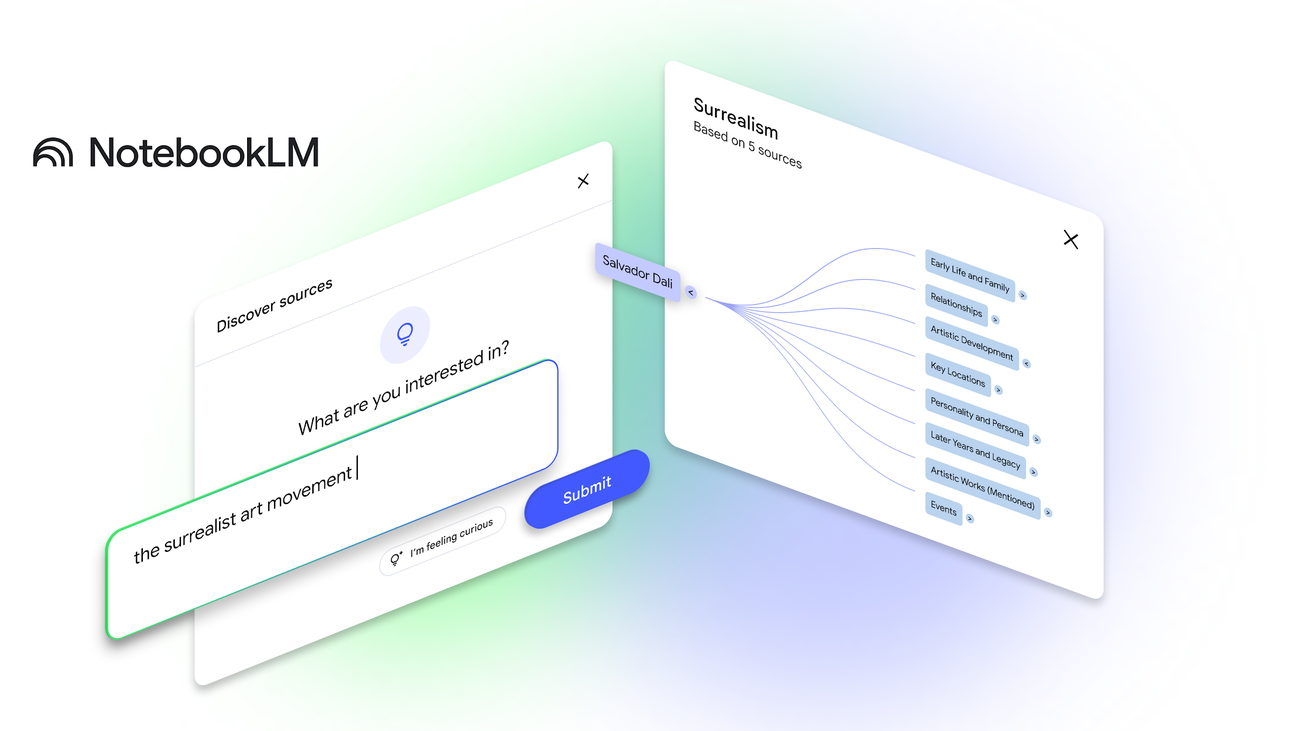
Here’s what most people don’t realize about Google NotebookLM: it’s not just a note-taking app. It’s quietly become one of the most powerful content creation pipelines on the internet.
In January 2026, Google upgraded NotebookLM with Video Overviews — a feature that turns your uploaded sources into fully produced explainer videos with AI-generated narration, visuals, and animations. Then in March 2026, they went further with Cinematic Video Overviews powered by Gemini 3 and Veo 3.
Combine that with NotebookLM’s ability to ingest YouTube video transcripts as source material, and you get something wild:
Feed it a competitor’s YouTube channel.
It reverse-engineers their playbook.
Then it generates your videos for you.
 This post walks you through the exact 5-step pipeline, with every prompt, tool, and setting you need. Bookmark this one.
🧰 What You’ll Need Before Starting
✅ A Google account (free tier works — 3 videos/day, 50 sources/notebook)
✅ NotebookLM — open in your browser
✅ A link-grabbing Chrome extension (Grabbit, Link Grabber, or YouTube to NotebookLM)
✅ A competitor YouTube channel to study (pick one that’s crushing it in your niche)
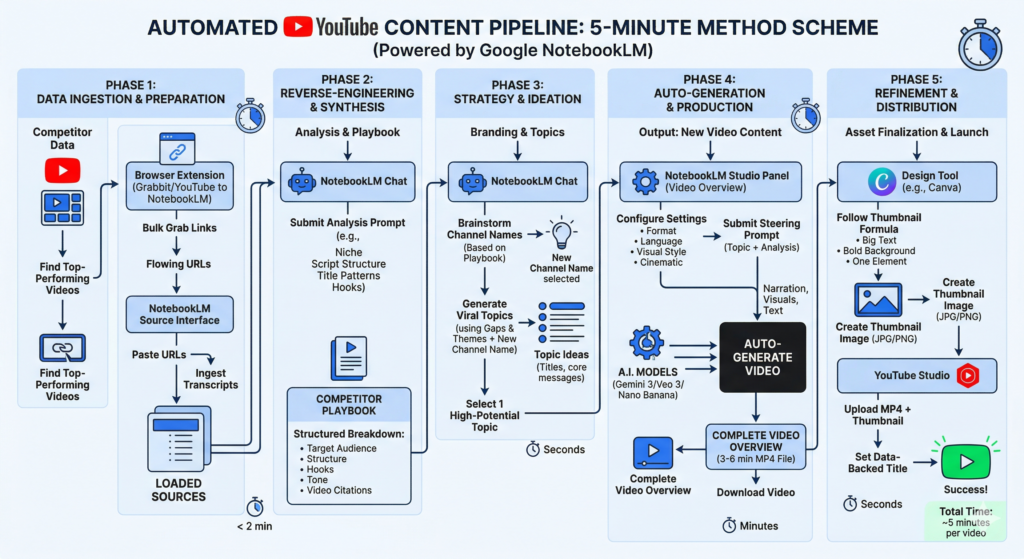
Step 1: Bulk-Import Competitor Videos into NotebookLM
1
GOAL: Get 10–20 top-performing videos from a competitor channel into NotebookLM as analyzable source material.
First, find a channel that’s already winning in the niche you want to enter. Go to their channel page and look at their most popular uploads.
Now here’s the trick: you don’t want to copy links one by one. That takes forever.
Install one of these Chrome extensions to grab all visible video URLs at once:
Option A: Grabbit — After installing, open its settings page: assign “Left Mouse” as the action, set “Ctrl” as the modifier key, and select “Copy URLs” as the output. Save. Now just hold Ctrl + Left Click and drag across the video thumbnails — every link gets copied at once.
Option B: YouTube to NotebookLM — Sends video/playlist/channel URLs directly into a notebook. One click. Rated 4.8★ on Chrome Web Store.
Option C: Link Grabber — Generic link extractor. Select multiple links with Ctrl+Click, copy in bulk.
Once you’ve got the links:
📋 How to Import
1. Open notebooklm.google.com → Create new notebook
2. Click “Add Source” → Select “YouTube” as source type
3. Paste your batch of video URLs
4. Wait for NotebookLM to ingest all transcripts (usually < 2 min)
💡 Pro tip: Keep batches under 20 URLs at a time to avoid errors. The free plan allows up to 50 sources per notebook — plenty for a deep analysis. Scroll down on the channel page first to load more videos before grabbing links. If Grabbit doesn’t respond on first try, refresh the page and try again — that usually fixes it.
Step 2: Reverse-Engineer the Channel’s Success Formula
2
GOAL: Extract the competitor’s niche, script structure, title patterns, and tone — their entire content playbook.
This is where NotebookLM becomes genuinely powerful. Unlike ChatGPT or Claude, NotebookLM only pulls from the sources you uploaded — no hallucinated training data bleeding in. Every answer cites the exact video it came from.
In the NotebookLM chat, use this prompt:
🎯 Analysis Prompt
I want to reverse-engineer this channel. Analyze all sources and break down:
1. Their niche and target audience
2. Script structure (how they open, build tension, close)
3. Title patterns that drive clicks
4. Hooks used in the first 15 seconds
5. Recurring topics and angles
6. Overall tone and personality
NotebookLM will return a detailed breakdown with citations pointing to specific videos. This is your competitor playbook.
You can go even deeper with follow-up questions:
▸ “What do they do in the first 15 seconds to keep attention?”
▸ “What topics and angles repeat the most across these videos?”
▸ “What’s their CTA strategy — how do they drive subscriptions?”
Step 3: Build Your Channel Identity and Generate Viral Topics
3
GOAL: Create a unique channel identity and generate 10+ high-potential video topics — all informed by real competitor data.
Now you’re not starting from zero. You have data. Use it.
Channel Name Brainstorm:
Based on the patterns in these sources, generate 10 two-word channel name ideas that:
– Establish authority with this exact audience
– Sound unique, not generic
– Work well as a brand name across platforms
Pick the one that feels right. Then immediately follow up:
Viral Topic Generation:
My channel name is [YOUR NAME]. Using the gaps and popular themes from this analysis, generate 10 video ideas with:
– A click-worthy title for each
– The core message in one sentence
– Why this topic would perform well based on the data
What makes this different from just asking ChatGPT for video ideas: every suggestion is grounded in real competitor data. NotebookLM saw what actually works in your niche — it’s not guessing.
🎯 Example in action (from a psychology-focused channel analysis):
NotebookLM suggested the channel name “Selective Solitude” — and generated topics like:
• “The Real Psychology Behind People Who Cut Off Relationships Without Warning”
• “Why Your Brain Finds Small Talk Physically Exhausting”
• “The Science of Why Loners Are Often the Smartest in the Room”
Every suggestion was grounded in patterns from the competitor’s actual top-performing videos — not random AI guessing.
Step 4: Auto-Generate the Video Inside NotebookLM
4
GOAL: Turn your topic into a complete video — script, voiceover, and visuals — without leaving NotebookLM.
This is the step that blows most people’s minds. You don’t need a video editor. You don’t need Premiere, CapCut, or even Canva. NotebookLM does it all.
Here’s the exact process:
Video Generation Walkthrough
1Copy your chosen video topic + the channel analysis summary from the chat
2Open the Studio panel (right side) → Click “Video Overview”
3Configure your settings:
Format: Explainer (structured walkthrough) or Brief (bite-sized)
Language: English (or any of 30+ supported languages)
Visual Style: Whiteboard, Watercolor, Anime, Retro Print, Heritage, Papercraft, Kawaii, or Custom
4Paste your topic + analysis into the Steering Prompt field
5Hit “Generate” → Wait a few minutes → Done.
NotebookLM renders a complete video with AI narration, generated visuals, and on-screen text — all based on your sources. The output is typically 3–6 minutes long.
To download: Click the three-dot menu (⋮) on your finished video → “Download.” That’s it — you’ve got an MP4 ready to upload to YouTube.
A note on quality: it’s surprisingly good. The narration sounds natural, the visuals match the content, and the pacing feels like something a human editor would produce. Is it Hollywood-grade? No. But for an explainer or educational channel, it’s more than good enough to publish — and it was made in minutes, not hours.
💡 Free plan workaround: You get about 3 video generations per day on the free tier. If you need more volume, you can use multiple Google accounts. That’s enough to produce ~90 videos per month at zero cost.
Step 5: Create a Click-Worthy Thumbnail
5
GOAL: Build a simple, high-CTR thumbnail while the video renders.
While NotebookLM generates your video (it can take a few minutes), knock out the thumbnail. You don’t need to be a designer.
Use Canva (free) or any thumbnail tool with YouTube templates:
Thumbnail Formula That Works
📝
Big Text
2–5 words max. The hook keyword from your title, big and bold.
🎨
Bold Background
Solid, eye-catching color. Yellow, red, or dark blue work best.
🖼️
One Visual Element
A single icon or image that captures the topic. Less is more.
For faceless/automated channels, simplicity is your superpower. The most successful thumbnails in this space use bold text + one strong visual element. That’s it.
🔄 The Complete Pipeline — One Visual
→
📥 Import
→
🔍 Analyze
→
💡 Plan
→
🎬 Generate
→
🖼️ Thumbnail
→
🚀 Upload
Total time: ~5 minutes per video (after initial channel analysis)
📋 Copy-Paste Prompt Cheat Sheet
Here are all the prompts from this guide in one place. Copy them. Tweak them. Make them yours.
PROMPT 1 — Channel Analysis
Analyze all sources. Break down: the niche, target audience, script structure (open/build/close), title patterns, hooks in the first 15 seconds, recurring topics, and overall tone.
PROMPT 2 — Channel Naming
Based on the patterns in these sources, generate 10 two-word channel name ideas that establish authority with this audience.
PROMPT 3 — Topic Ideas
My channel is [NAME]. Using gaps and popular themes from this analysis, generate 10 video ideas with click-worthy titles and a core message for each.
PROMPT 4 — Title Optimization
Review this video idea and generate 10 title variations. Spark curiosity, promise a clear benefit, and match the style of top-performing videos in our sources.
PROMPT 5 — Thumbnail Concepts
Give me 5 high-converting thumbnail concepts I can build in Canva — exact text, color scheme, and one visual element each.
🎁 Bonus Tips from Power Users
🔹 One notebook per video. Don’t generate all your videos from a single notebook. Create a separate notebook for each video topic — this gives NotebookLM more focused context and produces better, more relevant output.
🔹 Use Audio Overview as an alternative voiceover. If you’d rather produce your own video but need a great narration track, try the Audio Overview feature. It generates a natural-sounding podcast-style voiceover from your sources — perfect to lay over your own visuals.
🔹 Add books and PDFs too. YouTube links aren’t the only source type. Upload the competitor’s book, blog posts, or PDF resources as additional sources. The more context NotebookLM has, the richer the analysis gets.
🔹 Click the source citations. When NotebookLM gives you an analysis, click the numbered citations — they link back to the exact video and timestamp. This is how you verify the AI’s output and discover hidden patterns yourself.
⚠️ What You Should Know Before Going All-In
🔸 YouTube penalizes low-effort AI content. Pure AI-generated channels without any human value-add risk demonetization. The key: use NotebookLM for production efficiency, but add your own perspective, curation, and editorial judgment.
🔸 “Reverse-engineering” ≠ copying. You’re studying patterns and structures — not duplicating someone’s videos. Use competitor insights as inspiration, then create something genuinely original.
🔸 Video quality varies. NotebookLM’s Video Overviews are impressive for automated output, but they’re not Netflix quality. Best suited for explainer/educational content, not vlogs or entertainment.
🔸 Cinematic is Ultra-only ($250/mo). The really polished Cinematic Video Overviews (Gemini 3 + Veo 3) require Google AI Ultra. Standard Video Overviews on the free tier are still solid for getting started.
🔮 The Bottom Line
Two years ago, building a YouTube channel required a camera, editing software, hours of scripting, and weeks of practice. Today, a free Google tool can:
✅ Analyze your competitors’ entire content strategy in seconds
✅ Generate data-backed video ideas, titles, and scripts
✅ Produce a complete video with narration and visuals
✅ Do all of this for free, ~3 times a day
Is it perfect? No. Will it replace a skilled creator with genuine audience connection? Absolutely not. But as a starting point, a testing ground, or a production accelerator — NotebookLM’s pipeline is genuinely hard to beat.
The barrier to starting a YouTube channel
just dropped from “I need equipment and editing skills”
to “I need a Google account and 5 minutes.”
Whether you use this to launch a faceless automation channel, prototype content ideas before investing in production, or just learn what makes successful channels tick — the pipeline is now yours.
Go build something.
📎 Resources
🔗 Google NotebookLM — Start here (free)
🔗 Official Video Overview Guide — Google’s documentation on formats, styles, and settings
🔗 YouTube to NotebookLM Extension — Bulk import videos into notebooks (Chrome)
🔗 Nano Banana Visual Styles Update — Watercolor, Anime, Whiteboard and more
⭐ Claude Just Killed the $600 AI Mac Mini Trend (For $20/mo)