Stop Treating Claude Like a Chatbot: The Sonnet 4.6 Automation Guide
April 3, 2026
AI WORKFLOWS + ANALYSIS
Stop Treating Claude Like a Chatbot: How Sonnet 4.6 Changes the Way We Work
With the arrival of Sonnet 4.6, 1M token context windows, direct Excel MCP integration, and true “Computer Use,” Anthropic just turned Claude from an answering machine into a fully automated digital workforce. Here is how the top 5% are using it.
April 3, 2026 |
10 min read |
Actionable Prompts Included
What You Need to Know in 30 Seconds
Anthropic’s latest 4.6 model lineup completely redefines daily office work. Sonnet 4.6 has stepped up as the ultimate daily driver, boasting massive reasoning upgrades, a beta 1M token context window, and Extended Thinking capabilities previously reserved for Opus. But the real game-changers aren’t just under the hood: Claude in Chrome can now physically click and type through your repetitive browser tasks, and Excel + MCP integration allows Claude to pull live external databases directly into your spreadsheets. Even the free tier got a massive bump with reusable “Skills” and direct file generation.
What’s in This Breakdown
1. The Mindset Shift: Infrastructure vs. Chatbot
2. Sonnet 4.6: Why It’s the New King of the Office
3. Claude in Excel + MCP: The End of Manual Data Entry
4. Computer Use: Claude Takes the Wheel in Chrome
5. Massive Free Tier Upgrades You Should Be Using
6. Copy-Paste Prompts for Immediate ROI
1. The Mindset Shift: Infrastructure vs. Chatbot
If you are still opening Claude, pasting in a question, copying the answer, and closing the tab—you are using it like the bottom 95%. Anthropic’s new architecture demands a fundamental shift in how we view AI.
The Bottom 95% Approach: Ad-hoc Q&A. Opening Claude only when a specific need arises, explaining the context from scratch every single time, resulting in wildly inconsistent output quality.
The Top 5% Approach: Treating Claude as Infrastructure. Saving repetitive tasks as Skills, using MCP (Model Context Protocol) to auto-connect business data, and letting Computer Use execute the final steps. Humans handle the strategy and judgment; Claude handles the execution pipeline.
Your Action Item for Today: Pick exactly one highly repetitive task you do every week. Save the prompt as a Claude Skill, link your data source via MCP, and automate it. Start there.
2. Sonnet 4.6: Why It’s the New King of the Office
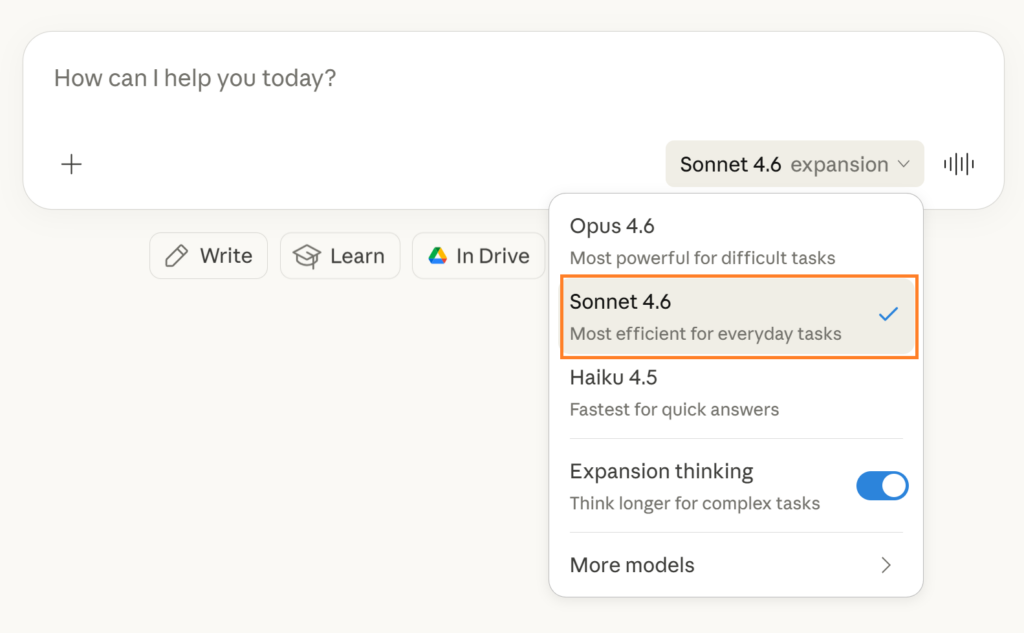
Anthropic has refined its model lineup, and the biggest winner is Sonnet 4.6. It has officially caught up to previous Opus iterations for almost all daily business needs.
The Big Three Upgrades to Sonnet 4.6
1. Deep Reasoning on Multi-step Tasks: Vastly improved performance on massive reports, financial modeling, and legal contract reviews. It features a beta 1M token context window and supports Extended Thinking.
2. Marathon Stability: In the past, AI models would “lose the plot” or hallucinate halfway through a massive 40-page generation. 4.6 maintains strict consistency from start to finish, making it the perfect engine for automated data pipelines.
3. Hallucination Eradication: The rate of “made-up” numbers and fake citations has plummeted. Financial analysis and visual reasoning reliability are noticeably higher compared to 4.5.
Note on the rest of the family: Use Opus 4.6 strictly for your most ambitious, complex strategic planning. Use Haiku 4.5 when speed is everything (quick translations, rapid API endpoints, basic Q&A).
3. Claude in Excel + MCP: The End of Manual Data Entry
The Feature That Will Save You Hours
Claude can now directly query your company databases and external tools from inside Microsoft Excel using MCP Connectors.
Until now, analyzing external data meant downloading CSVs, copying them, pasting them into a chatbot, and pasting the results back. Claude in Excel changes this via the Model Context Protocol (MCP).
You can now link financial sources, business databases, or web analytics directly. Inside Excel, you just write one prompt: “Build a comparative analysis table using the data from [Connected Source].” Claude fetches the data, builds the model, and populates your spreadsheet natively. This allows you to build a one-click automated KPI reporting pipeline that updates instantly every week.
4. Computer Use: Claude Takes the Wheel in Chrome
We are finally entering the era of UI automation without needing to know Python or Selenium.
How “Claude in Chrome” Works
By installing the Claude in Chrome extension, you grant the AI the ability to traverse browser tabs, click elements, type text, and fill out forms exactly like a human operator. You tell it: “Go to this portal, download the last 30 days of invoices, and format them into a report.” Claude watches the screen and executes the clicks. This spells the absolute end of mundane, repetitive copy-paste web tasks.
5. Massive Free Tier Upgrades You Should Be Using
Anthropic didn’t just bless the paid users; the free tier got incredibly powerful new tools that completely bypass the old “copy/paste” limitations.
Direct File Generation: Claude can now export its outputs directly into ready-to-use files (.docx, markdown, code files, etc.). No more copying raw text.
Basic Connectors: Connect your most frequently used external apps. Claude accesses the data directly, bypassing the need for manual context uploads.
Custom Skills (Reusable Workflows): Save your carefully crafted, high-performing prompts and workflow structures as a “Skill.” You can trigger it instantly, guaranteeing the same high-quality output every time without re-explaining the rules.
6. Copy-Paste Prompts for Immediate ROI
Stop using generic “write an article about X” prompts. Use these Sonnet 4.6 optimized prompts to leverage its new reasoning capabilities:
PROMPT #1: EXECUTIVE REPORT AUTOMATION
“Based on this attached data, draft a 1-page executive summary designed for C-suite review. You must include: 1. Top 3 core metrics, 2. The primary business implications of these numbers, 3. Immediate next action items. Keep the tone highly concise and strip out all unnecessary fluff.”
PROMPT #2: LONG DOCUMENT RISK ANALYSIS
“Analyze this entire document. Provide a summary broken down into exactly these three categories, with precisely 3 bullet points each: 1. The core structural findings, 2. Hidden risk factors or liabilities, 3. Easily missed exceptions or edge cases.”
PROMPT #3: PIPELINE ARCHITECTURE DESIGN
“I have a repetitive weekly task that involves: [Describe your manual task here]. Act as an expert automation architect. Design a step-by-step pipeline blueprint showing me exactly how to fully automate this specific task using Claude’s Computer Use, MCP database connectors, and reusable Skills.”
The Bottom Line
The gap between companies using AI to “write faster emails” and companies using AI as “automated digital infrastructure” is widening rapidly. Claude Sonnet 4.6 is the bridge to that second category.
By integrating directly into where you work—your Excel sheets and your Chrome browser—Claude is removing the friction that kept AI as a novelty tool. Stop copy-pasting. Start building your automated workflows today.
Jisun is the founder and editor of MindWiredAI (mindwiredai.com), where she publishes hands-on guides on Claude, ChatGPT, and practical AI tools for creators, office workers, and small business owners. She focuses on real-world workflows, testing tools herself and writing step-by-step tutorials that beginners can actually follow.