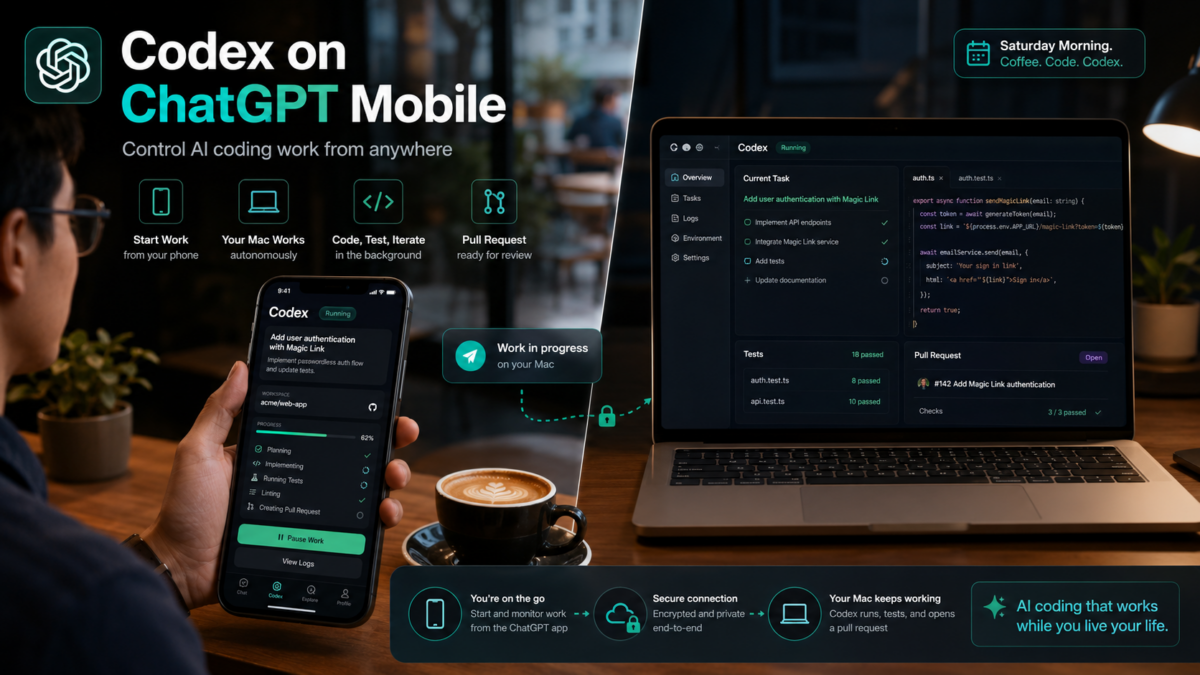
 Picture this. It’s Saturday morning. You’re at a café, coffee in hand, phone on the table. Your Mac is sitting at home on your desk — and it’s already working. Codex is writing a feature, running tests, building a pull request. You haven’t touched your keyboard in two hours.
On May 14, 2026, OpenAI made this literal. Codex is now inside the ChatGPT mobile app — available on iOS and Android, on every plan including Free. Your phone becomes the control surface for AI coding work that keeps running whether you’re at your desk or not.
One developer documented building a working Snake game from their phone with two prompts, then had Codex package it as a real iOS installable app while Codex ran on their Mac. Total time: under ten minutes. Here’s exactly what changed, what you can do with it, and how to get started.
By the numbers
First: What This Actually Is (It’s Not What You Think)
You’re not coding on your phone. That’s the first thing to understand.
Codex still runs on your Mac, laptop, Mac mini, company devbox, or remote development server — wherever it was before. Your phone becomes a window into that running session. Think of it as a remote control for a machine that’s already doing the work.
“This is more than the ability to remotely control a single task or dispatch new tasks to your computer. From your phone, you can work across all of your threads, review outputs, approve commands, change models, or start something new.”
— OpenAI, Official Announcement, May 14, 2026
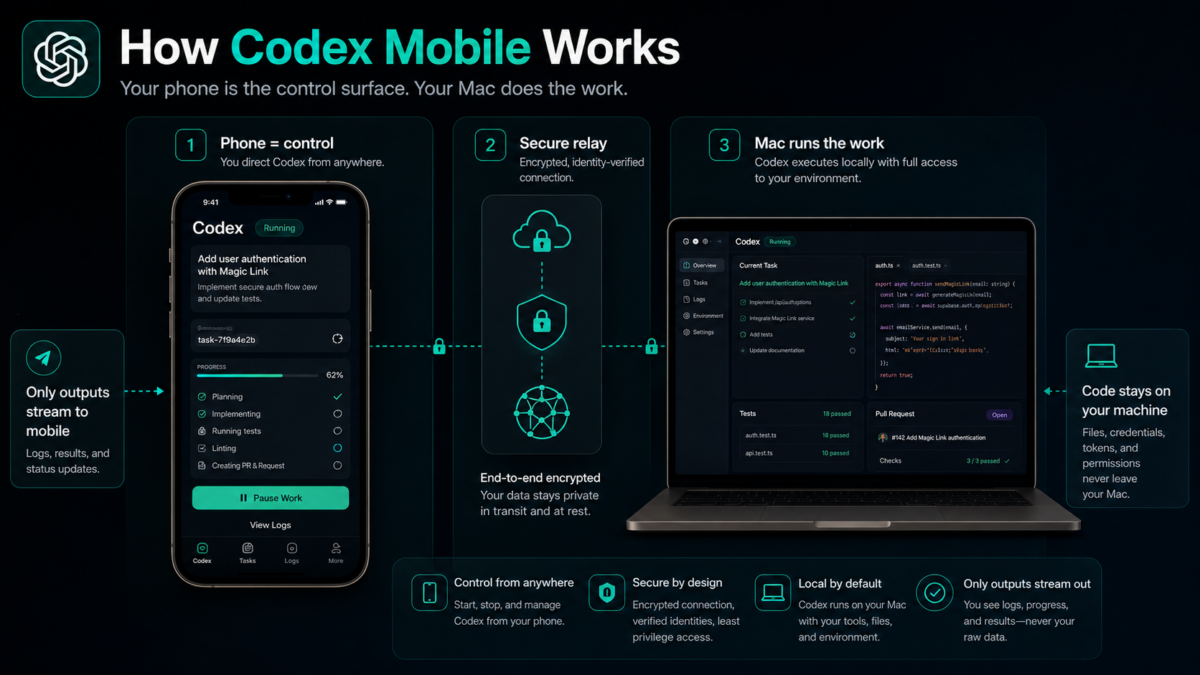
The technical piece that makes this work: OpenAI built a secure relay layer that keeps your machines reachable across devices without exposing them to the public internet. Your files, credentials, and permissions never leave the machine where Codex is running. What flows to your phone is the output — terminal logs, diffs, screenshots, test results, approval prompts. Not your code.
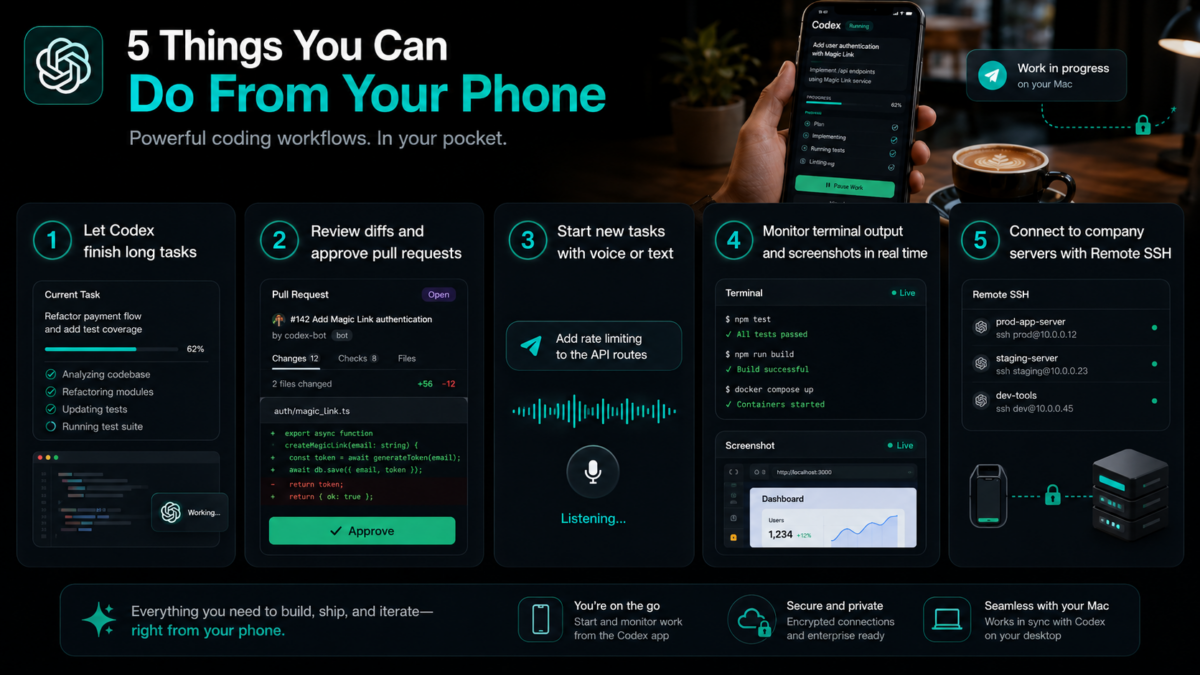
5 Things You Can Now Do That Were Impossible Before
① Close your laptop and let Codex finish the job
Kick off a long build, a batch refactor, a test suite run — then walk away. Codex keeps going on your machine. When it hits a decision point, your phone buzzes with an approval prompt. You tap yes or no. Work continues. No more babysitting a terminal window for hours.
② Review diffs and approve PRs from anywhere
Commuting? In a meeting? Walking between floors? Codex sends you the diff, you review it on the phone screen, and approve or redirect — all before you sit back down. On a train, you push a feature branch. By the time you arrive, the pull request is ready.
③ Start new tasks with voice or text, on the go
Send a new prompt from your phone — “fix the login bug I flagged earlier” or “write tests for the auth module” — and Codex picks it up and starts working on your desktop environment immediately. You don’t need to be at your desk to hand off a task.
④ Monitor terminal output and screenshots in real time
Terminal output, test results, screenshots of what Codex is seeing — all stream to your phone as it happens. You can watch Codex work in real time from a phone in your pocket. If something looks wrong, you redirect it before it goes further down the wrong path.
⑤ Connect to company servers via Remote SSH
Remote SSH is now generally available — Codex can connect into approved remote development environments with your company’s own dependencies, credentials, and security policies. Your phone controls Codex, which runs inside your company’s infrastructure. The dev room is now in your pocket.
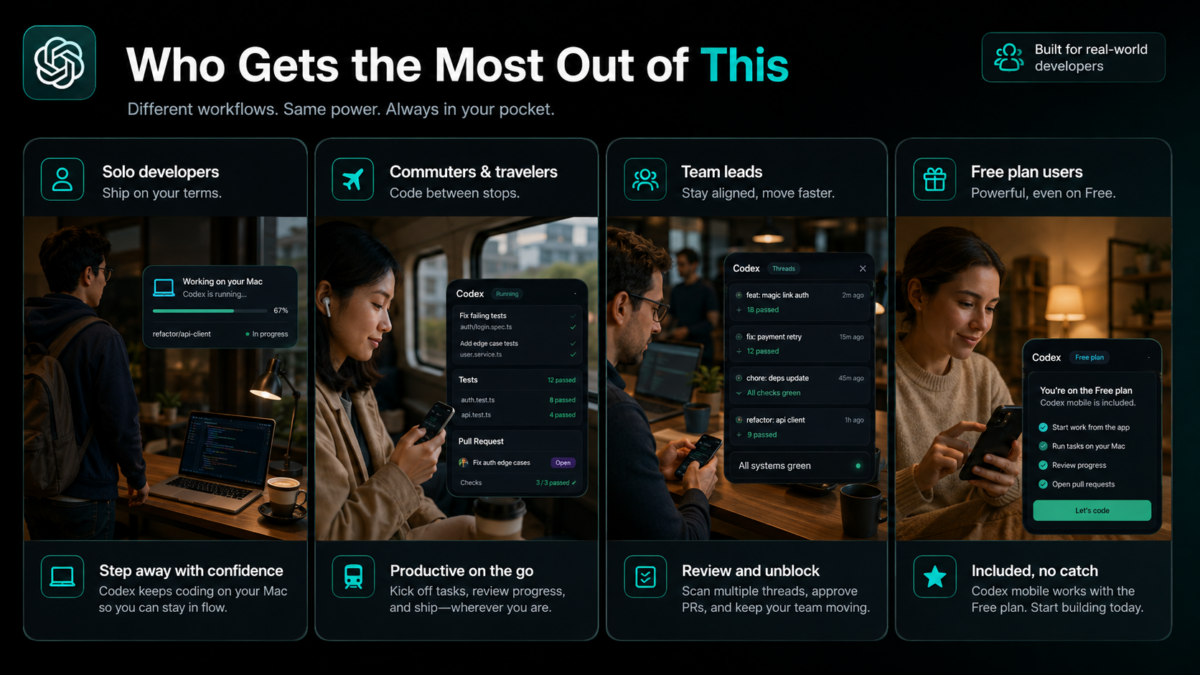
Who Gets the Most Out of This
Solo developers and indie hackers
You’re the only one watching the build. Now your phone watches it for you. Kick off tasks, step out, get notified when you need to make a call. Your Mac mini at home becomes a 24/7 developer that checks in with you over the phone.
Developers who travel or commute
Long commute, frequent flights, client meetings — Codex doesn’t pause because you’re not at your desk. You approve the next step from wherever you are and it keeps moving.
Team leads and engineering managers
Monitor multiple Codex threads across your team’s environments, review outputs on the go, and keep projects moving without context-switching back to your laptop between meetings.
Anyone on the Free plan who didn’t think this applied to them
This is rolling out across all plans including Free and Go in preview. You don’t need Plus or Pro to try it. If you use ChatGPT on your phone and have Codex on your Mac, update both apps and it’s there.
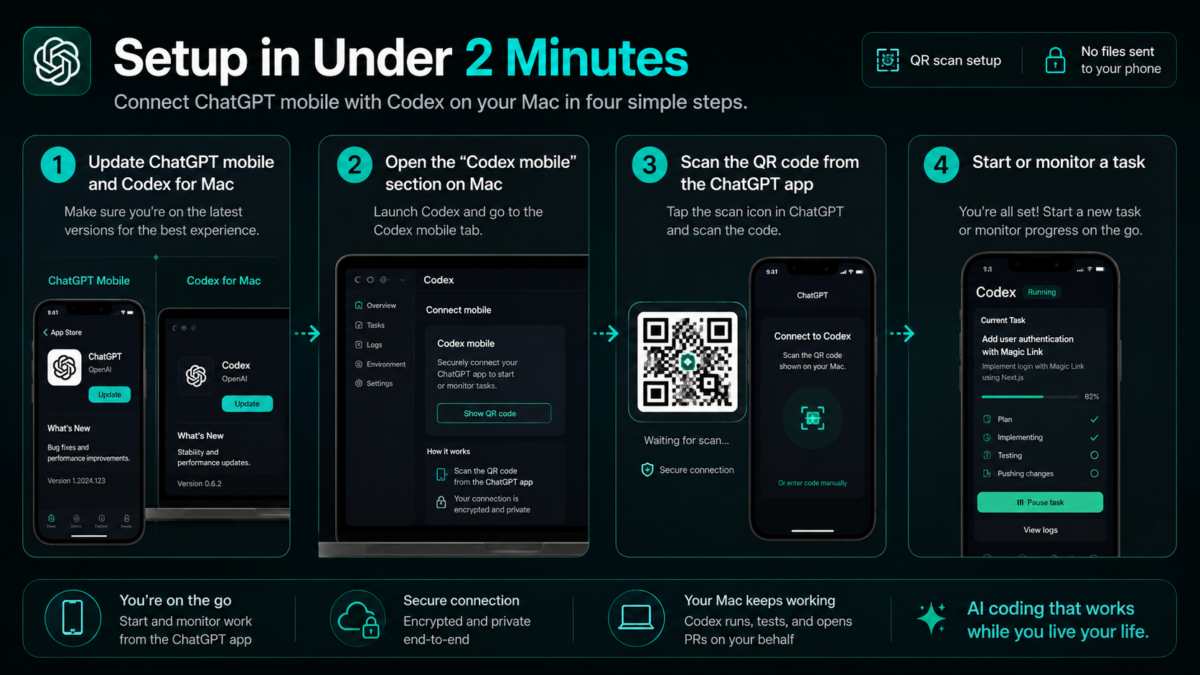
Setup: Under 2 Minutes
Update both apps
Update the Codex desktop app on your Mac and the ChatGPT mobile app on your iPhone or Android to the latest builds. If Codex doesn’t appear in the ChatGPT mobile sidebar after updating, force a full app store refresh.
Open Codex on Mac → find the “Codex mobile” section
In the Codex desktop app interface, look for the new “Codex mobile” section. It shows a QR code.
Scan the QR code from the ChatGPT mobile app
Open ChatGPT on your phone, find Codex in the sidebar (alongside ChatGPT, Sora, and Operator), and scan the QR code. Done. Your active desktop threads appear on your phone immediately.
Start a task — or pick up an existing one
Tap any active thread to monitor it, approve the next step, or redirect Codex. Or send a new message to kick off a fresh task on your desktop machine from your phone.
 What Else Launched on May 14 (The Enterprise Stuff)
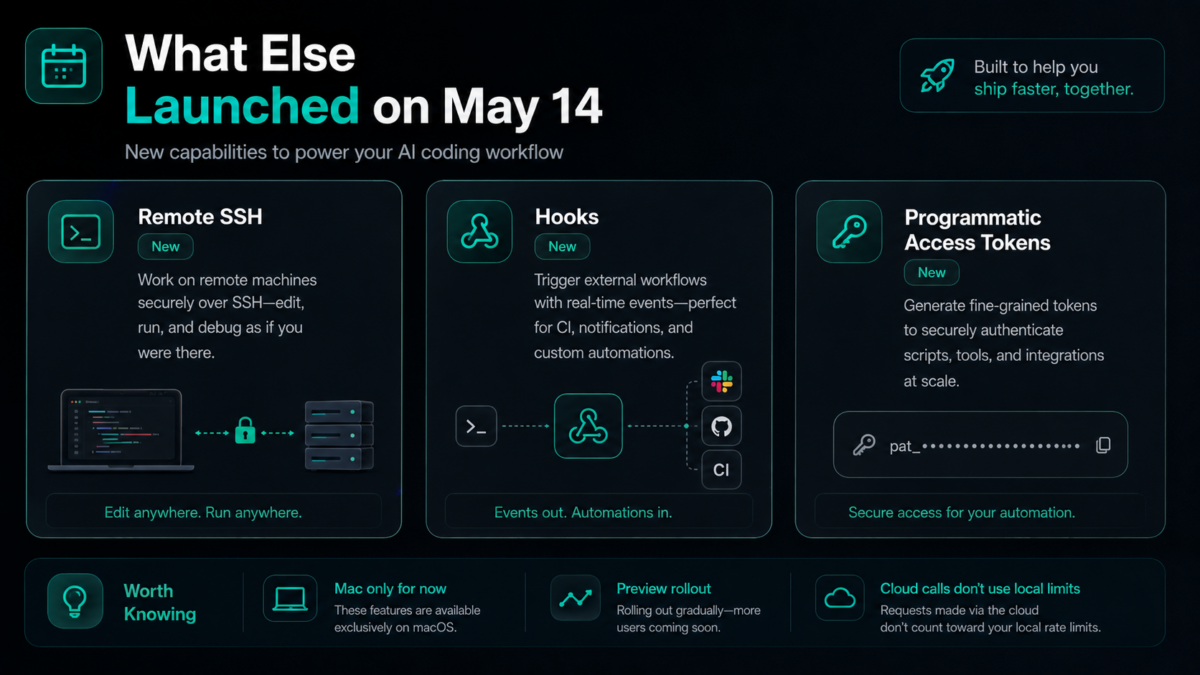 What Else Launched on May 14 (The Enterprise Stuff)
Mobile was the headline, but three other things went live the same day that matter for teams:
🔗 Remote SSH — Generally Available
Codex can now connect into approved company development environments with your organization’s dependencies, credentials, and security policies. The Codex desktop app auto-detects SSH hosts from your SSH config file.
⚡ Hooks — Generally Available
Automated triggers on specific events — run a linter before every commit, post a Slack message when a task completes, trigger a deploy after tests pass. Available on all plans.
🔑 Programmatic Access Tokens (Business + Enterprise)
API-style tokens for integrating Codex into CI/CD pipelines and release workflows. Business and Enterprise plans only. This is the piece that lets teams automate Codex invocations without manual steps.
⚠️ A Few Things Worth Knowing
Mac only for now. Your phone connects to the Codex app on macOS. Windows host support is “coming soon” — no date. If your main machine is Windows, you’re waiting.
This is a preview. Rolling out in supported regions, may not be available everywhere immediately. Update your apps first — if Codex doesn’t appear in the ChatGPT mobile sidebar, you’re on an older build.
Cloud Codex calls don’t burn your local usage. Tasks you run via mobile don’t count against the 5-hour local Codex limit. You can run cloud sessions from your phone and save the local allocation for IDE work.
The framing OpenAI used is “a new rhythm for collaboration” — and that’s actually accurate. As AI agents take on longer-running work, the developer’s job shifts from continuous typing to occasional steering. The bottleneck isn’t the coding anymore. It’s the moments where a human needs to make a call. Mobile Codex means those calls can happen from anywhere, not just from a desk.
Update your apps, scan the QR code, and see what it feels like to have your Mac working while you’re not looking at it.
Get Started Right Now
Free on all plans · Update ChatGPT mobile + Codex for Mac · Scan QR · Done
Know a developer who’s been waiting at their laptop watching builds run?
Send them this. Their Mac can work without them now.
Written by the MindWiredAI team. All details verified against OpenAI’s official May 14, 2026 announcement, 9to5Mac, TechCrunch, Engadget, MacRumors, TestingCatalog, and BuildFastWithAI coverage. The 4M+ weekly users figure is from OpenAI’s official announcement. The Snake game example is from AICloudit developer documentation. Codex mobile is currently in preview — availability, features, and pricing may change before general availability. Windows Codex host support timing unconfirmed. HIPAA-compliant Codex limited to eligible ChatGPT Enterprise workspaces.


